Paper Feed
SM 4-91 D062/D063/D065/D066
Replacement
and
Adjustment
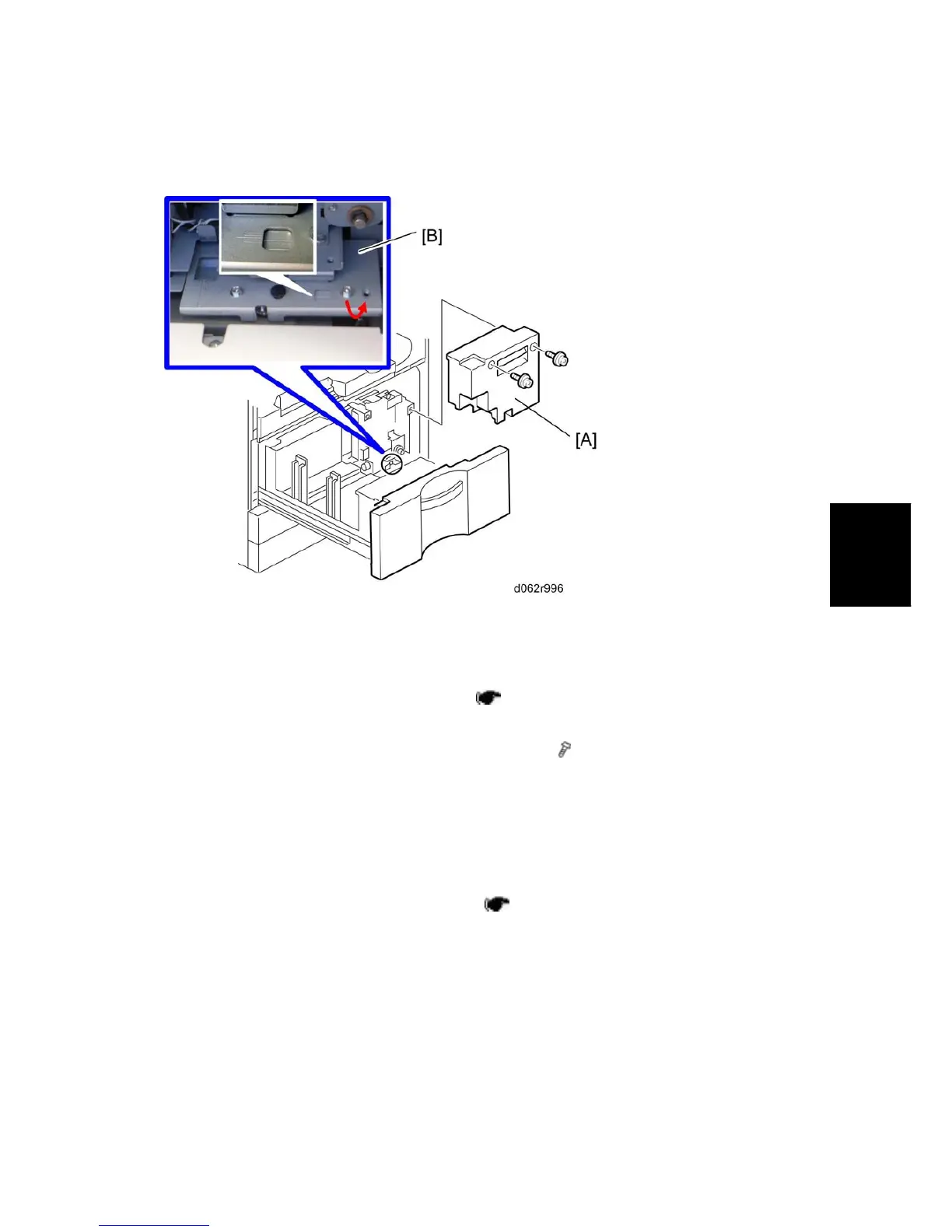
4.11.7 TANDEM TRAY SIDE REGISTRATION
Normally the side registration of the image can be adjusted in the SP mode.
If the punch hole positions are not aligned from a particular feed station, however, you can
manually adjust the side registration by changing the tray cover position for that tray, and
then adjust the side registration of the image (
p.4-133 "Copy Image Adjustments:
Printing/Scanning")
1. Pull out the tray and remove the right inner cover [A] (
x 2).
2. Loosen the screws and adjust the position of the plate [B].
Adjustment range: 0 ± 2.0 mm adjustment step: 1.0 mm/step
4.11.8 PICK-UP, FEED, SEPARATION ROLLER
REPLACEMENT
1. Remove the tandem tray or universal tray ( p.4-82 "Paper Tray ").



 To Next Page