Fold Unit
D373/D374 16 SM
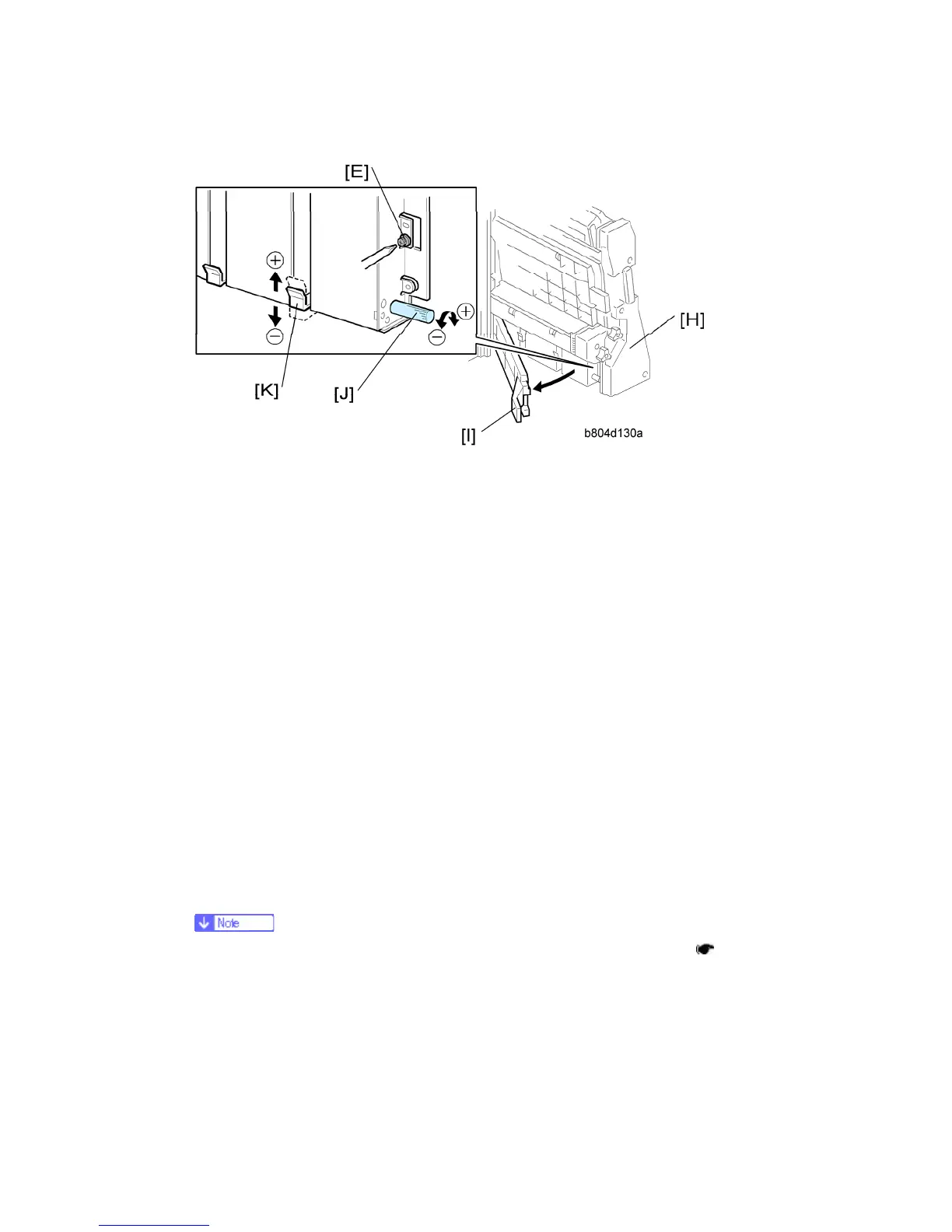
15. Open the front door of the finisher and pull the stapler unit [H] out.
16. Open the guide plate [I].
17. Turn the adjustment screw [J] to correct the amount of skew you measured from the test
sheet.
For + skew [F], turn the adjustment screw (clockwise).
For – skew [G], turn the adjustment screw to the left (counter-clockwise).
Every click in the +/– direction adjusts the fold position by 0.1 mm by moving the
bottom fence [K].
18. Raise the tip of the adjustment screw [J] and allow it to lower under its own weight.
19. Attach and tighten the lock screw [L].
20. Push the stapler unit into the machine, close the front door, then turn the copier on.
21. Europe, Asia: Do SP6-134-001 (this is for A3 paper). North America: Do SP6-134-005
(this is for DLT paper).
22. Reset it to "0".
23. Do the test again.
24. If the result is satisfactory, this completes the adjustment. -or- If some skew remains,
repeat this adjustment.
After doing this adjustment, adjust for vertical skew, if necessary. (
1.4.6 "Fold
Vertical Skew Adjustment")



 To Next Page