11
2017 Page 230 5IN2413 B
Appendix D: Troubleshooting
Troubleshooting and diagnostics can be done by performing by the various
systems tests that are available (see Testing the System, page 215) and with the
Configuration Software. Additional information is available through RISCO
University. For additional assistance, contact RISCO Group Technical Support.
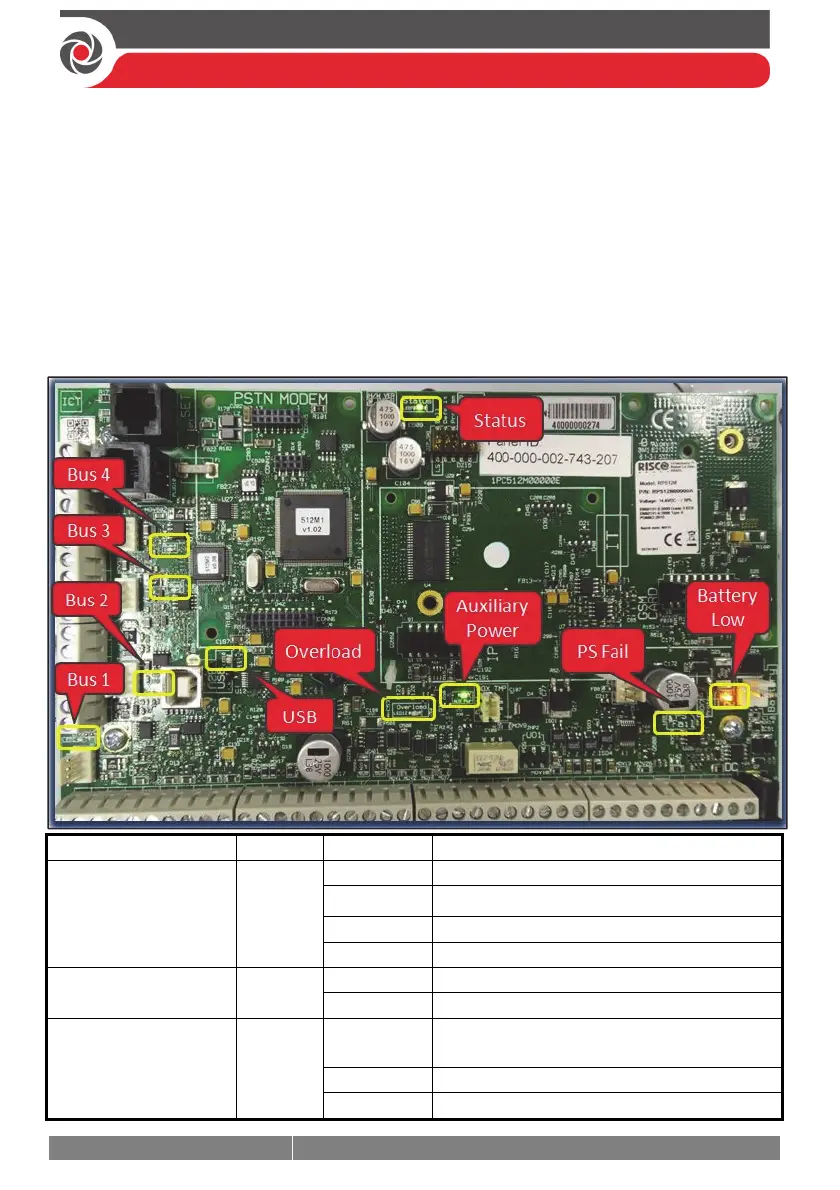
LED Indicators – Main Panel PCB, Communication Modules
Main Panel PCB LEDs
LED/Function Color State Status
LED 7 (Status)
Green
ON System Ready
OFF System not available
Blink slow Bus test/installation mode
Blink fast Upgrade mode
LED 9 (PS Fail)
Red
ON AC power disconnected
OFF AC power connected
LED 11 (Batter y)
Orange
ON
Battery failed/disconnected
(voltage > 7 V)
OFF Battery charged (voltage > 11.2 V)
Blink fast Battery charging



 To Next Page