12-2 Sysmex XP-300
Cleaning and Maintenance
Revised October 2012
12.2 Check instrument status
If you should contact the Sysmex service representative regarding
any instrument problem, you may be asked to check the operation
counter, program version, and other information.
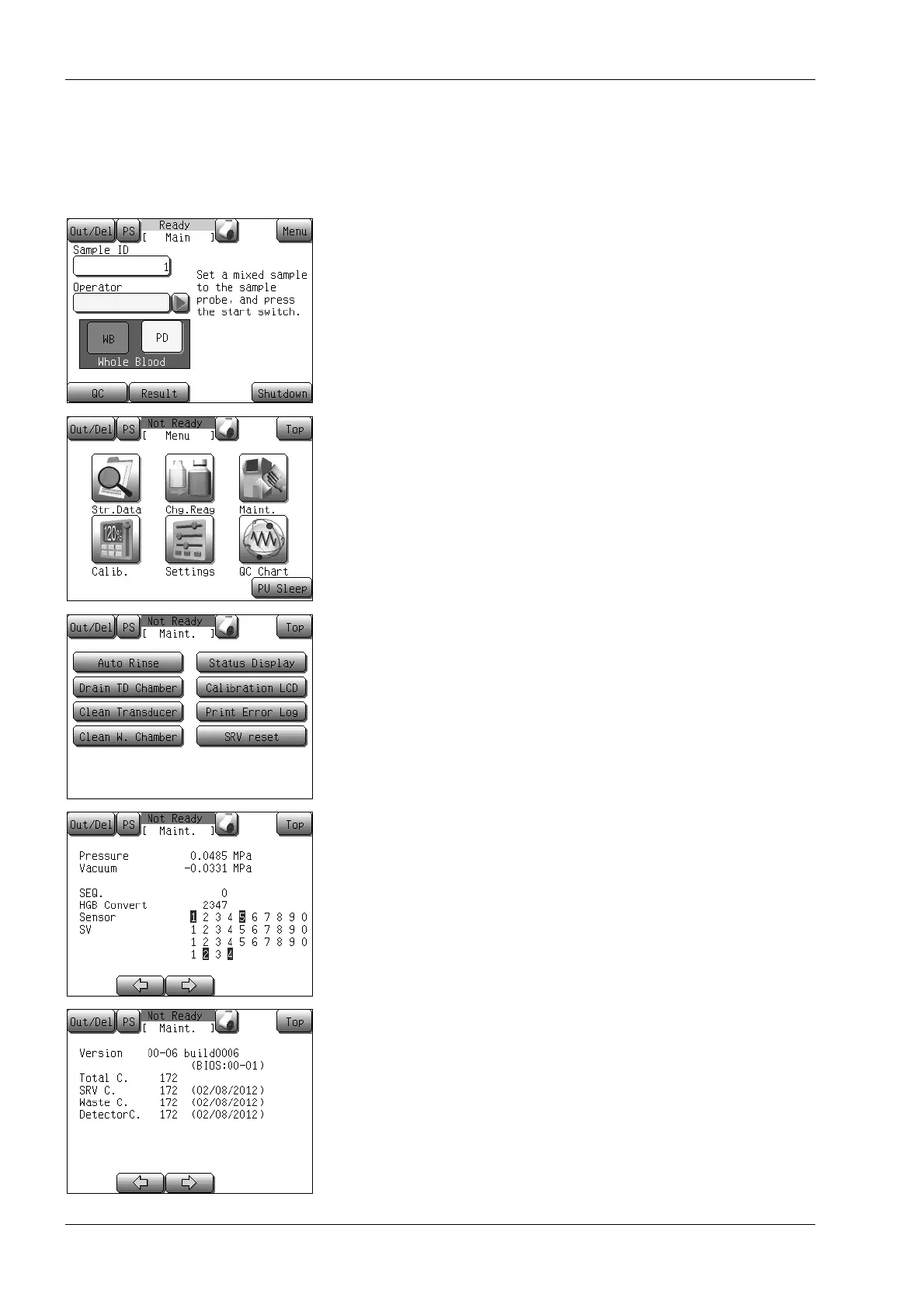
(1) Press the [Menu] button at the Ready status.
The Menu screen will appear.
(2) Press the [Maint.] button.
The maintenance menu screen will appear.
(3) Press the [Status Display] button.
The status display screen will appear. The following
information is displayed on this LCD screen.
* The status display screen consists of 2 screens. Press the [←]
or [→] button to switch the screen.
• [Pressure]: Current pressure value
• [Vacuum]: Current vacuum value
• [HGB Convert]: HGB convert value
• [Sensor]: ON/OFF status of each sensor
• [SV]: ON/OFF status of each solenoid valve
• [Version]: Program version
• [Total C.]: Number of cycles since instrument
production
• [SRV C.]: Number of cycles since last cleaning of
the SRV
• [Waste C.]: Number of cycles since last cleaning of
waste chamber
• [DetectorC.]: Number of cycles since last cleaning of
TD



 To Next Page