Sysmex XP-300 12-7
Cleaning and Maintenance
Revised March 2012
12.6 Clean TD
When the main power switch is turned ON, and if either the counter
value exceeds 1,500, or if 1 month has passed since the last
maintenance, a message will appear prompting the operator to
perform periodic maintenance (TD cleaning).
• Press the [Cancel] button to continue start up without executing
the cleaning TD operation. Until the TD is cleaned, the message
is displayed at start-up.
• When this message is displayed, perform the TD cleaning
according to the following procedures.
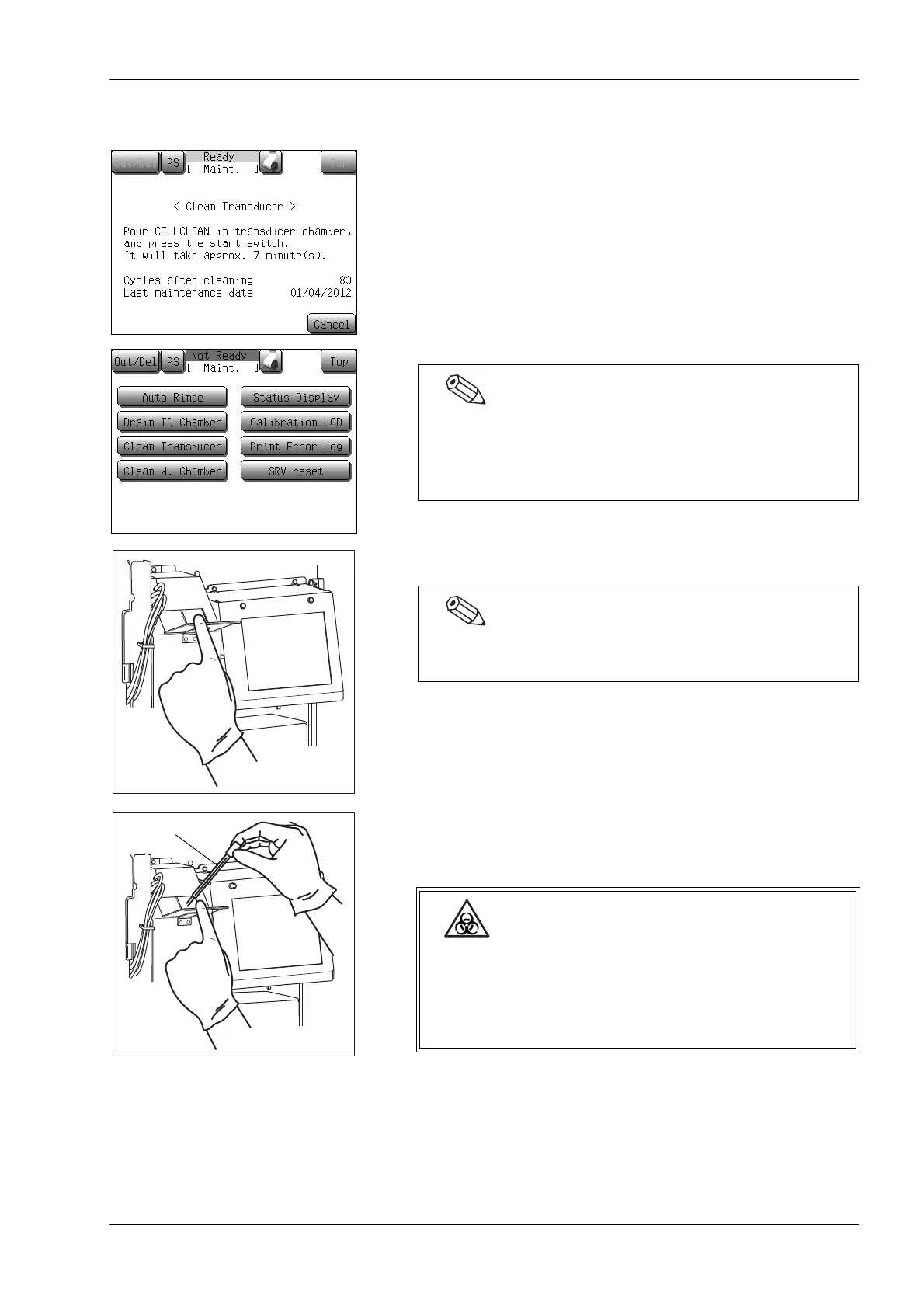
(1) Open the front cover of the main unit.
(2) Open the transducer cover.
(3) Using the filler provided with the unit, pour approximately 1
mL each of CELLCLEAN into the WBC transducer and RBC
transducer.
Even when the above-mentioned message is not displayed,
TD cleaning can be executed by pressing the [Maint.]
button of the menu screen, then pressing the [Clean
Transducer] button of the maintenance screen.
The transducer cover with spring close hinge automatically
closes when you let go of the cover.
When opening the transducer cover, wear protective
garments and gloves. After completion of work, wash
hands with disinfectant. If your hands are
contaminated by blood, etc., there is a risk of infection
by pathogens.



 To Next Page