7-28 Sysmex XP-300
Sample Analysis
January 2012
7.12 End of operation (Shutdown)
At the end of the day’s analysis, before the instrument is turned OFF,
the Shutdown sequence should be executed. Executing a Shutdown
cleans TD chambers and diluted sample lines.
Executing a Shutdown:
To be carried out after all analysis have been performed, or at least
once every 24 hours, if instrument is used continuously.
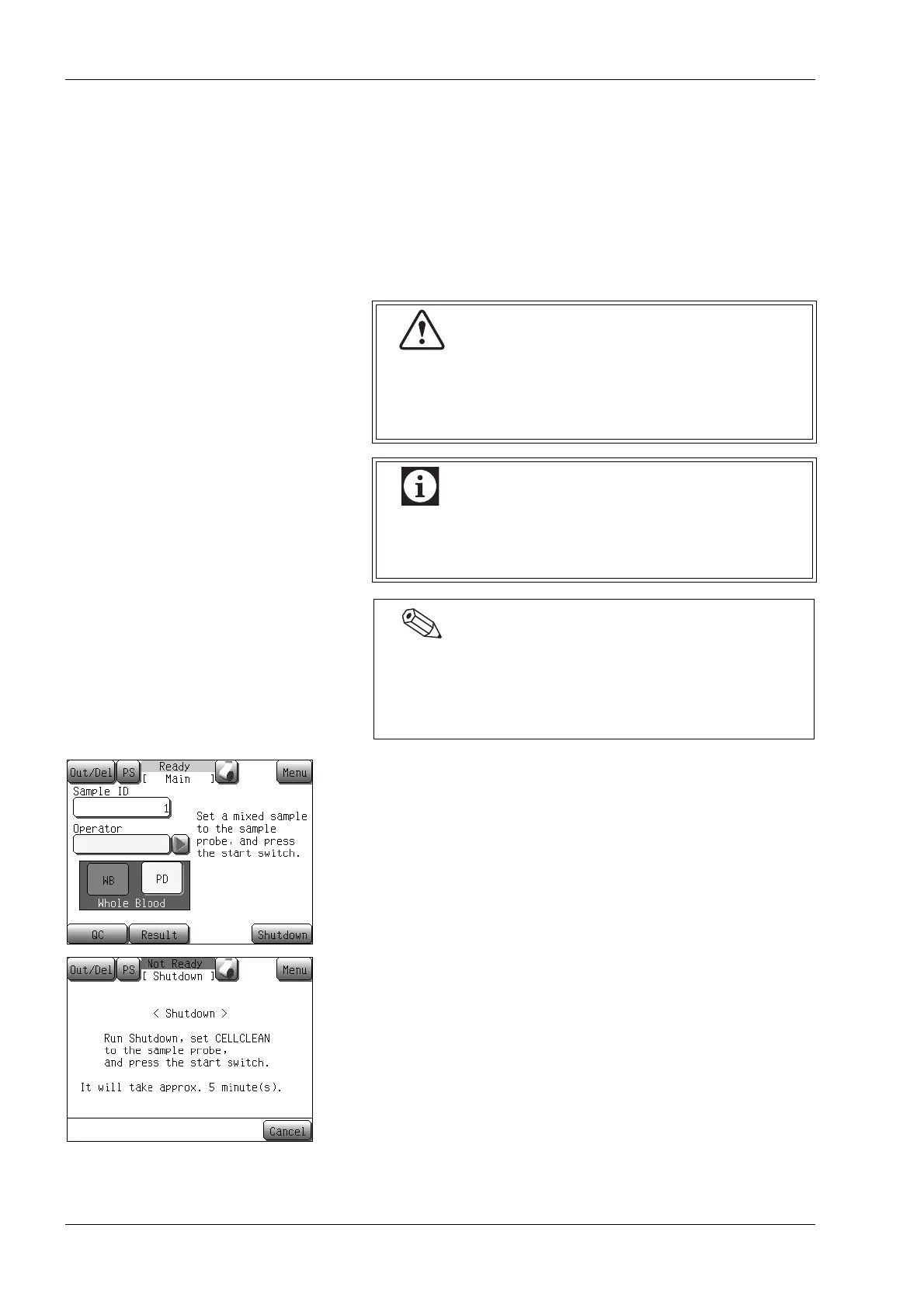
(1) Press the [Shutdown] button at the Ready status.
The shutdown confirmation dialog screen will appear.
• In case the [Cancel] button is pressed, the Shutdown is
canceled, and the instrument returns to the Main screen.
If the instrument is used continuously without
performing the Shutdown sequence, protein build-up
on the internal parts may prevent obtaining correct
analysis results, and may damage the instrument.
If the instrument is turned OFF without executing a
Shutdown, water droplets may come out of the rinse
cup or deposits may build-up on the rinse cup.
• It takes approximately 5 minutes to complete the Shutdown
sequence.
• If you repeatedly restart the instrument after Shutdown, the
shutdown confirmation dialog screen appears each time.



 To Next Page