Sysmex XP-300 12-23
Cleaning and Maintenance
January 2012
12.13 Calibrate LCD screen
The LCD screen of this instrument is a touch panel system.
This section explains the calibration procedures of the touch panel
input positions. Calibrate the LCD if panel operation is not properly
aligned.
Calibrate according to the following procedures.
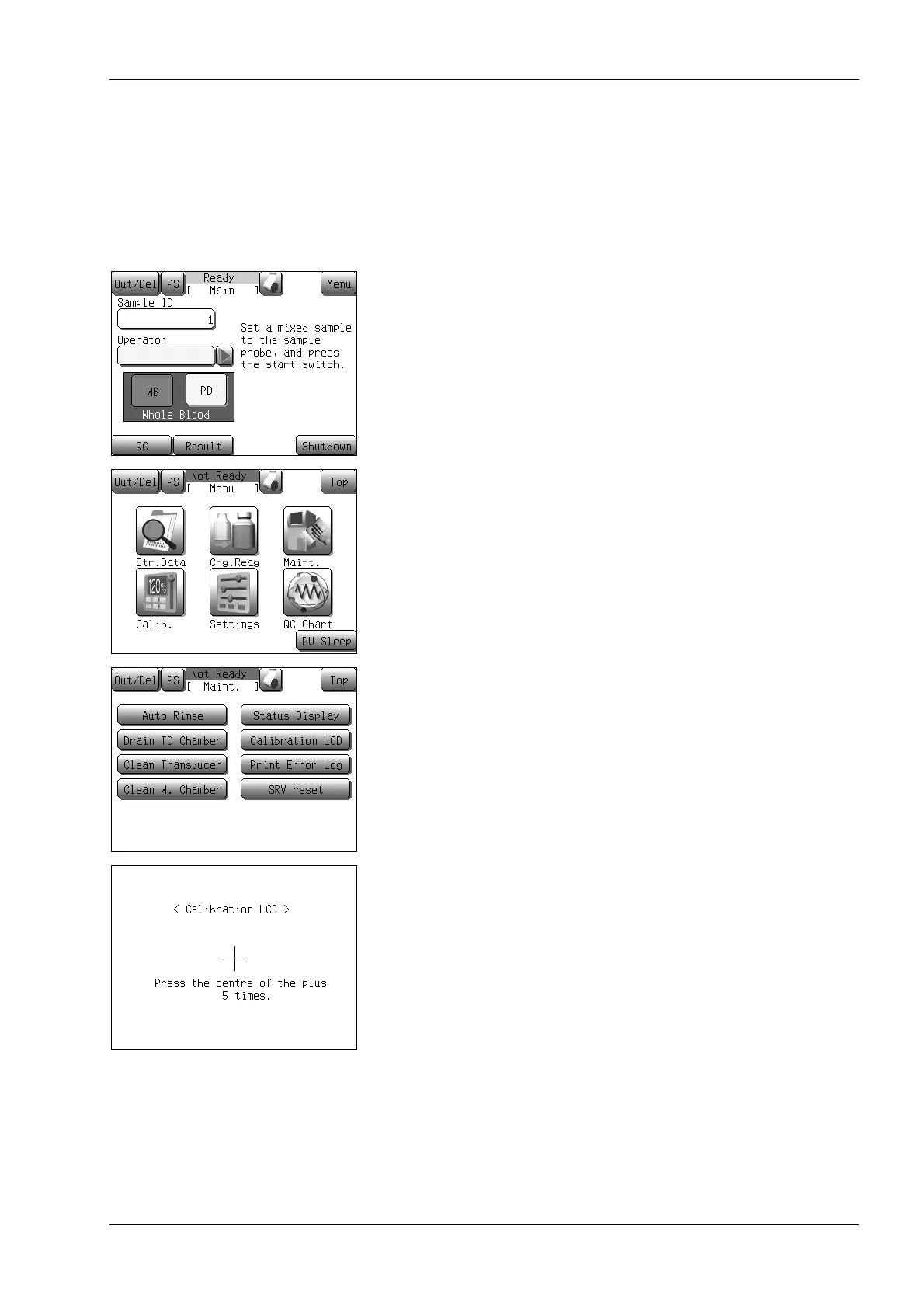
(1) Press the [Menu] button on the Main screen.
The Menu screen will appear.
(2) Press the [Maint.] button.
The maintenance menu screen will appear.
(3) Press the [Calibration LCD] button.
The calibration LCD start confirmation dialog will appear.
• Press the [OK] button to display the calibration LCD screen.
• Press the [Cancel] button to close the dialog.
(4) Press the center of “+” mark on the screen each time the “+”
mark is displayed.
The “+” mark will appear on the LCD in the following order: at
the center, the upper left, the lower left, the lower right, and the
upper right.
After completion of all “+” marks input, the calibration LCD
confirmation dialog screen will appear.



 To Next Page