www.trilithic.com
Page II-43
180 DSP Operation Manual
Signal Level Meter
Adding Channels to a Channel Plan
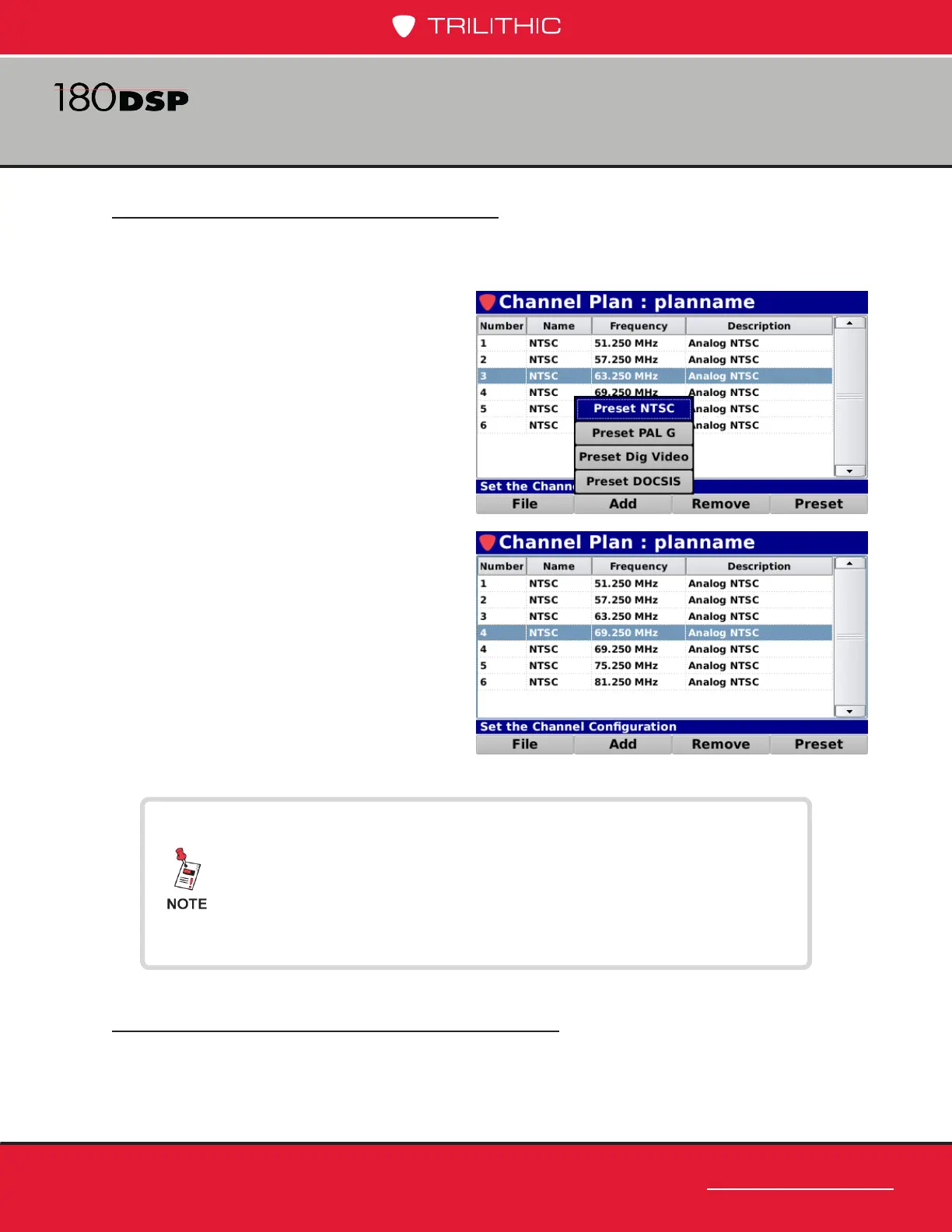
The 180 DSP comes pre loaded with four different channel presets; NTSC, PAL G, Dig
Video, and DOCSIS. Perform the following steps to add a channel to the channel plan:
1. Use the up/down arrow buttons to
highlight the row above the location
to add the new channel. Skip this
step when adding the rst channel
to an empty channel plan.
2. Select the Add softkey.
3. From the Add pop-up menu, select
from one of four preset channels as
shown in the image to the right.
4. The new channel will be inserted
below the previously highlighted
row or as the rst channel in the
channel plan.
Removing Channels from a Channel Plan
To remove a channel from the channel plan, use the up/down arrow buttons to highlight the
channel to be removed and select the Remove softkey.
To add a DOCSIS 3.1 channel, choose Preset DOCSIS from the
Add pop-up menu, and then edit the channel to change the
standard to DOCSIS 3.1.
See the Digital Channel Properties, Channel Standards
section later in this chapter for more information.



 To Next Page
 Loading...
