www.trilithic.com
Page II-107
180 DSP Operation Manual
Signal Level Meter
Update Firmware from Website
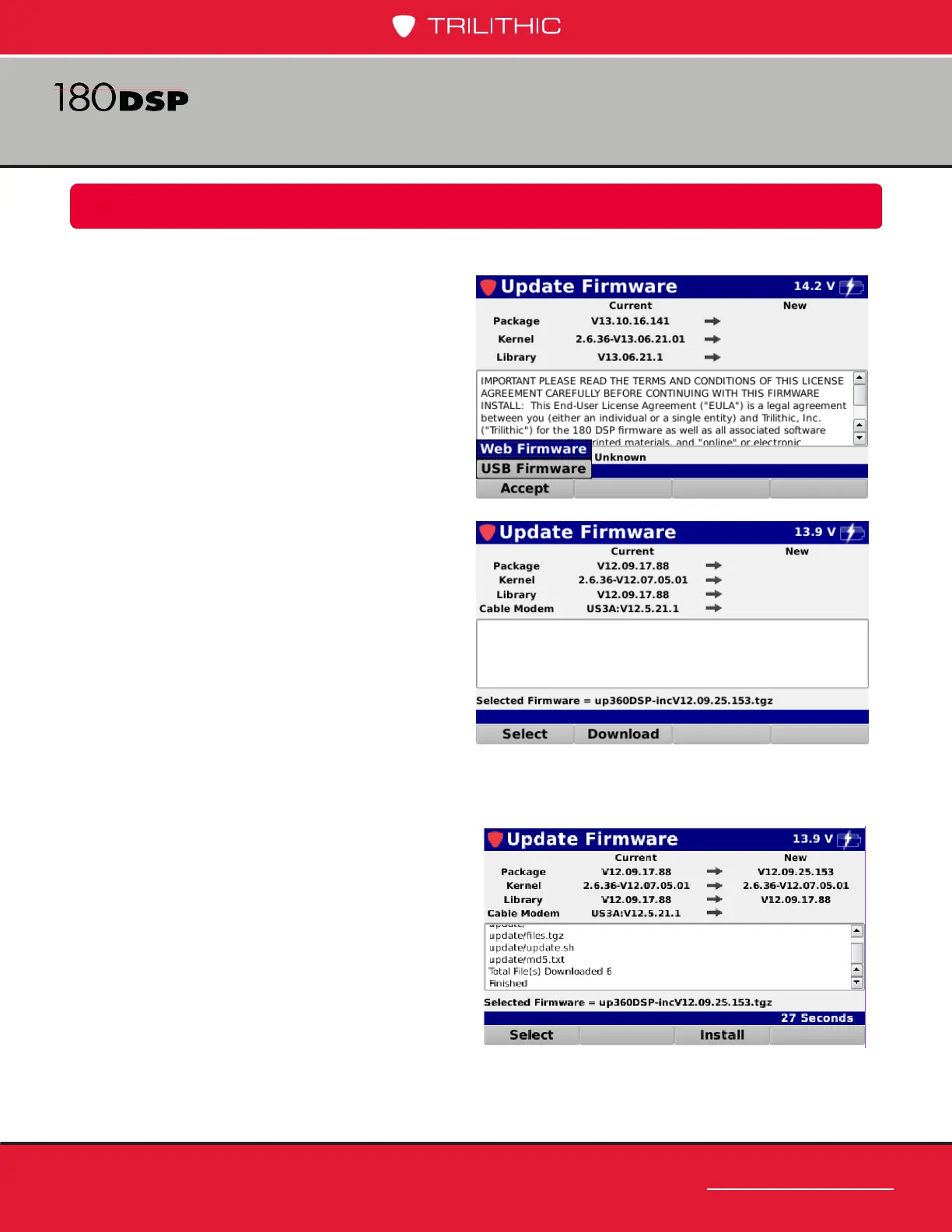
Perform the following steps to update the 180 DSP rmware from a website:
1. Make sure you are connected to the
network via the Network Manager in
the Function menu.
2. Select the Accept softkey.
3. From the Accept pop-up menu, select
the Web Firmware button as shown in
the image to the right.
4. Once the meter shows the current
rmware version, select the Download
softkey as shown in the image to the
right to download the rmware le.
5. The download progress will be
displayed in the activity area of the
Update Firmware screen as shown in
the image to the right.
6. Once the download has nished,
the new rmware information will be
displayed as shown in the image to
the right. Select the Install softkey to
install the rmware le.
7. Once the installation is nished, the
180 DSP will automatically restart with the new rmware.



 To Next Page
 Loading...
