4.2 Using the Digital Operator
98 YASKAWA ELECTRIC SIEP C710616 35D YASKAWA AC Drive E1000 Technical Manual
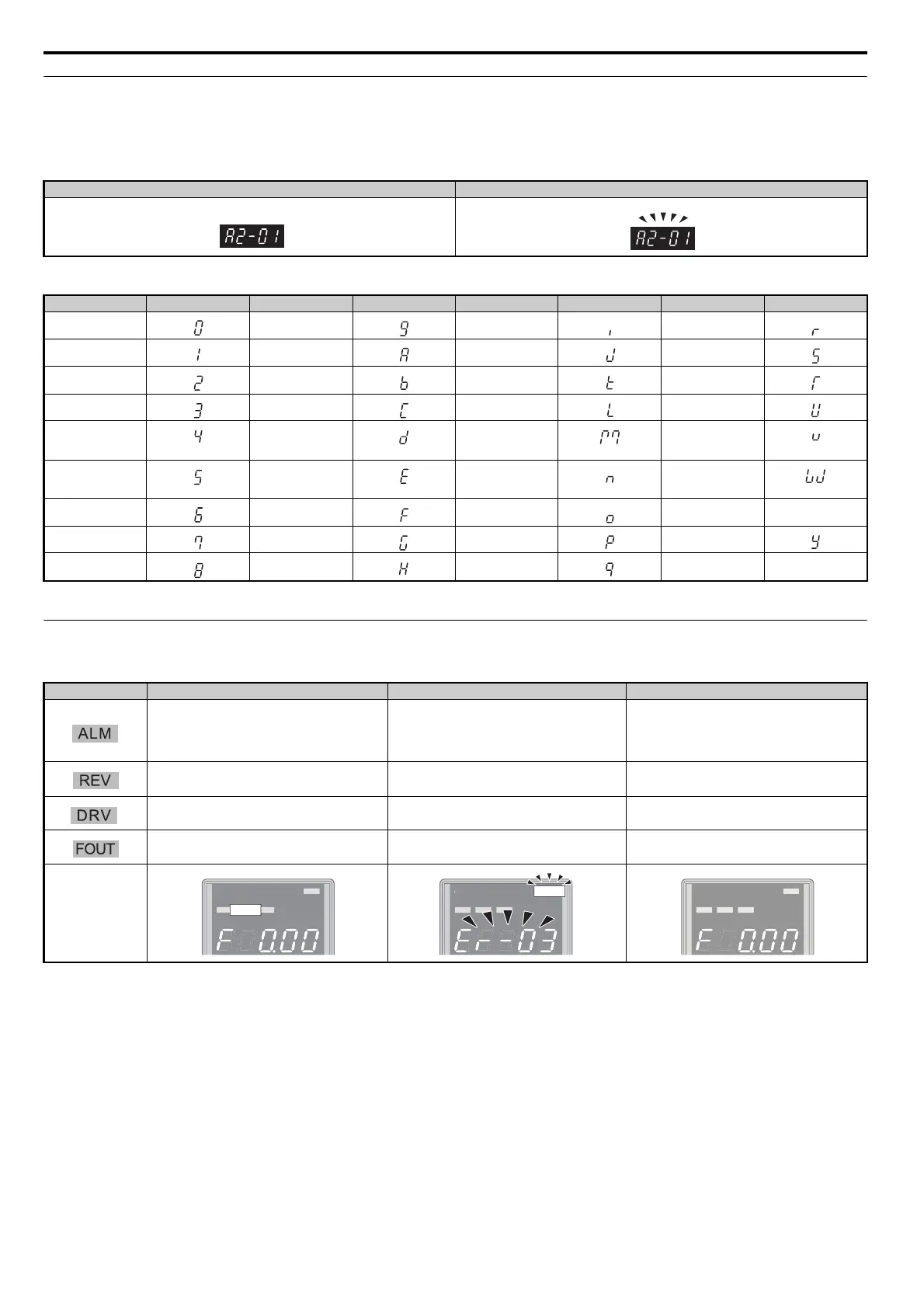
◆ Digital Text Display
Text appears on the digital operator as shown below. This section explains the meaning of text as it appears on the display
screen.
Table 4.1 Digital Text Display
◆ LED Screen Displays
Table 4.2 LED Screen Displays
Lit Flashing
Text LED Text LED Text LED Text LED
09IR
1AJS
2BKT
3CLU
4DM
<1>
V
5ENW
<1>
<1> Displayed in two digits.
6 F O X none
7GPY
8 H Q Z none
Display Lit Flashing Off
The drive has detected an alarm or error
• When an alarm occurs
• oPE detected
• When a fault or error occurs during Auto-Tuning
Normal state (no fault or alarm)
Motor is rotating in reverse – Motor is rotating forward
• The drive is in the Drive Mode
• During Auto-Tuning
When DriveWorksEZ is used
<1>
<1> Refer to the DriveWorksEZ instruction manual for further information.
• The drive is in the Programming Mode
• The drive will not accept a Run command
When the display shows the output frequency –
When a display other than the output frequency
monitor is shown.
As illustrated in this
manual
UT
IGITAL OPERATOR JVOP-182
DRV
T
I
ITAL
PERAT
R
V
P-1
2
ALM
UT
IGITAL OPERATOR JVOP-182
SIEP_C710616_35.book 98 ページ 2015年11月30日 月曜日 午後2時2分



 To Next Page