Chapter 1. 9500 MXC CT Introduction
Vol. IV-1-2 Alcatel-Lucent
With few exceptions a configuration change made in one screen will immediately
reflect through to all other affected screens - it is not necessary to click Send to
confirm a change made in one screen to see its affect in a related screen or
screens
Each CT screen is read from the radio, with the read action on a
per-screen-opened basis. During an opening (read) or sending (write) action a
progress indicator shows the read/write status as shown in Figure 1-1. Once a
screen is opened it stays open and is immediately readable for the duration of the
CT session.
Figure 1-1. Progress Indicator
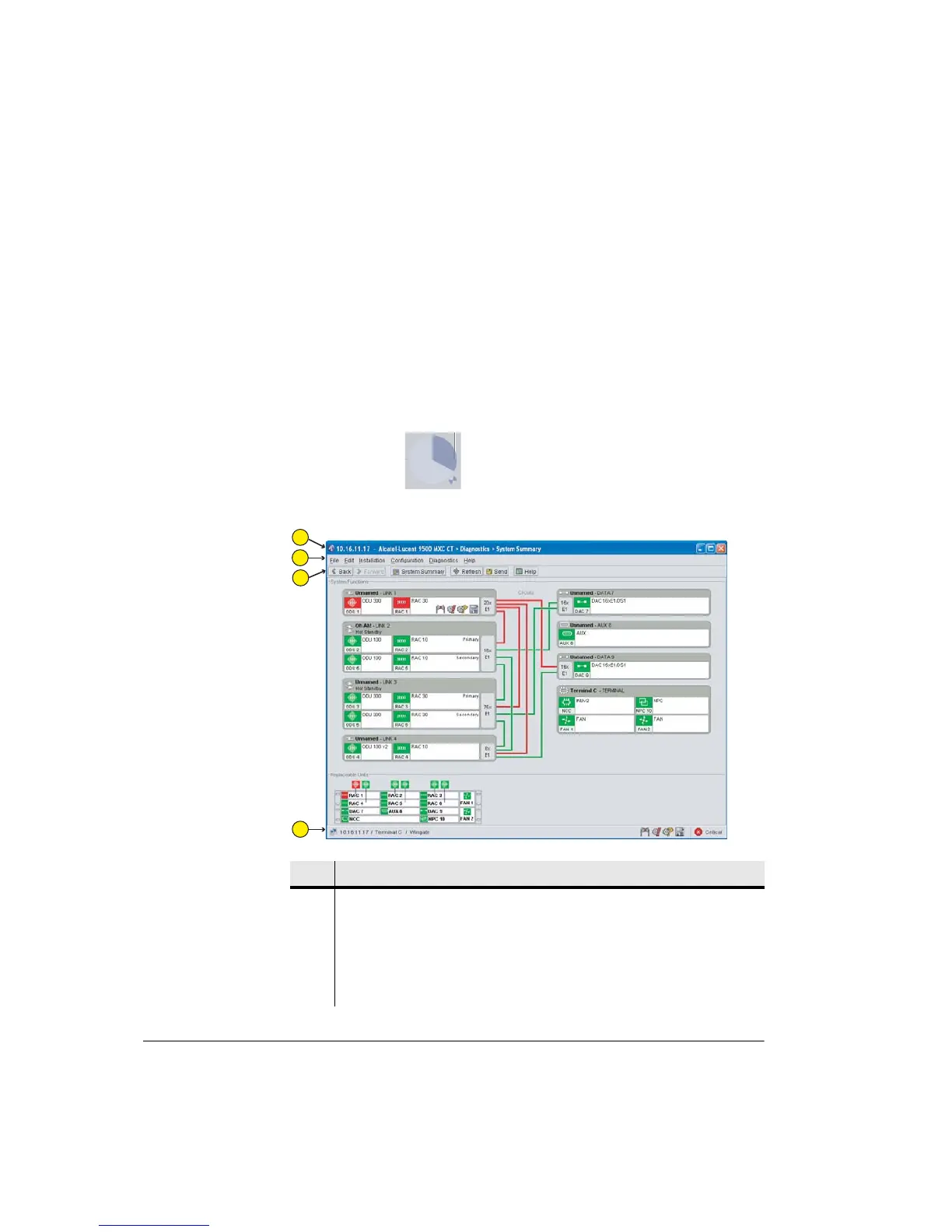
Figure 1-2. Example 9500 MXC CT Screen
Item Description
1 Selected screen. Identifies the IP address for the terminal and the opened
screen. In this example it is the System Summary screen, which is a Diagnostics
screen.
2 Menu bar. Provides direct navigation to main areas of user interest. Clicking on
a Menu brings up a sub-menu that provides direct access to relevant screens and
commands.
Indicator shows
read/write progress
1
2
3
4



 To Next Page