Chapter 9. Circuits
Vol. IV-9-12 Alcatel-Lucent
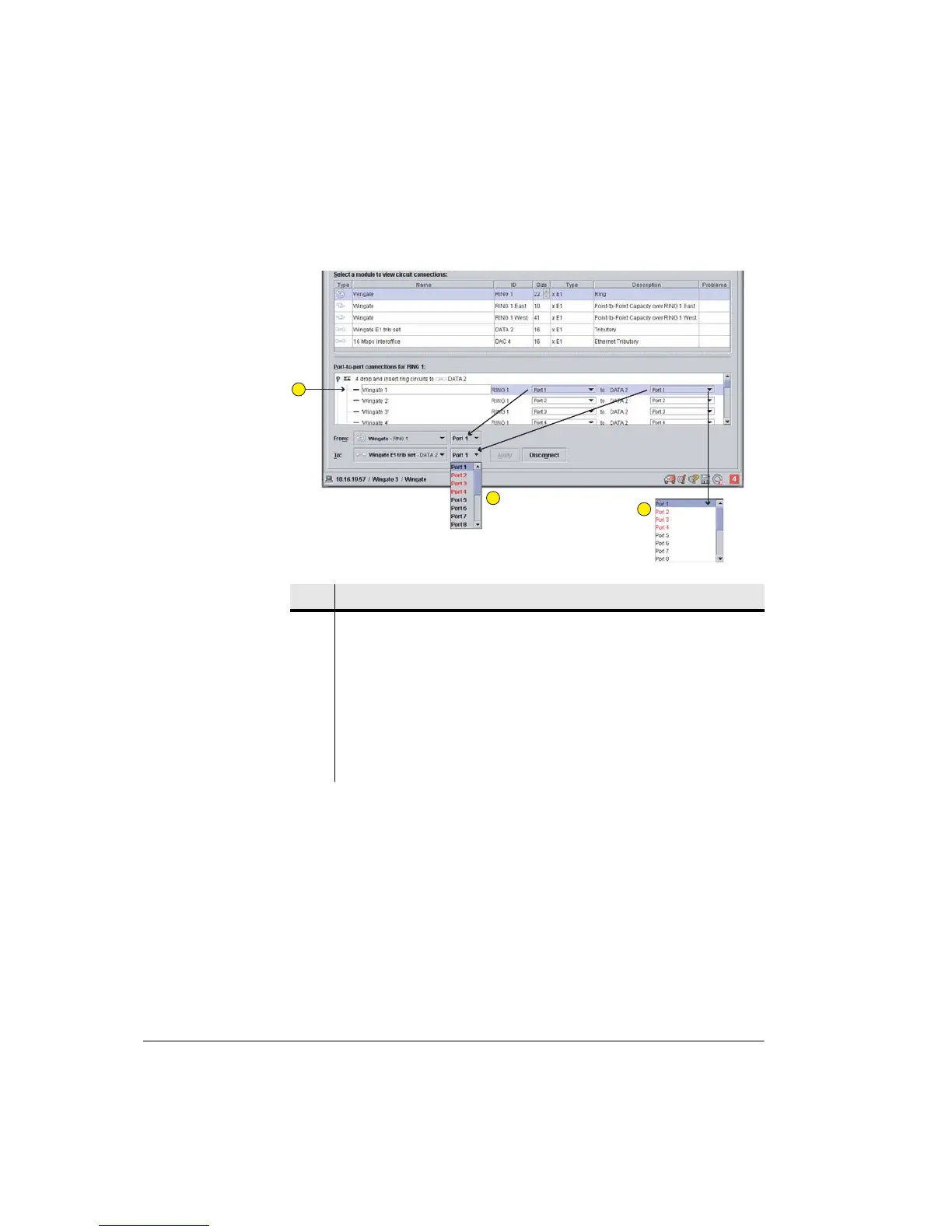
Figure 9-7. Changing Existing Circuit Connections
8. To disconnect existing circuits, highlight groups of circuits (toggle up) or
individual circuits (toggle down), and click disconnect.
9. To commit the new configuration, click Send.
Additional Rules for an East-West PDH Ring
1. The Backplane Configuration must be set to E1 or DS1. Ring circuit
protection is only valid for NxE1 or NxDS1 configurations.
2. The connections box defines connections from a Link to a DAC as drop and
insert circuits. Circuits which are connected through (east - west) are termed
pass-through circuits.
Item Description
1 Highlighting a circuit line displays the relevant module and port numbers in the
From and To tabs.
2 The From and To sub-menus are used to effect a port change. For example if
Ring 1, Port 1, is to be changed to DATA 2 Port 5, click the To: Port 5, and then
Apply. The now unallocated DATA 2 Port 1 is returned to circuits unallocated.
Red lettering denotes an allocated port. Black denotes it is unallocated.
3 Circuit editing can also be achieved using the sub-menus under the Port buttons
in the circuit line.
1
2
3



 To Next Page