Chapter 11. 9500 MXC Node and Terminal Alarm Actions
Vol. IV-11-2 Alcatel-Lucent
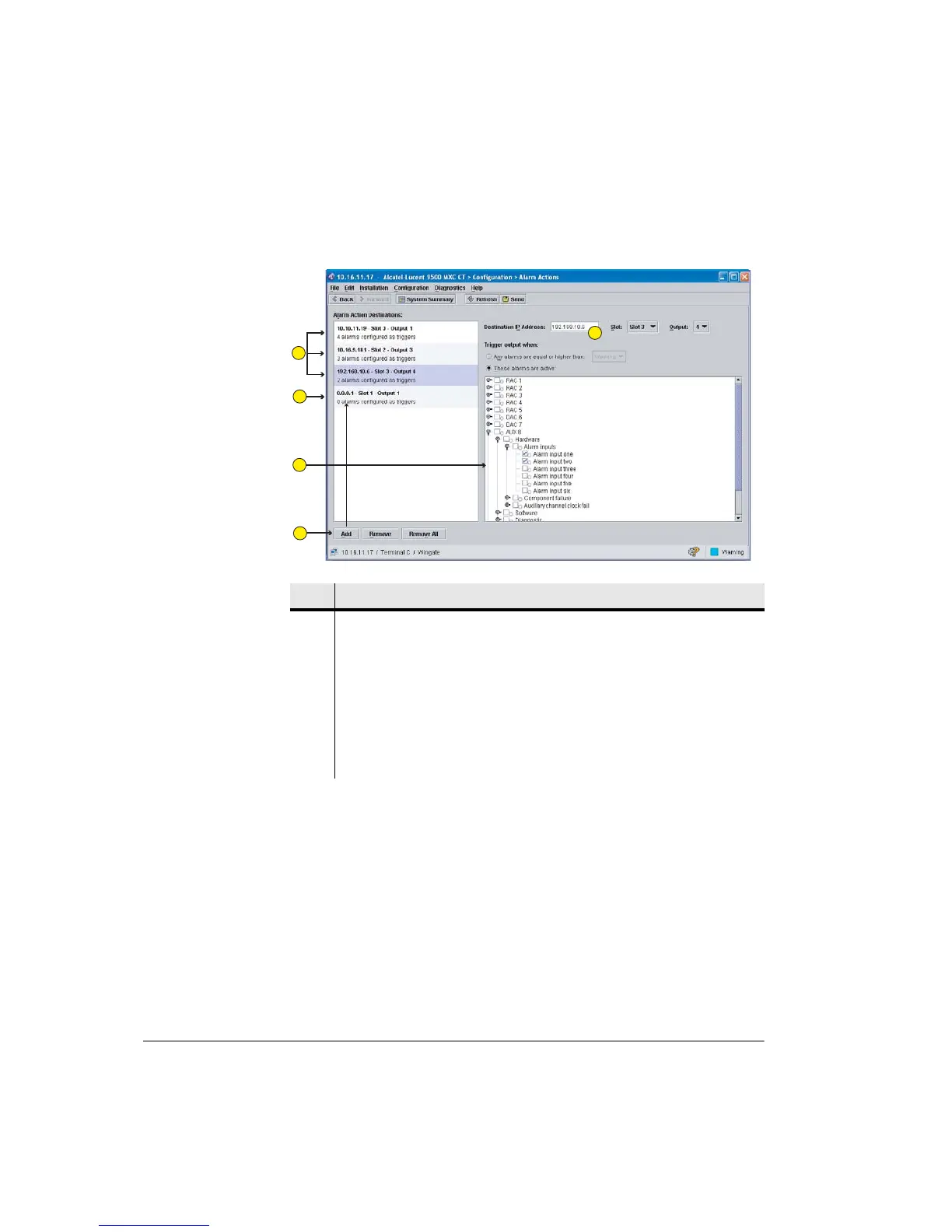
Figure 11-1. Alarm Actions Screen
Before You Begin
When mapping alarm inputs and/or outputs at the local Node/Terminal it is
recommended its AUX module is first configured for the required Alarm I/O
input and output port conditions. Refer to Alarm I/O Configuration on page 7-90.
Similarly, until remote-destination AUX modules are configured, the mapped
output action from the local Node/Terminal is not received.
Item Description
1 Summarizes the setup for each alarm destination.
2 Example of a new, non-configured destination.
3 Shows an alarm tree for local Node/Terminal. Click the triggers to activate or
de-activate alarm events to be mapped to selected destinations.
4 Click Add to add a new destination.
5 Enter the IP address of the destination Node/Terminal, enter the slot number of
the destination AUX plug-in (Node only), and enter the output port number.
1
2
3
4
5



 To Next Page