Chapter 2. Setting Up 9500 MXC CT
Vol. IV-2-28 Alcatel-Lucent
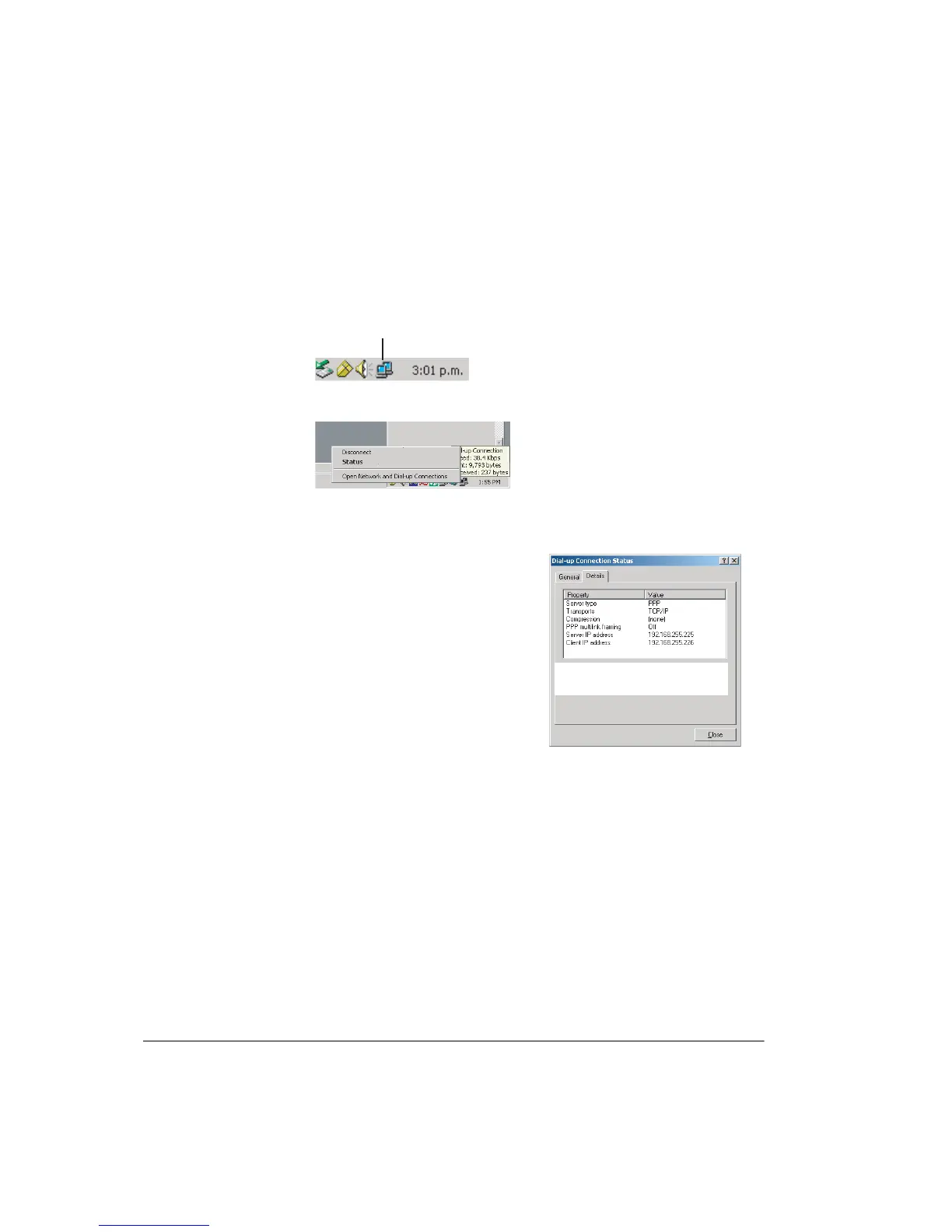
Procedure for Checking and Entering a Changed V.24 IP Address
1. Stay connected via the maintenance cable.
2. Right-click the dial-up connection icon, on your PCs system tray.
The dial-up connection menu options are displayed.
3. To open the Dial-up Connection Status window, select
Status.
4. Click the Details tab.
5. The IP address displayed should be the same as the default 192.168.255.225.
If the Server IP address is different then take a note of this IP address.
6.
Close the Dial-up Connection Status screen.
7. Within the CT start-up window enter the Server IP address in the Connect to
line, and click Connect.
Using a V.24 Connection to Obtain the Ethernet IP Address
Use this procedure to determine the IP address of a radio. Typically this would be
used where an Ethernet connection is preferred, but the IP address for the radio
you wish to connect to is not known.
(Assumes the DHCP server option has not been enabled).
Connection Icon
Right click on the network connection icon
to open the Disconnect - Status window
Click Status to open the Dial-up Connection
Status window
The Server IP address under 'Details'
shows the IP address for the MXC 9500
V.24 port
The Server IP address displayed is
the 9500 MXC V.24 port IP address



 To Next Page