Chapter 9. Circuits
Vol. IV-9-4 Alcatel-Lucent
Expanded Circuits Configuration Screen
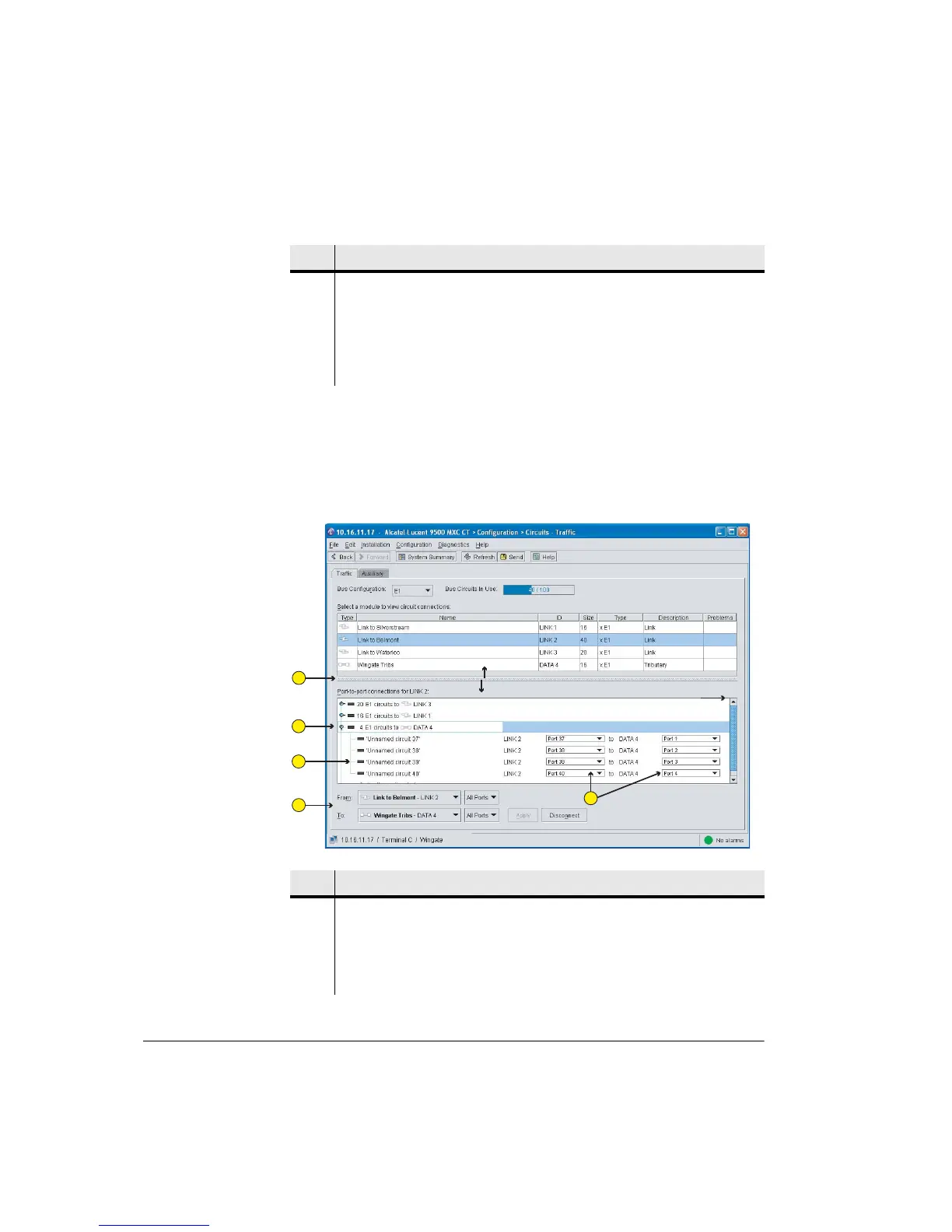
Figure shows the port-to-port connections for Link 2 to Data 4 for the
configuration shown in Figure 9-1:
Typical Expanded Circuits Screen Showing Port-By-Port Connections
Figure 9-2. Expanded Circuits Screen Showing Port-By-Port Connections
4 From, To and Port tabs are used to set circuit connections.
5 Backplane bus options. Backplane can be configured for transport of NxE1 / 2
Mbps, NxE3, NxDS1 / 1.5 Mbps, NxDS3 or NxSTM1/OC3 / Nx150 Mbps.
6 Displays the configured (used) backplane capacity. In this example 40 of the
available 100xE1 circuits have been configured to carry traffic.
Item Description
Item Description
1 Click and drag the bar to adjust the window heights.
2 With toggles in the down position, circuit connections are displayed
port-to-port.
3 Circuit names can be user-defined.
Use scroll bar to
view all circuits
1
2
3
4
5



 To Next Page