Chapter 7. Node and Terminal Plug-ins
Vol. IV-7-32 Alcatel-Lucent
DAC 3xE3/DS3M Screen
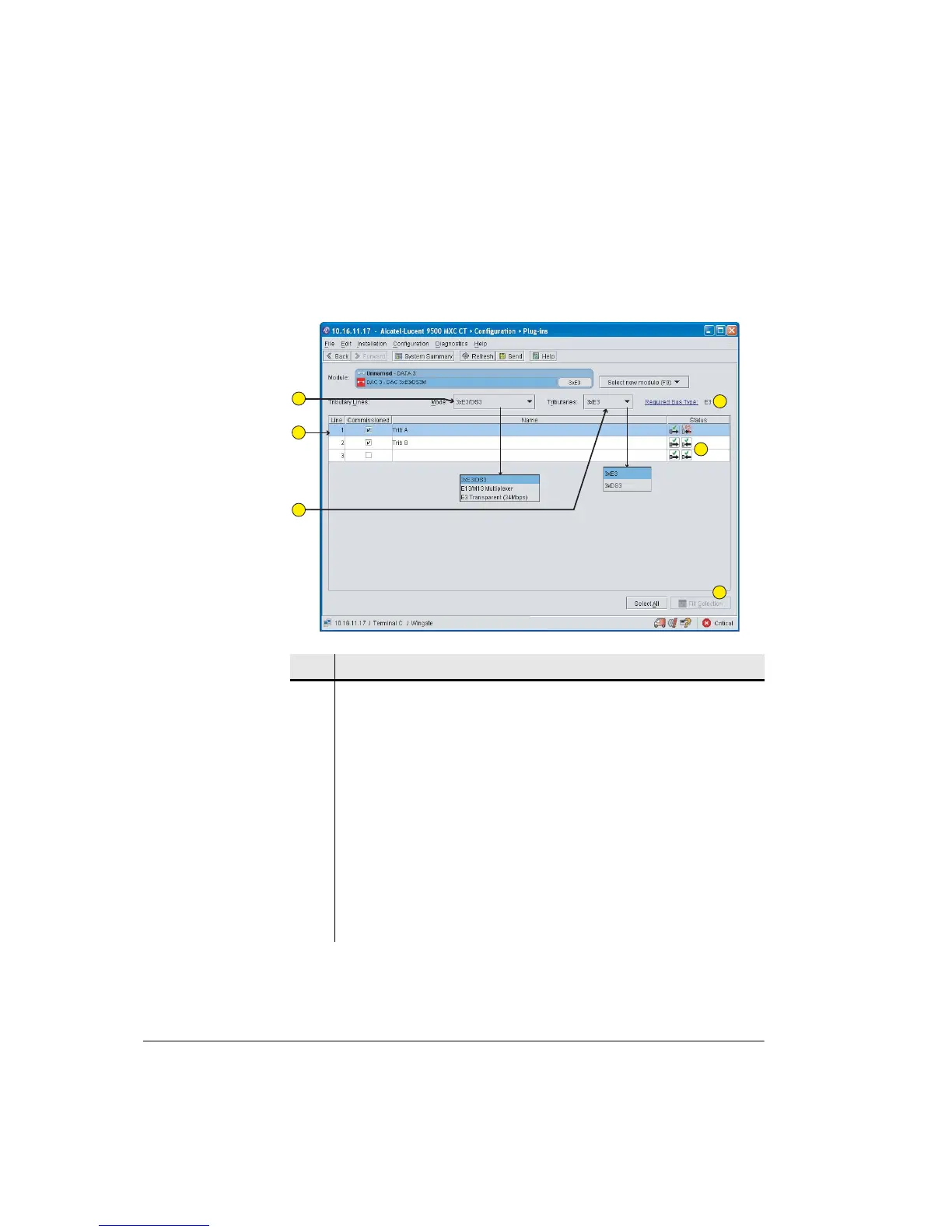
Figure 7-8 shows a typical Plug-ins screen.
Figure 7-8. DAC 3xE3/DS3M Screen
Item Description
1 Select operational mode: 3xE3/DS3, E13/M13 Multiplexer, or E3 Transparent.
2 Tributary Lines provides user-defined entries for:
• Commissioned. Configured tribs should be ticked as commissioned. When
commissioned, LOS alarms are raised if LOS is detected.
• Name. Each trib can be individually named/identified.
3 Select trib type for a 3xE3/DS3 operational mode.
4 Link to circuits screen to select backplane bus type.
5 Icons indicate trib in/out status. Mouse-over for tooltip support. The example
screen shows an LOS alarm on Trib A.
6 Fill Selection sets all selected (high-lighted) tribs to the same setting as the
top-most selected trib.
1
2
3
4
5
6



 To Next Page