Chapter 7. Node and Terminal Plug-ins
Vol. IV-7-54 Alcatel-Lucent
to disable Address Learning is used where the DAC ES connection is
supported from an external switch, such as in a ring/mesh Ethernet network
where protection is provided by an external RSTP switch. To avoid conflict
between the self-learning functions within the DAC ES and external RSTP
switches during path failure situations, the DAC ES capability must be
disabled. Failure to do so means that in the event of an Ethernet path failure,
and subsequent re-direction of traffic by the external switch to an alternate
path, the DAC ES will inhibit re-direction of current/recent traffic until its
address register matures and deletes unused/un-responsive destination
addresses, which may take up to 5 minutes.
9. Enter a name (optional - recommended) for the module by right-clicking in
the relevant DATA module in the System Summary screen, selecting
Rename, and typing. The default name is ‘unnamed’.
10.
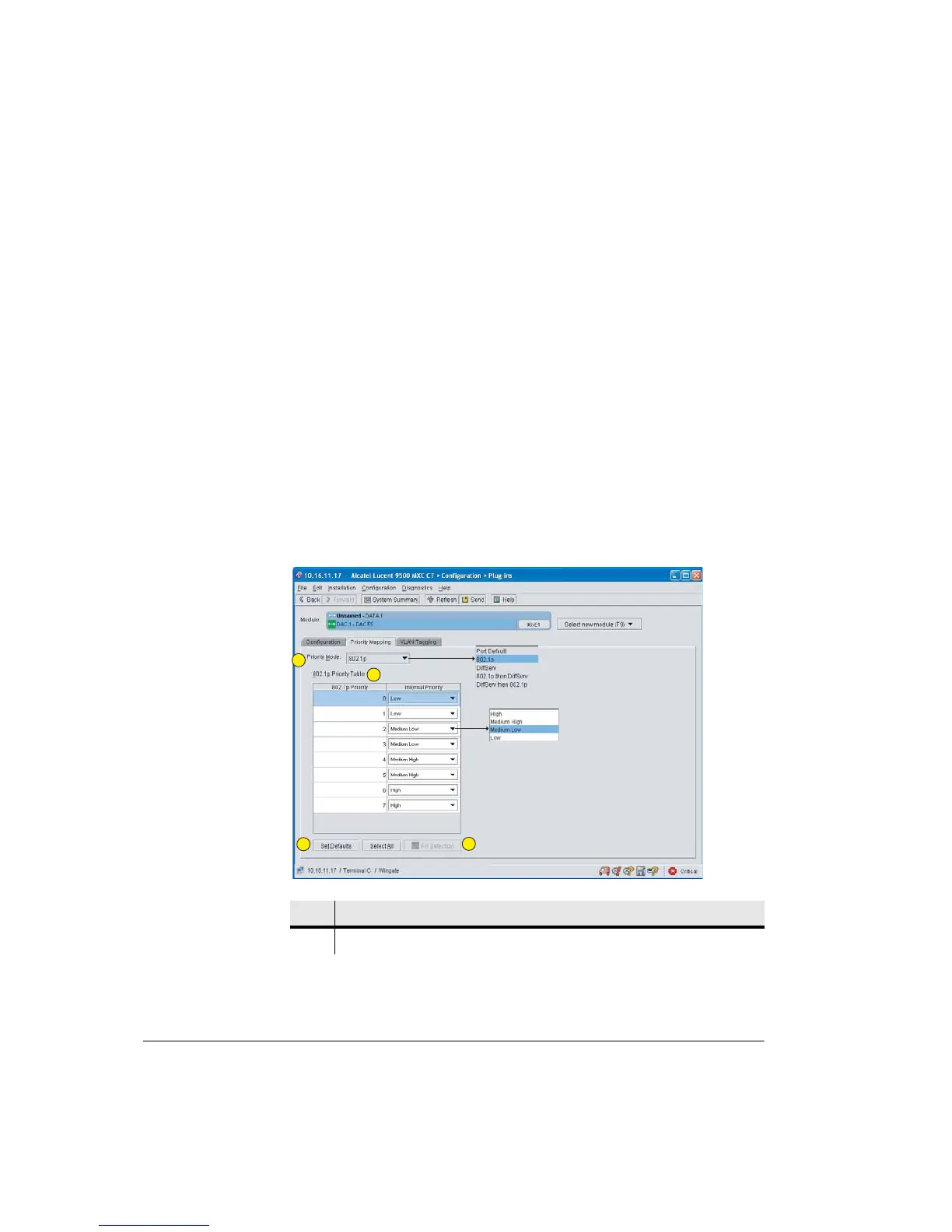
Priority Mapping: Click the Priority Mapping tag to display the priority mode
window. The default mode is Port Default. Click on the Priority Mode box to
view and select from the mode menu. A mode selection applies to all ports.
Refer to Figure 7-16.
Figure 7-16. DAC ES Priority Mapping Window
Item Description
1 Priority Mode. Select from the drop-down menu.
1
2
3
4



 To Next Page