9500 MXC User Manual
3DB 23063 ADAA - Rev 004 July 2007 Vol. IV-7-75
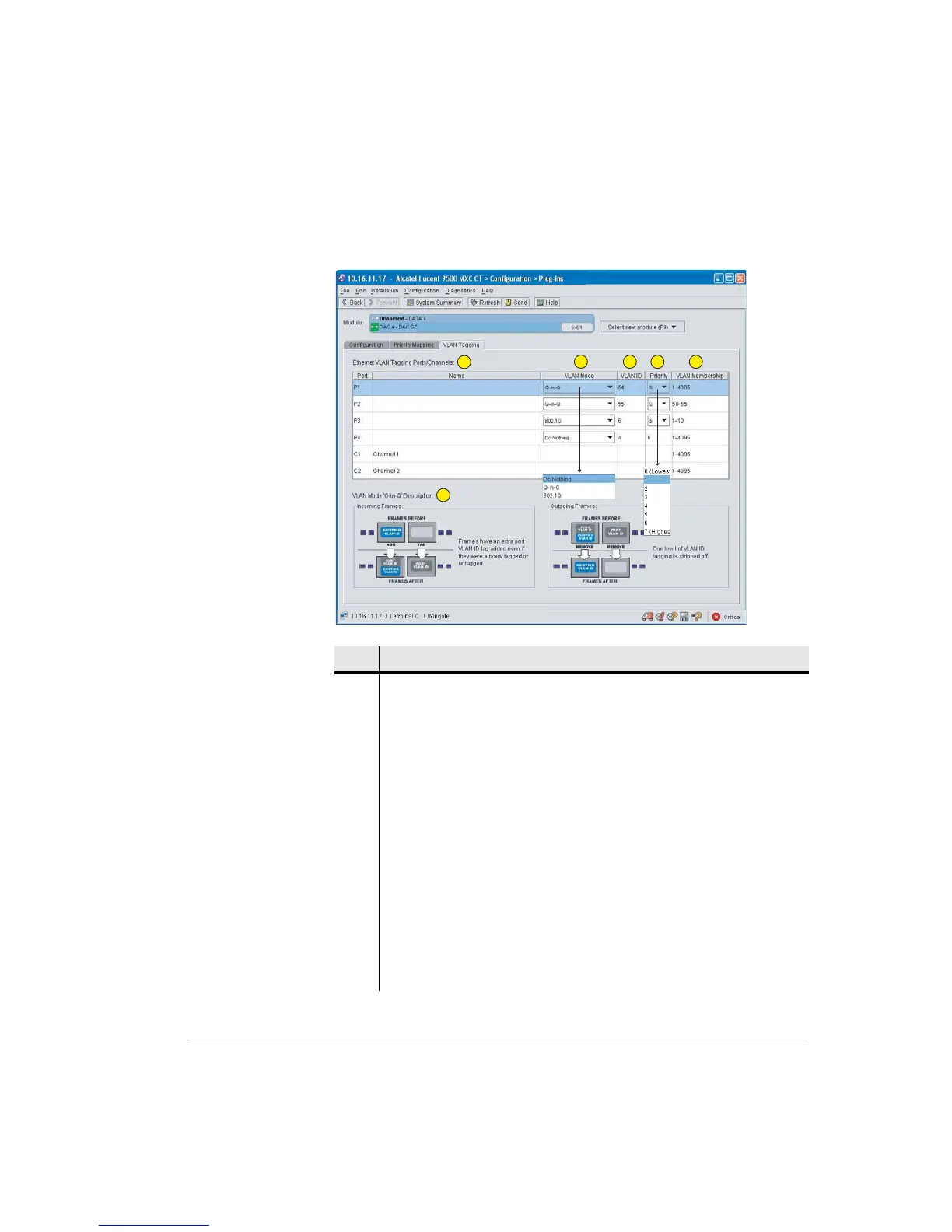
Figure 7-27. DAC GE VLAN Tagging Screen
Item Description
1 A name (if required) is entered in the DAC GE Configuration screen.
2 VLAN Mode. Select a mode from the drop-down menu. A description for each
selection is provided at the bottom of the screen.
3 A VLAN ID can be entered (range 0 to 4095) or left as default
1
. At each end of
the VLAN the IDs must be matching.
4 Priority
1
. Select from the 8-level drop-down menu. This sets a VLAN priority
with respect to other VLANs. When available bandwidth is exceeded, VLAN
traffic with a higher priority is forwarded on a strict priority basis ahead of
lower priority VLAN traffic.
For Do Nothing, the VLAN ID and Priority fields are not editable; the existing
entries are not acted on (have no relevance).
5 VLAN Membership. Applies a filter to the Port and/or Channel so that only the
selected range of IDs is allowed to transit.
6 VLAN mode description. Illustrates the action on incoming and outgoing
frames.
1
2 3
4 5
6



 To Next Page