MC4 Hardware
14 MC4 User Guide
Capacity Indication
If you reset the calibrator or remove/replace the battery pack, "teach"
the capacity of the batteries to the calibrator's charging electronics
by doing as follows:
1. Fully charge the batteries
(approx. 5 hours with no
extra load).
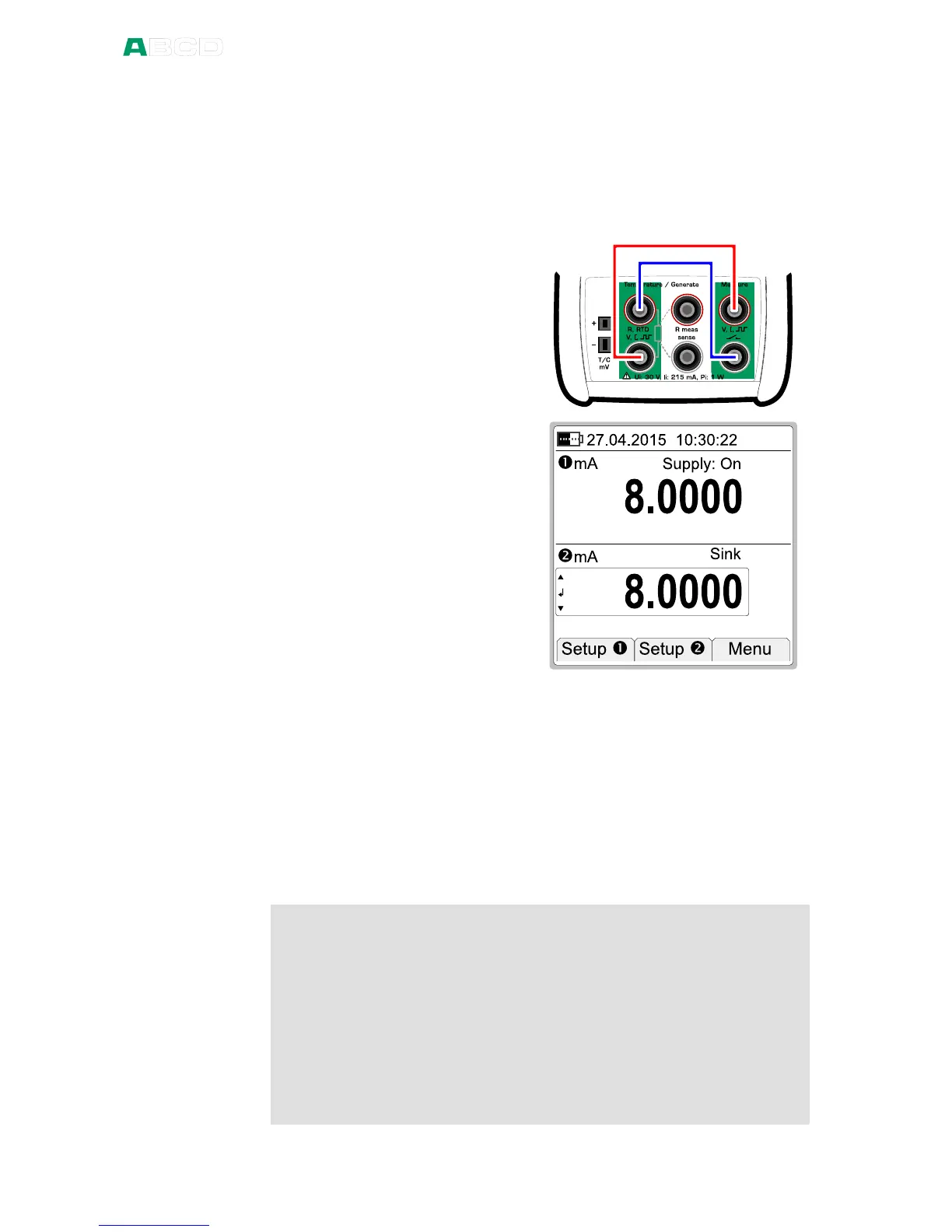
2. Connect the current
generation terminals to
the current measurement
terminals as shown in the
adjacent picture.
3. Configure Window to
measure current with
supply on. See also note
below.
4. Configure Window to
generate (sink) 8 mA.
The user interface should
look as in the adjacent
picture.
5. Do not use the
backlight.
6. Let the calibrator fully discharge its batteries. This is the stage
where the charging electronics "learn" the capacity of the
battery pack.
7. When the calibrator shuts itself automatically, the learning is
done.
8. Recharge the batteries and start using the calibrator
Note.
See part B for more detailed information on connections and
configuring Window 1 and 2.
Hint.
If the calibrator's capacity indication has gotten mixed up, use the
following method to reset the capacity indication:
Fully discharge the batteries as presented above. Then start recharging
and immediately select F3/Menu, Calibrator Adjustment and enter
1590 as the "password". This resets the capacity indication to 0 %.
Then "teach" the capacity of the batteries using the instructions above
again.
Similarly, the "password" 1599 sets the capacity to 100 %, if needed.



 To Next Page