Sync Camera Assembly
17
Camera Set-up and Calibration
The Camera Calibration functions are used to control the operation of the Pinfall Camera. The Pinfall
Camera takes a picture of the standing pins that is used to calculate the score. The camera settings are
very important for proper operation of the scoring system. The score for each ball is determined by
comparing the light level within a target with a threshold value. If the light level inside the target is
higher than the threshold value, the scorer will determine the pin is standing. If the light level inside
the target is lower than the threshold value, the scorer will determine the pin has fallen and score it
as pinfall. The system has two light thresholds. One that is set up for use during normal operating
conditions (Day Level) and one that is set up for operation in low light conditions such as black lights,
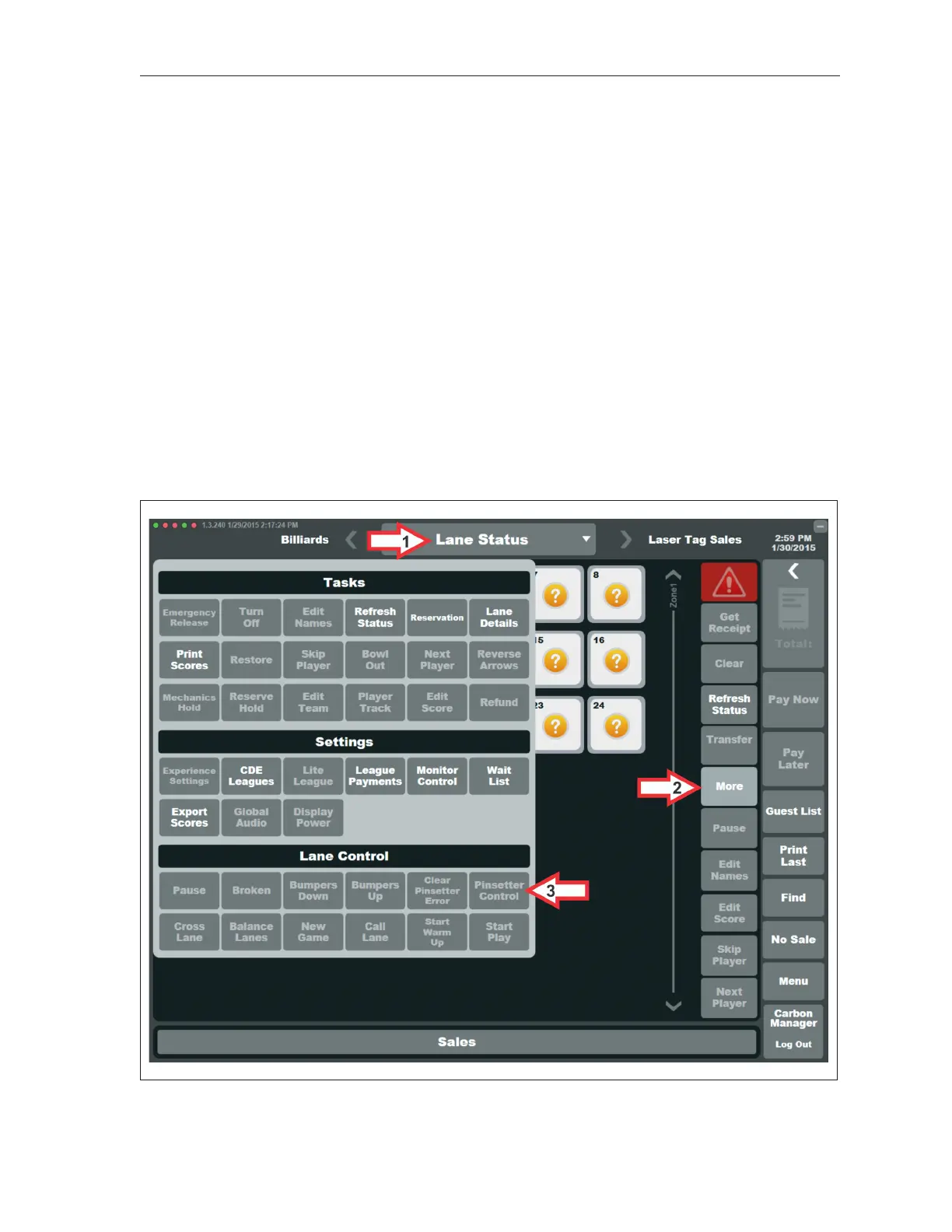
or times when lights over the bowling lanes are turned off (Night Level). Refer to the gures titled
Accessing Camera Calibration, Pinsetter Control Window and Camera Calibration Window.
Use the following sequence to access the camera calibration screen:
1. Navigate to the “Lane Status” or “Lane Sales” screen and select the desired lane.
2. Select “More” to display the Lane Control selections.
3. Select “Pinsetter Control” to open the pinsetter control window.
Accessing Camera Calibration



 To Next Page