6 Sync Overhead Monitors
DISPLAY CONTROLLER
Connections
The Display Controller receives scoring information from the Distribution Interface through a network
connection. Using this information it provides the high denition scorer video to the monitors for a lane
pair using HDMI cables. It also provides on/off and video source control for the monitors through a
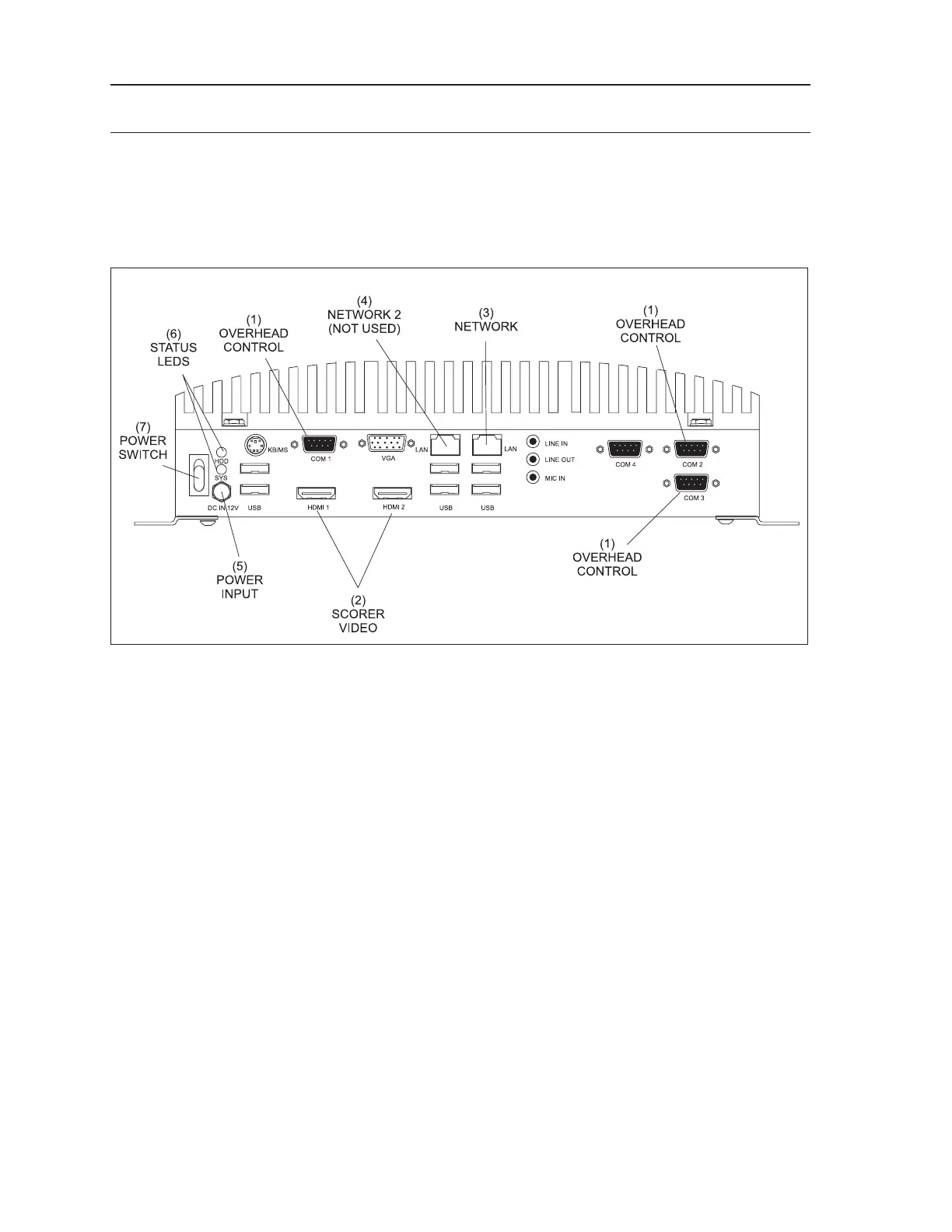
serial port (Com1). Refer to the gure titled Display Controller.
Display Controller
The function of the connections on the Display Controller are:
(1) Overhead Control - (Com 1) RS232 serial port that provides On/Off and video input control
for the overheads.
(2) Scorer Video - (HDMI 1 / HDMI 2) HD Output connection to the LCD monitor for the scorer
video. HDMI 1 - left (odd) lane video, HDMI 2 is right (even) lane video.
(3) Network - (LAN) Connection for the ethernet network. The Display Controller communicates
with the other devices in the system through this connection.
(4) Network 2 (Not Used) - Disabled network port. Do NOT USE.
(5) Power In - (DC In 12v) Input for power coming from the power supply unit located behind the
left lane overhead monitor.
(6) Status LEDs - (HDD/SYS) The HDD LED ashes to indicate when the hard drive inside the
Display Controller is being accessed. The system LED lights when the Display Controller is
“ON”.
7) Power Switch - This switch turns the Display Controller On/Off.



 To Next Page