12 Sync Overhead Monitors
CONFIGURING SAMSUNG OVERHEAD MONITORS
The Samsung overhead monitors are directly connected and controlled from the Display Controller
through a serial port. For the monitors to function properly they must be congured as follows:
Monitor ID
1. Turn the monitor “ON”, then press the “Menu” button on the remote control to display the
“Setup” menu.
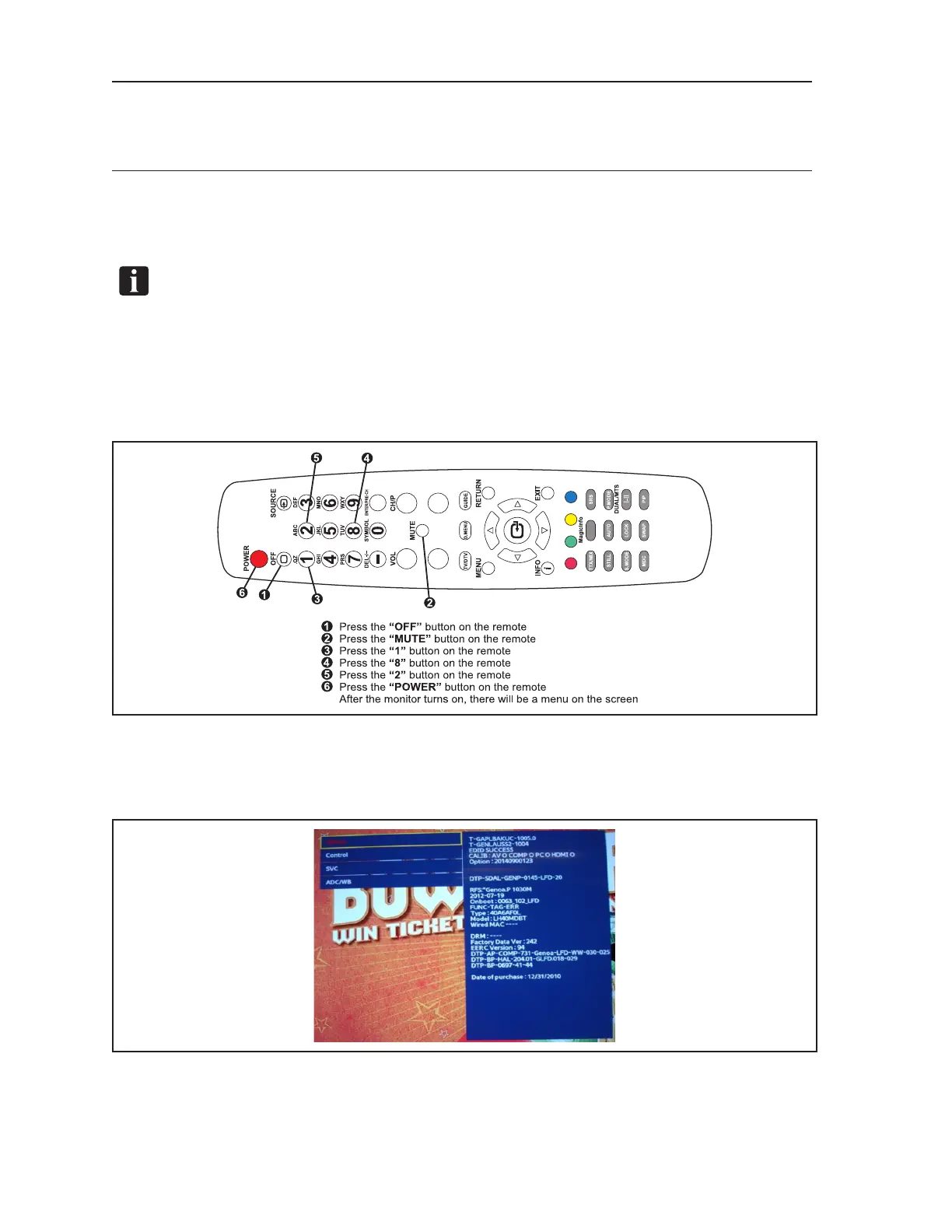
NOTE: If the “Setup “menu does not appear when the “Menu” button is pressed, menu access
may need to be re enabled by resetting the monitor as detailed in steps a -c.
a. At the monitor being congured, press the following buttons in sequence on the Samsung
remote control to reset the monitor and enable the on-screen display:
“OFF”, “Mute”, “1”, “8”, “2” , “Power”. Refer to gure titled Typical Samsung Remote
Control.
Typical Samsung Remote Control
b. After the monitor turns “ON”, a “Service” menu will appear on the screen. Turn the
monitor “OFF” to exit the “Service” menu.
c. Turn the monitor “ON”, then press the “Menu” button on the remote to display the “Setup”
menu.



 To Next Page