38 Sync Control System
Netgear ProsSAFE - JFS524E
Netgear Prosafe JFS524E
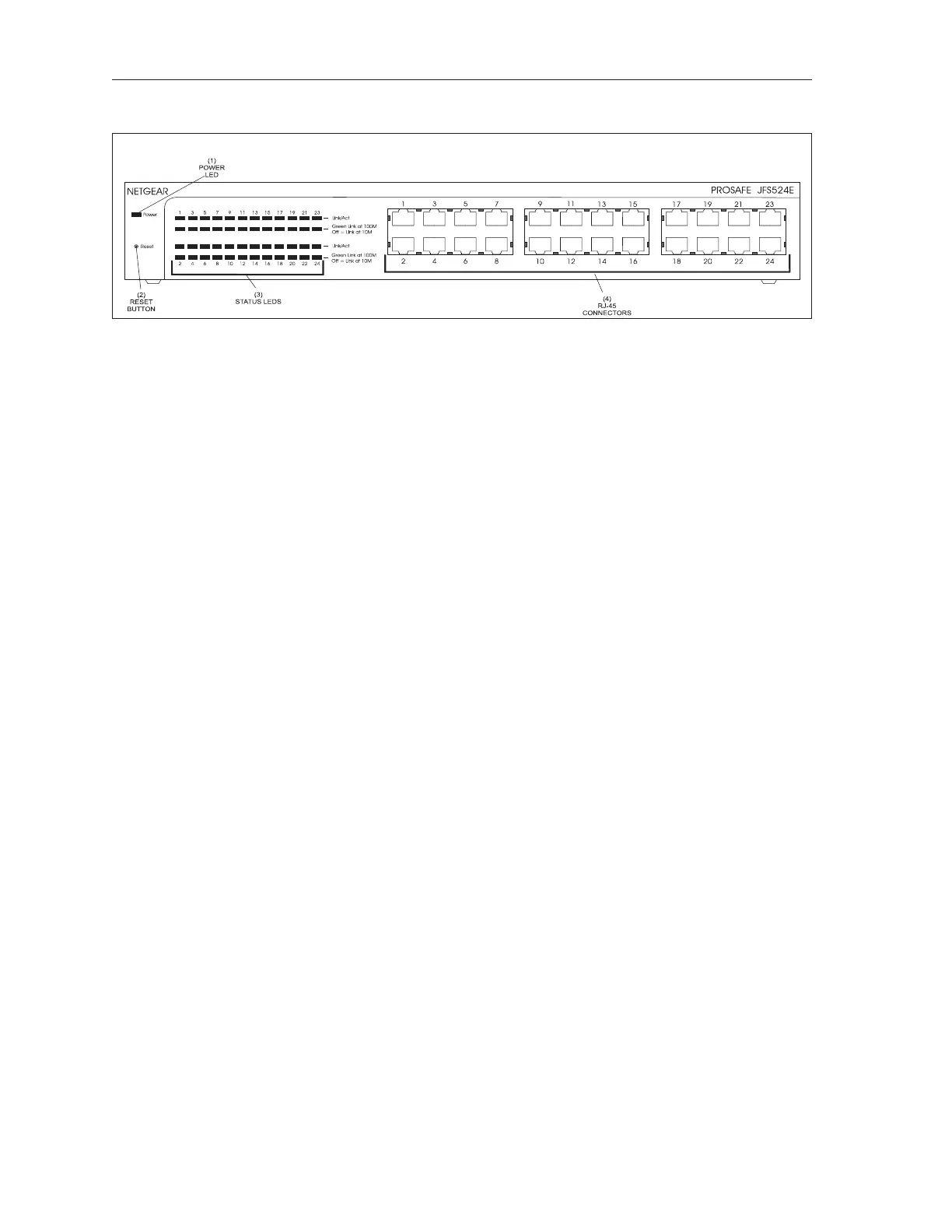
The functions of the components and connectors on the Netgear JFS524E 24 Port switch are:
(1) Power LED - This LED indicates when the Ethernet switch is powered on.
(2) Reset Button - Push this button to restart the switch. Push and hold the button to restore the
switch settings to factory defaults.
(3) Status LEDs - These LEDs indicate the status of each RJ-45 connector. The Link/Act LEDs
lights when there is a device connected to the corresponding port. A ashing Link/Act LED
indicates information is being transmitted though the port.
The speed LED located below each Link/Act LED indicates the speed at which the devices are
communicating. A green LED indicates a communication rate of 100M. If the LED is off, a
10M link has been established.
(3) RJ-45 Connector - Connection (port) for the Cat5 ethernet cables attached to each display
controller and the ethernet switch located at the control desk or ofce. Each port is capable of
auto sensing for 10Mbps or 100Mbps.



 To Next Page