Sync Control System 17
Pole Display
The optional pole display shows the amount of money a customer owes as well as the amount of change
the customer will receive.
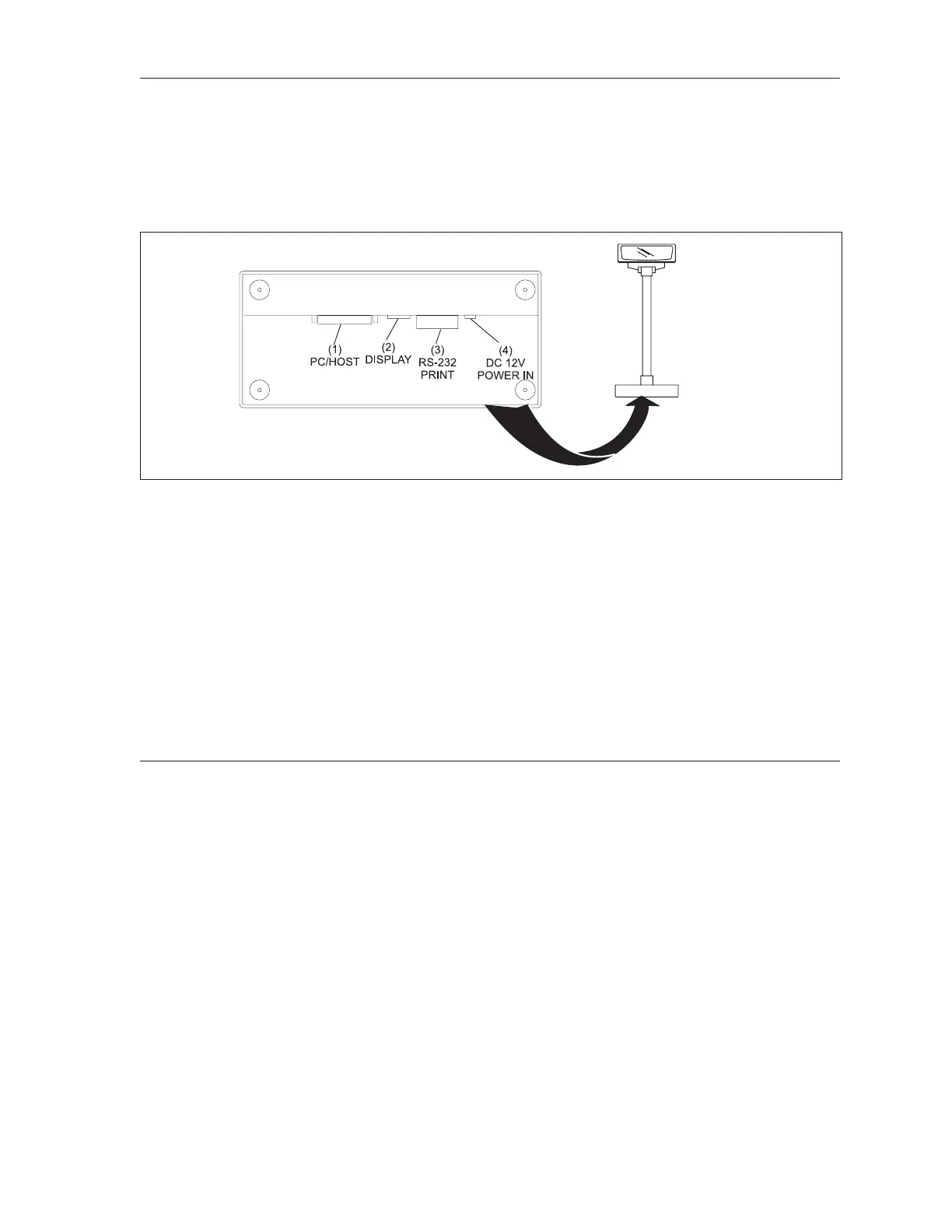
The display connects directly to the client or server computer. A connector on the bottom of the display
allows the connection of the receipt printer. See gure titled Pole Display.
Pole Display
(1) PC/Host - Connector to attach the display to the computer. This connection supplies serial
communications to the pole display.
(2) Display - Connection for the display’s LED readout PCB.
(3) Receipt Printer - Connection to the receipt printer for the POS (point of sale) terminal. This
connection allows serial communication entering the PC/Host connector to continue to the
printer.
(4) DC12V - Power connector for the pole display.
Cash Drawer
The primary function of the cash drawer is to provide a place to put money received from customers.
For the convenience of the control desk operator, the cash drawer opens automatically whenever a
payment key, such as “cash” is selected. If the operator is assigning or cashing-out a lane, the pinsetter
and scorer will turn on or off when the drawer is closed.
Power to open the drawer comes from the receipt printer. For the drawer function properly the receipt
printer must be on and cannot be in an error state.



 To Next Page