54 Sync Scorer Components
Display Controller Replacement
NOTE: The screen shots in this procedure may vary slightly from what is displayed on your
system. Although the graphics might differ, the content and the procedure is the same regardless
of the system version.
NOTE: Before disconnecting any cables from the original Display Controller, take note of where
each cable is connected so that they are attached to the replacement Display Controller properly.
It is strongly recommended to mark each cable with a marker to designate its connection before
disconnecting the cables.
1. Turn “OFF” the display controller using the power switch located at the back of the Display
Controller.
2. Take note of where each cable connects to the original Display Controller, then disconnect all
cables from the Controller.
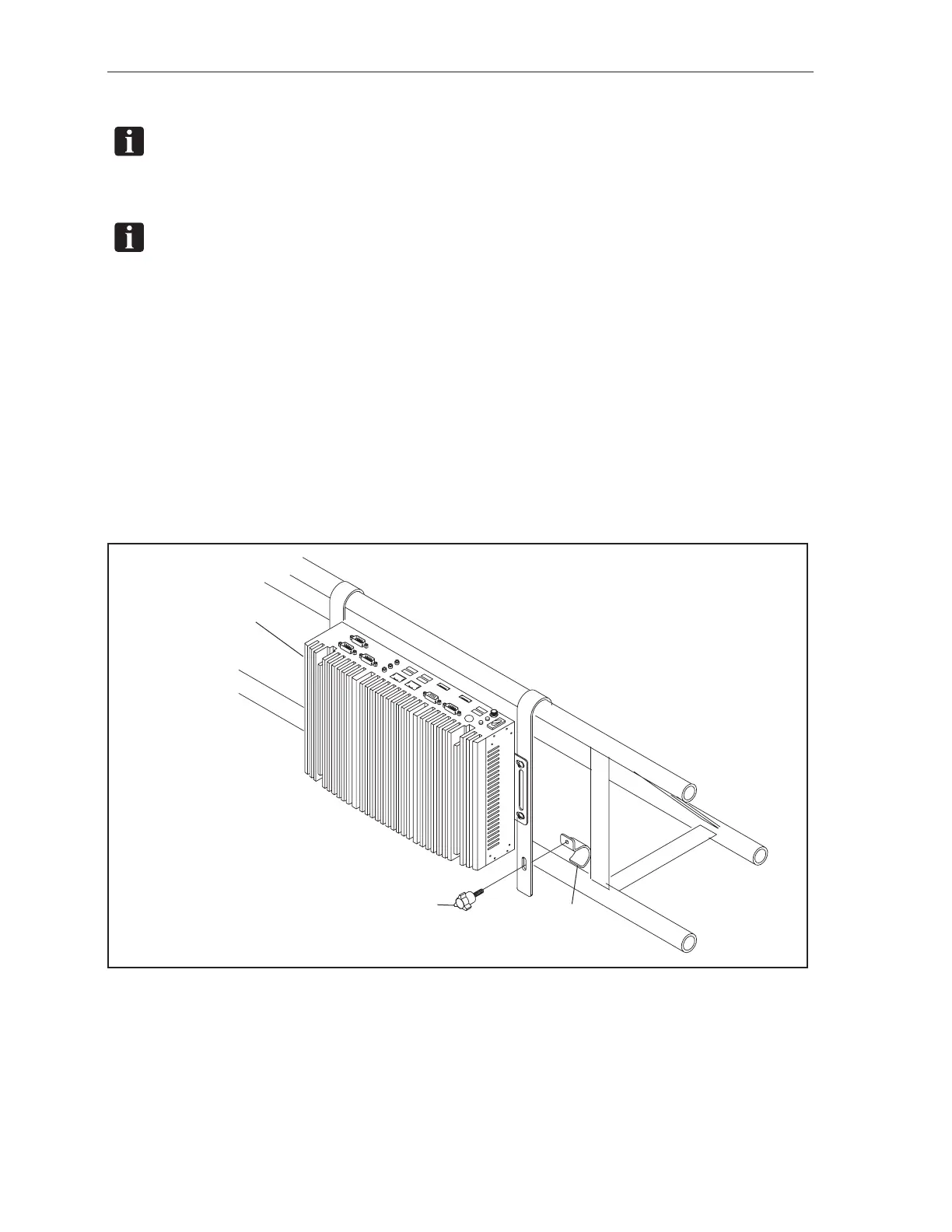
3. Remove the knob and strap clamp from the hanging strap and lift the original Display Controller
up and off of the overhead structure. Retain the knob and clamp for reinstallation with the new
Display Controller. Refer to the gure titled Display Controller Clamp.
(3)
KNOB
(2)
HANGING
STRAP CLAMP
(1)
DISPLAY
CONTROLLER
Display Controller Clamp
(1) DISPLAY CONTROLLER (2) HANGING STRAP CLAMP (3) KNOB



 To Next Page