24 Sync Control System
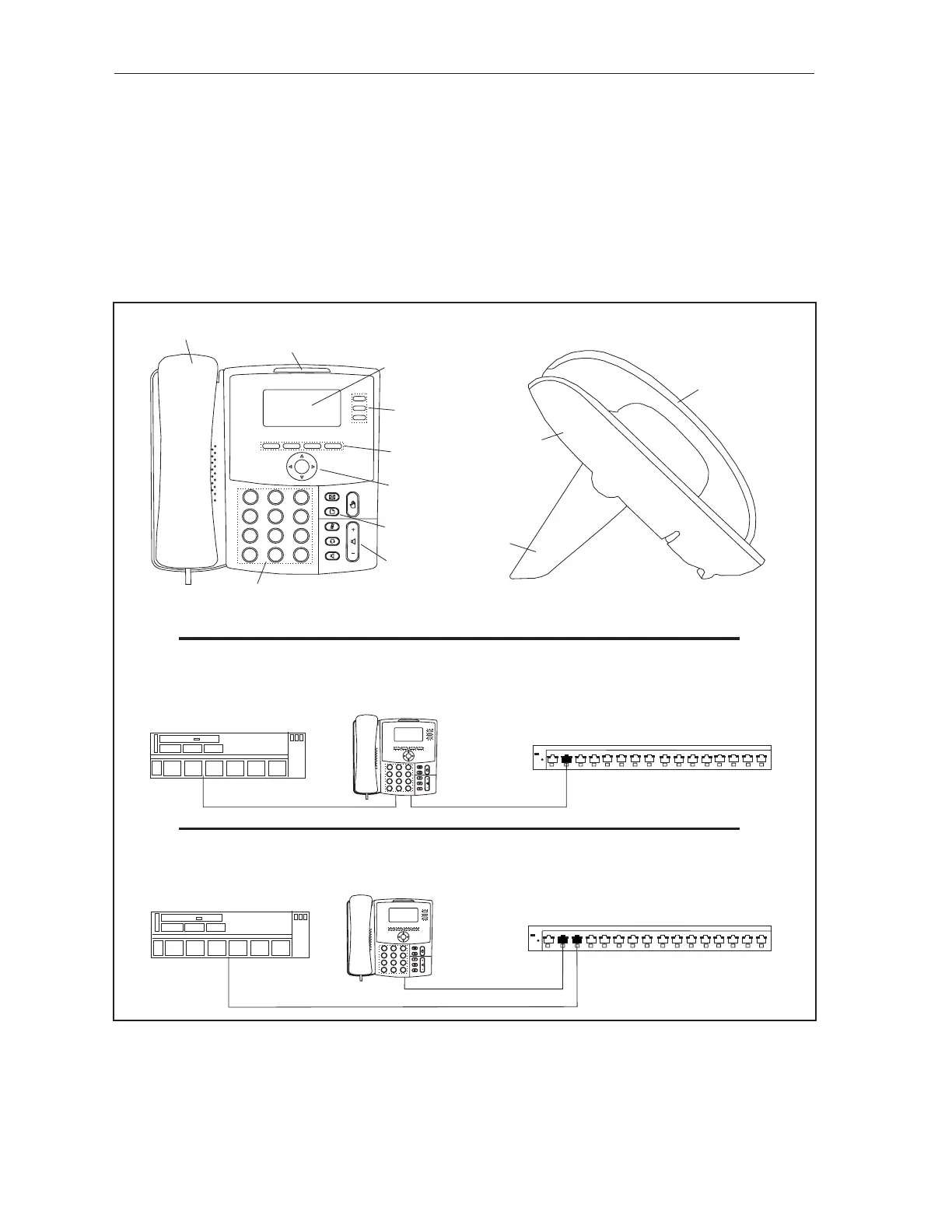
Intercom with Sync Tablets
When the center is equipped with lower tablets, a VOIP (Voice Over Internet Protocol) telephone is
used to provide intercom capability to the tablets. The VOIP telephone connects to the Sync network
via a Cat5e cable and utilizes the network to provide intercom communication to the tablets. Normally
this is accomplished by using the phone’s pass-thru feature and connecting the phone, in-line, between
the network switch and a Sync computer. In situations where the phone is not conveniently located
near a Sync computer, the phone can be connected directly to the network switch using an independent
cable, without continuing to the Sync computer. The Phone/Intercom will require minor assembly, cable
connection, and basic conguration before use. Refer to gures titled Intercom for Sync Tablets and
VOIP Intercom Network Connections.
(1)
HANDSET
(3)
LCD DISPLAY
(2)
LED INDICATOR
(4)
SPEED DIAL
KEYS
(5)
SOFT KEY
BUTTONS
(6)
NAVIGATION
BUTTON
(7)
SETUP
BUTTON
(8)
VOLUME
BUTTON
1
2
ABC
3
DEF
4
GHI
JKL
5
MNO
6
7
PQRS
TUV
WXYZ
8
9
0
*
#
(9)
KEYPAD
(10)
PHONE
STAND
(11)
PHONE
BASE
(1)
HANDSET
(13)
SYNC CLIENT
OR SERVER
COMPUTER
(14)
ETHERNET
SWITCH
57-501367-000
NETGEAR
ProSafe GS116E
1
86
5
4
3
2
7
Both=1000M
100M 10M
On = Link,
Blink=ACT
9
16
14
12
11
10
15
13
Factory
Defaults
Power
1
2
ABC
3
DEF
4
GHI
JKL
5
MNO
6
7
PQRS
TUV
WXYZ
8
9
0
*
#
(14)
ETHERNET
SWITCH
57-501367-000
NETGEAR
ProSafe GS116E
1
86
5
4
3
2
7
Both=1000M
100M 10M
On = Link,
Blink=ACT
9
16
14
12
11
10
15
13
Factory
Defaults
Power
1
2
ABC
3
DEF
4
GHI
JKL
5
MNO
6
7
PQRS
TUV
WXYZ
8
9
0
*
#
(12)
PASS-THRU
NETWORK CONNECTION
(15)
INDEPENDENT
NETWORK CONNECTION
(13)
SYNC CLIENT
OR SERVER
COMPUTER
Intercom for Sync Tablets
(1) HANDSET (2) LED INDICATOR (3) LCD DISPLAY
(4) SPEED DIAL KEYS (5) SOFT KEY BUTTONS (6) NAVIGATION BUTTON
(7) SETUP BUTTON (8) VOLUME BUTTON (9) KEYPAD
(10) PHONE STAND (11) PHONE BASE (12) PASS-THRU NETWORK
(13) INDEPENDENT NETWORK CONNECTION
CONNECTION



 To Next Page