4 Sync Scorer Components
SYNC SCORING OVERVIEW
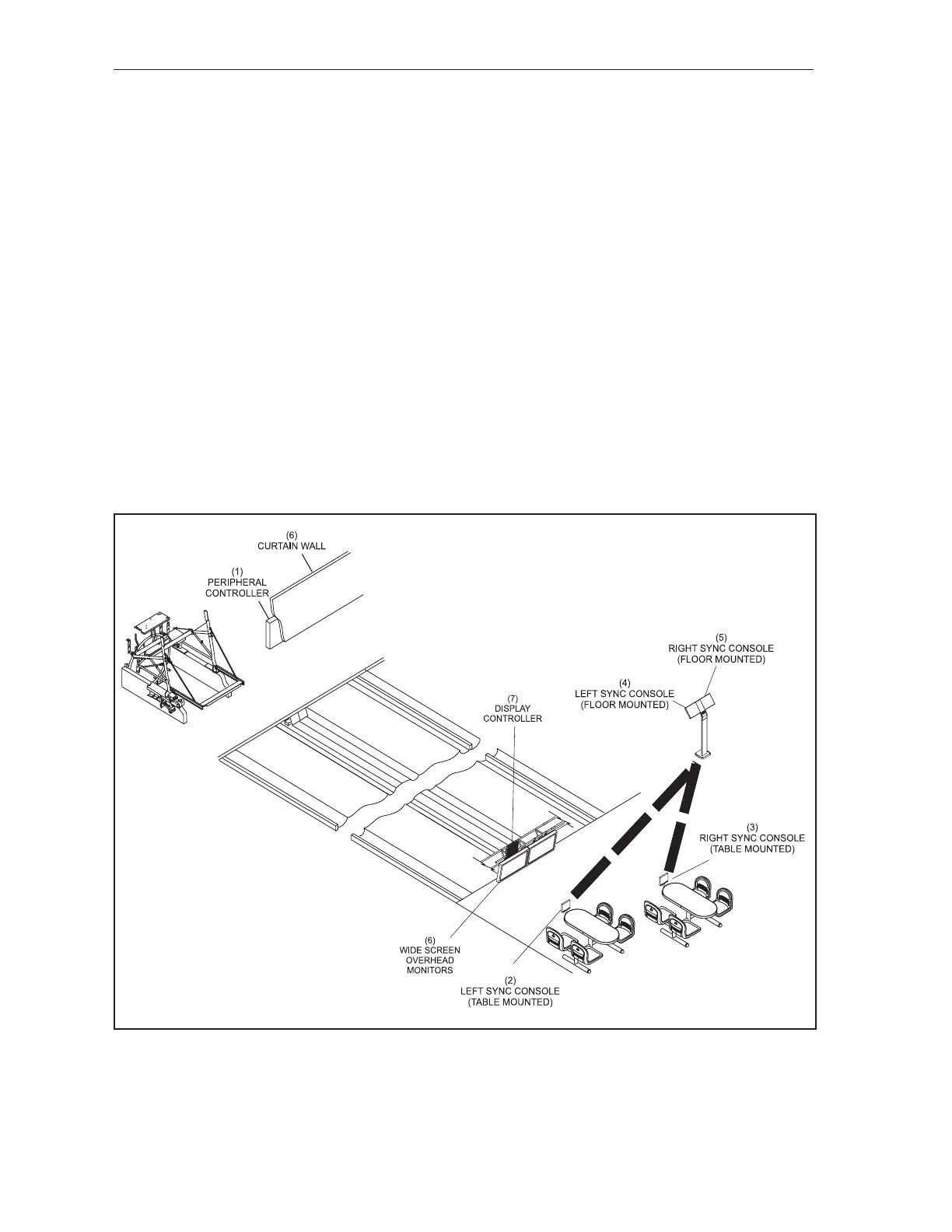
The Sync scoring system includes electronic components located in the bowler and pinsetter areas.
Together, these assemblies perform automatic scoring functions, provide the bowler with input
capabilities, control the pinsetter, and display information about the game in progress. Refer to gures
titled Sync Conguration Overview and Vector Keypad Conguration Overview.
The system is available with Touchpads (keypads) or with full display touchscreen bowler’s consoles.
Both types of consoles allow the bowler to enter all information needed to begin bowling, change or
correct information once bowling has begun and access special features of the scoring system. The
full display touchscreen console is also capable of showing the bowler’s scoresheet screen. Centers
upgrading from Vector scoring have the option of re-using their Vector keypads instead of Sync
bowler’s consoles.
Overhead monitors for each lane pair are equipped with a computer called a Display Controller. This
controller provides scoring functionality and produces a high denition (HD) scorer display for the
screens.
Peripheral Controller boxes mounted on the curtain wall connect to lane pair components such as the
pinsetters, pin cameras, Vector keypads or Sync Touchpads (keypads), and automated bumpers as
needed.
Sync Conguration Overview
(1) PERIPHERAL CONTROLLER (2) LEFT SYNC CONSOLE (3) RIGHT SYNC CONSOLE
(TABLE MOUNTED) (TABLE MOUNTED)
(4) LEFT SYNC CONSOLE (5) RIGHT SYNC CONSOLE (6) CURTAIN WALL
(FLOOR MOUNT) (FLOOR MOUNTED)
(7) DISPLAY CONTROLLER (8) WIDESCREEN OVERHEAD MONITORS



 To Next Page