50 Sync Control System
Rebooting System Components
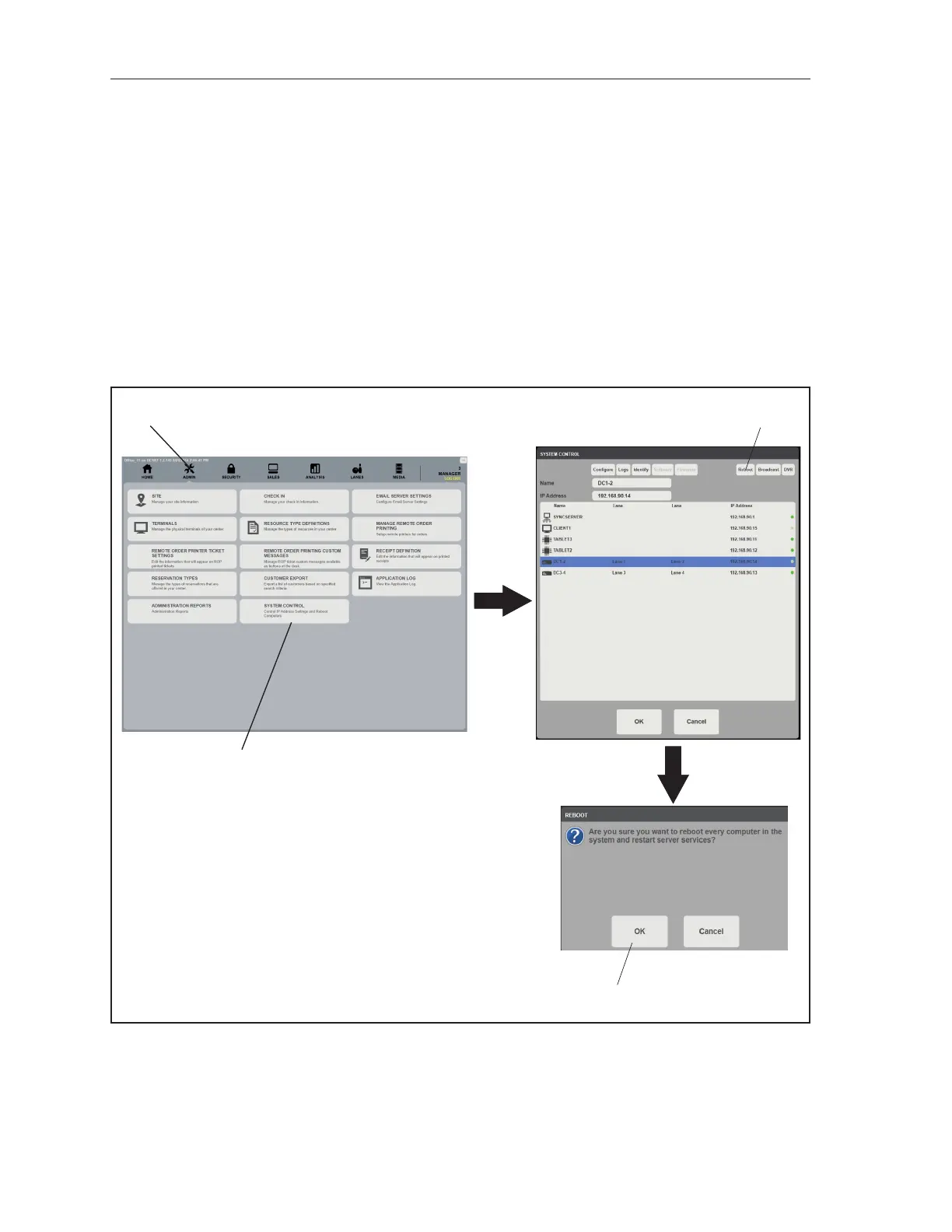
The simultaneous reboot of Sync Clients, Display Controllers and Sync Tablets can be accomplished by
using the System Control screen located in the ofce program. Alternatively, each component can be
rebooted individually or in a group, as needed.
Sync Clients, Display Controllers and Sync Tablets
The following procedure will reboot ALL client computers, Display Controllers and Sync Tablets found
in the system.
1. In the Sync Ofce program, navigate to the Admin page.
2. Select System Control
3. Select Reboot
4. Select OK on the message screen
(1)
SELECT
ADMIN
(2)
SELECT
SYSTEM
CONTROL
(3)
SELECT
REBOOT
(4)
SELECT
OK
Simultaneous Rebooting Client Computers, Display Controllers, and Tablets
(1) SELECT ADMIN (2) SELECT SYSTEM CONTROL (3) SELECT REBOOT
(4) SELECT OK



 To Next Page