Sync Control System 13
(2)
POWER SUPPLY
STATUS INDICATOR
(13)
POWER
SUPPLY DIAGNOSTIC
BUTTON
(1)
POWER
CONNECTOR
(8)
AUDIO
CONNECTORS
(9)
PS/2 KEYBOARD
CONNECTOR
(3)
USB 2.0
CONNECTIONS
(11)
DISPLAY
PORT
(10)
24V POWERED
USB 2.0 CONNECTOR
(6)
SERIAL
PORT
(6)
SERIAL
PORT
(7)
PS/2 MOUSE
CONNECTOR
(5)
VGA
CONNECTOR
(6)
SERIAL PORTS
(4)
ETHERNET
CONNECTORS
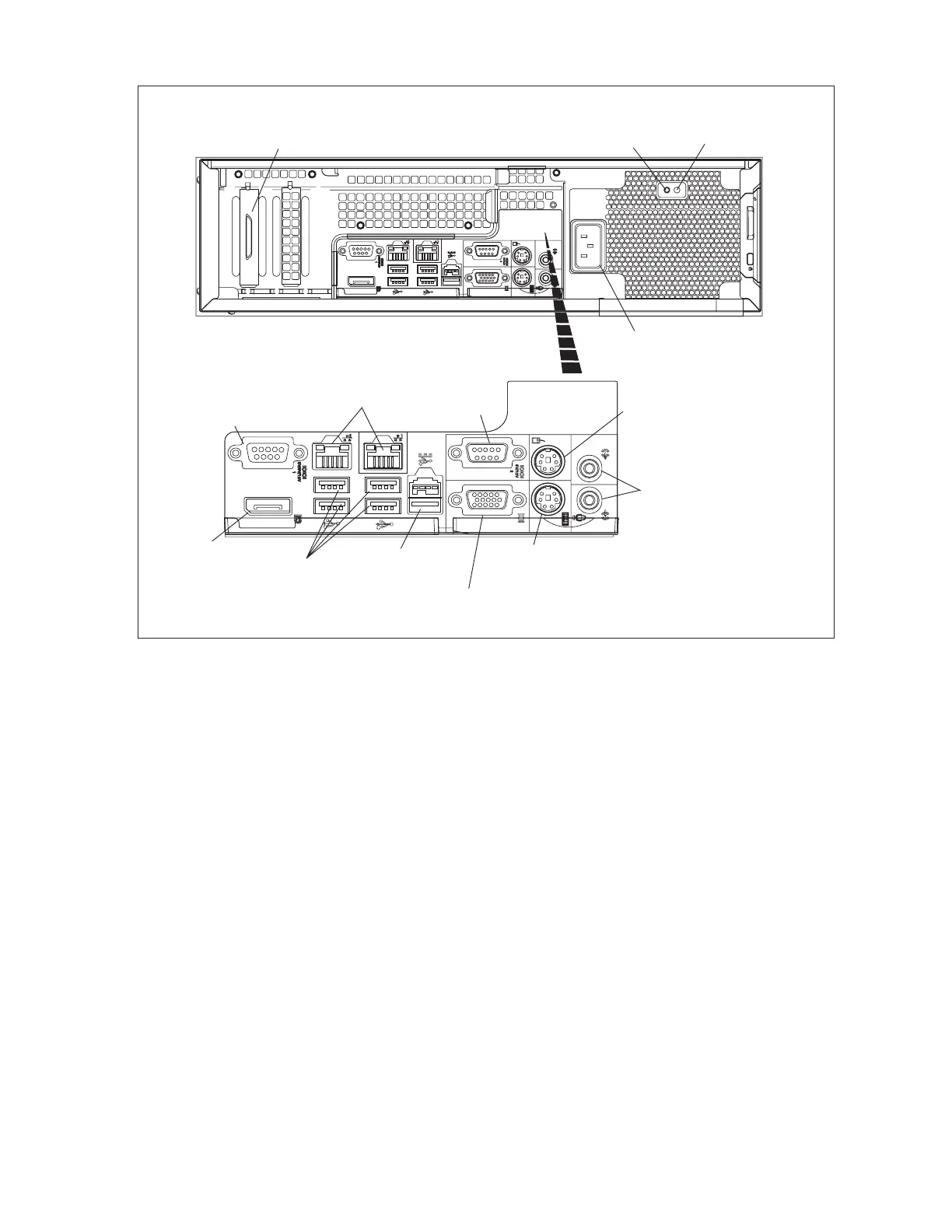
Rear Panel Connectors - Client (Optiplex XE Shown)
Functions of the connectors and controls on the back of the computer may include:
(1) Power Connector - Connection from computer to an AC power source.
(2) Expansion Slots - Connection slots for up to ve full-height PCIe expansion cards.
(3) USB 2.0 Connections - The USB ports can be used to connect standard USB devices such as a
printer, mouse or keyboard.
(4) Ethernet Connectors - Ethernet port 1 is used to connect to the Sync Network. Port 2 of the
server can be used to connect the server to a 2nd network such as one that allows connection to
the internet.
(5) VGA Connector - A 15 pin connector for video to the VGA monitor.
(6) Serial Port - The serial ports allow the connection of external devices to the computer. The
port assignments vary based on the equipment installed and are congured through the
Administration tab in the Sync Ofce program.. The ports are typically connected as follows:
COM 1 TouchScreen
COM 2 Pole Display, Receipt Printer, and Cash Drawer
COM 3 IPTran
COM 4 Audio Control Unit



 To Next Page