56 Sync Scorer Components
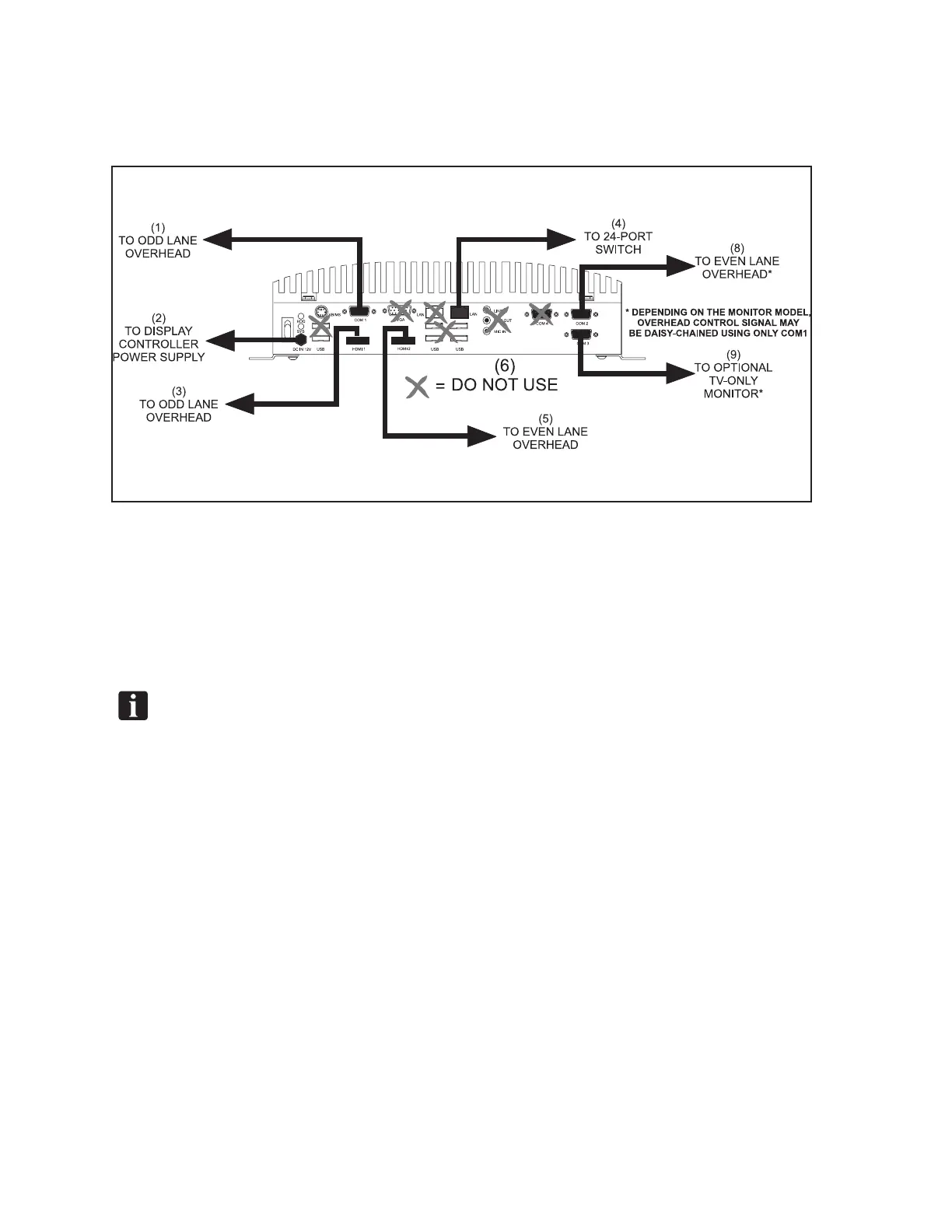
6. Attach the network, video (HDMI), and communication cable to the replacement Display
Controller exactly as they were on the original controller and as noted in step 2. Once
veried, connect the and power cable to the unit. Refer to the gure titled Display Controller
Connections.
Display Controller Connections
(1) TO ODD LANE OVERHEAD (2) TO DISPLAY CONTROLLER (3) TO ODD LANE OVERHEAD
POWER SUPPLY
(4) TO 24-PORT SWITCH (5) TO EVEN LANE OVERHEAD (6) DO NOT USE
7. If the replacement display controller did not automatically start booting up when the power
cable was connected, press the power button on the controller. A beep will sound notifying that
the controller is booting up.
NOTE: The actual information and messages that appears on the conguration screen during
and after rebooting is dependent on whether the unit is new from the factory or if it was
previously installed.
8. Once the Display Controller has fully booted, the overhead display will show the IP address and
a Device Name. For previously installed Display Controllers a screen indicating a “Duplicate
Device Name” along with the name of an existing Display Controller may appear. For Display
Controllers that have never been installed, a screen indicated an “Invalid Conguration” along
with a temporary name. Take note of the IP address as it is needed for the next step. Refer to the
gure titled Display Controller - IP Address.



 To Next Page