64 Sync Scorer Components
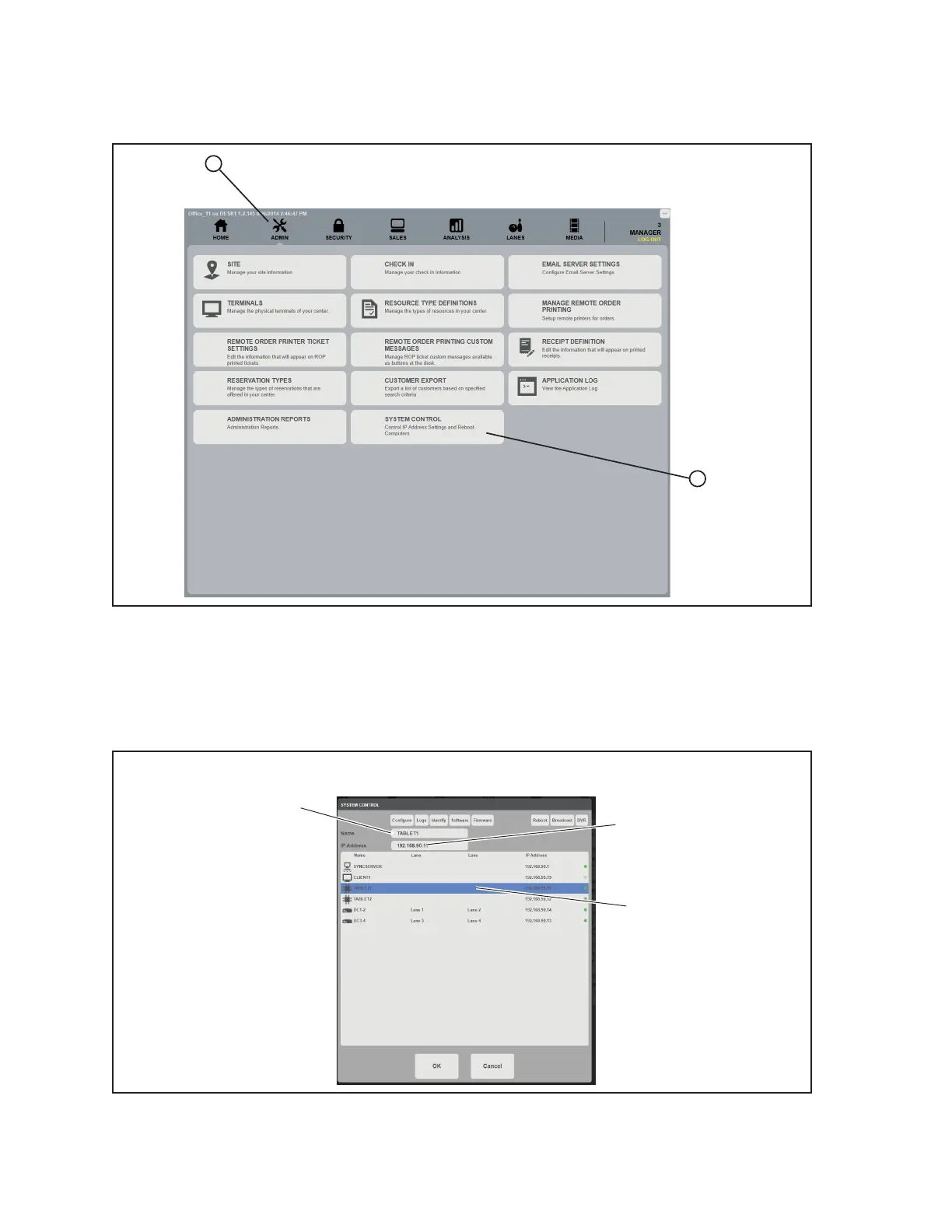
9. In the Sync Ofce program, navigate to the system control screen. Refer to the gure titled
Admin - System Control.
1
2
Admin - System Control
10. Find the lane that the replacement tablet will be assigned to. The lane is the number after the
word Tablet in the name column. Once selected, change the IP Address to the new IP address
currently being displayed on the tablet and as noted in step 8. DO NOT CHANGE THE NAME
OF THE TABLET. Refer to the gure titled System Control - New IP Address.
(1)
FIND AND
SELECT
TABLET LANE
(2)
INPUT NEW
IP ADDRESS
(3)
DO NOT
CHANGE NAME
System Control- New IP Address
(1) FIND AND SELECT TABLET LANE (2) INPUT NEW IP ADDRESS (3) DO NOT CHANGE NAME



 To Next Page