66 Sync Scorer Components
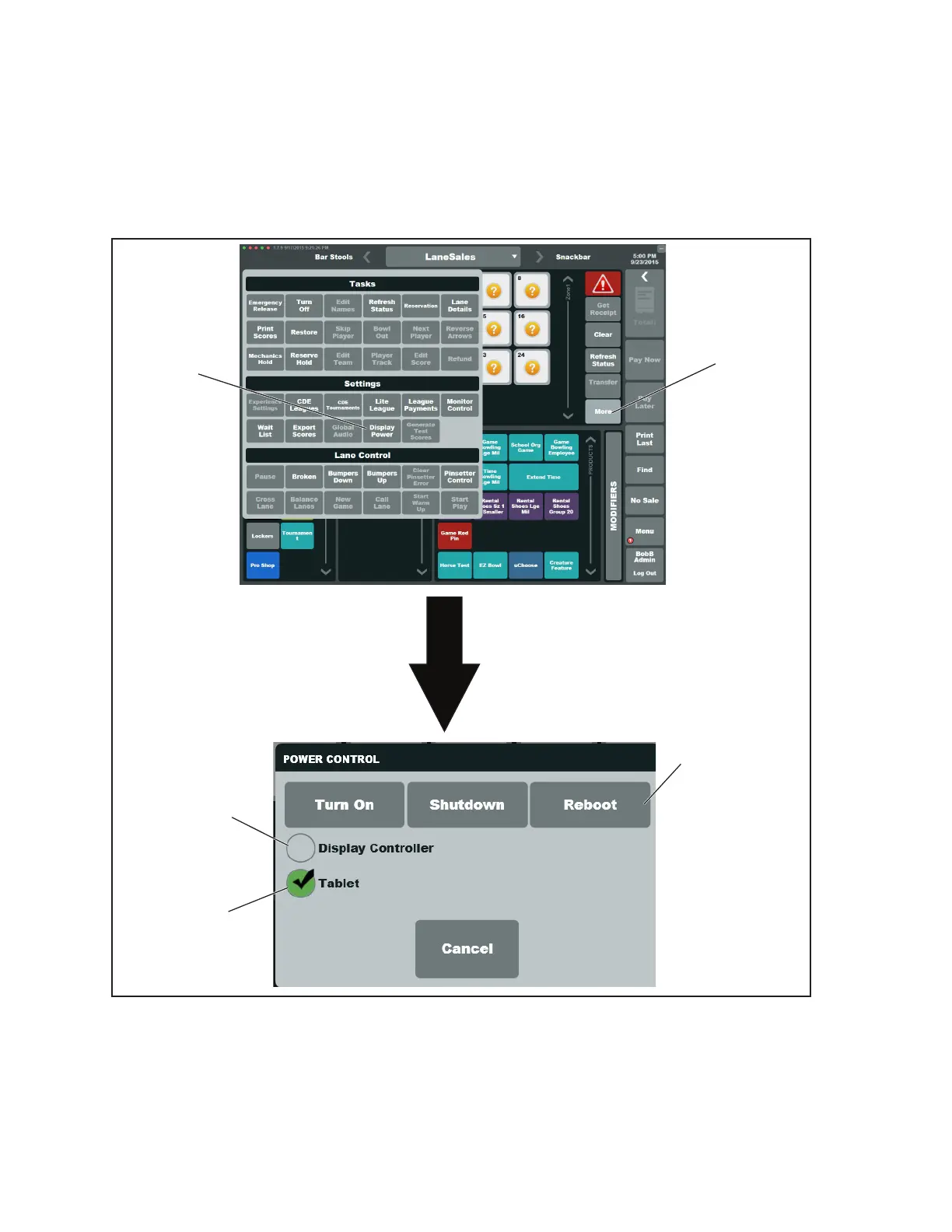
13. Reboot the newly installed tablet as follows (Refer to gure titled Rebooting A Tablet):
a. In the Sync Desk program, navigate to the Lane Sales page and select the the lane where
the new tablet is installed.
b. Select More, then select Display Power
c. Uncheck the Display Controller option and check the Tablet option.
d. Select Reboot.
(1)
MORE
(2)
DISPLAY
POWER
(3)
SELECT
TABLET
(4)
DE-SELECT
DISPLAY
CONTROLLER
5)
SELECT
REBOOT
Rebooting A Tablet
(1) MORE (2) DISPLAY POWER (3) SELECT TABLET
(4) DE-SELECT DISPLAY (5) REBOOT
CONTROLLER
14. IMPORTANT! Once the Display Controller has completely rebooted, assign 2 bowlers to the
lane pair using “Lite League”. Bowl on the lanes to test for proper functionality.



 To Next Page