Specify the page layout settings such as binding position and margin values.
Binding Location
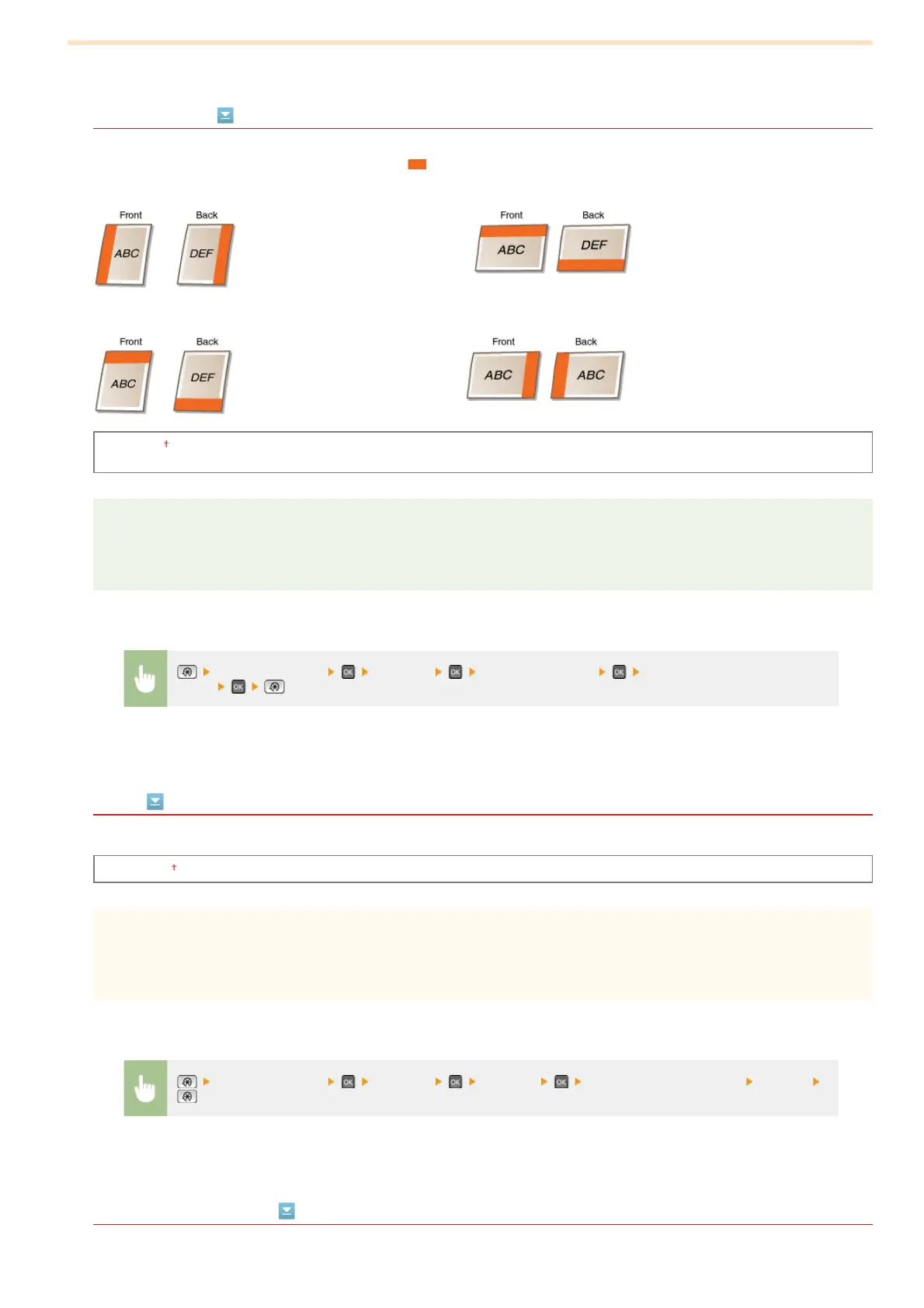
Select the binding position of the paper (along the long edge or the short edge). For 2-sided printing, image orientation is
automatically arranged to produce the correct layout.
in the illustrations below represent margins.
When the binding position is on the long edge of the paper:
When the binding position is on the short edge of the paper:
Long Edge
Short Edge
NOTE
You cannot create a binding margin with this setting alone. Use this setting in combination with the <Gutter> setting to set
the binding margin for the selected binding position.
Gutter
Specify the binding margin to apply to the binding position selected in the <Binding Location> setting.
-50.0 to ±0 to +50.0 (mm)
IMPORTANT
If this setting moves any of the print data outside the printable area, the portion outside the printable area will not be
printed.
Offset Short Edge (Front)
Specify the print position by setting the offset value for the short edge on the front side of the paper. Increasing the value moves
<Printer Settings> <Layout> <Binding Location> Select <Long Edge> or <Short
Edge>
<Printer Settings> <Layout> <Gutter> Specify the binding margin <Apply>
㻡㻝㻡㻌㻛㻌㻢㻣㻢











 To Next Page