CDM-570A/570AL Satellite Modem with Optional Packet Processor
Revision 5
FAST Activation Procedure 5–4 MN-CDM570A
5.2.2 FAST Activation via the CDM-570A HTTP Interface
See Chapter 7. ETHERNET-BASED REMOTE PRODUCT MANAGEMENT for
complete information about using this interface.
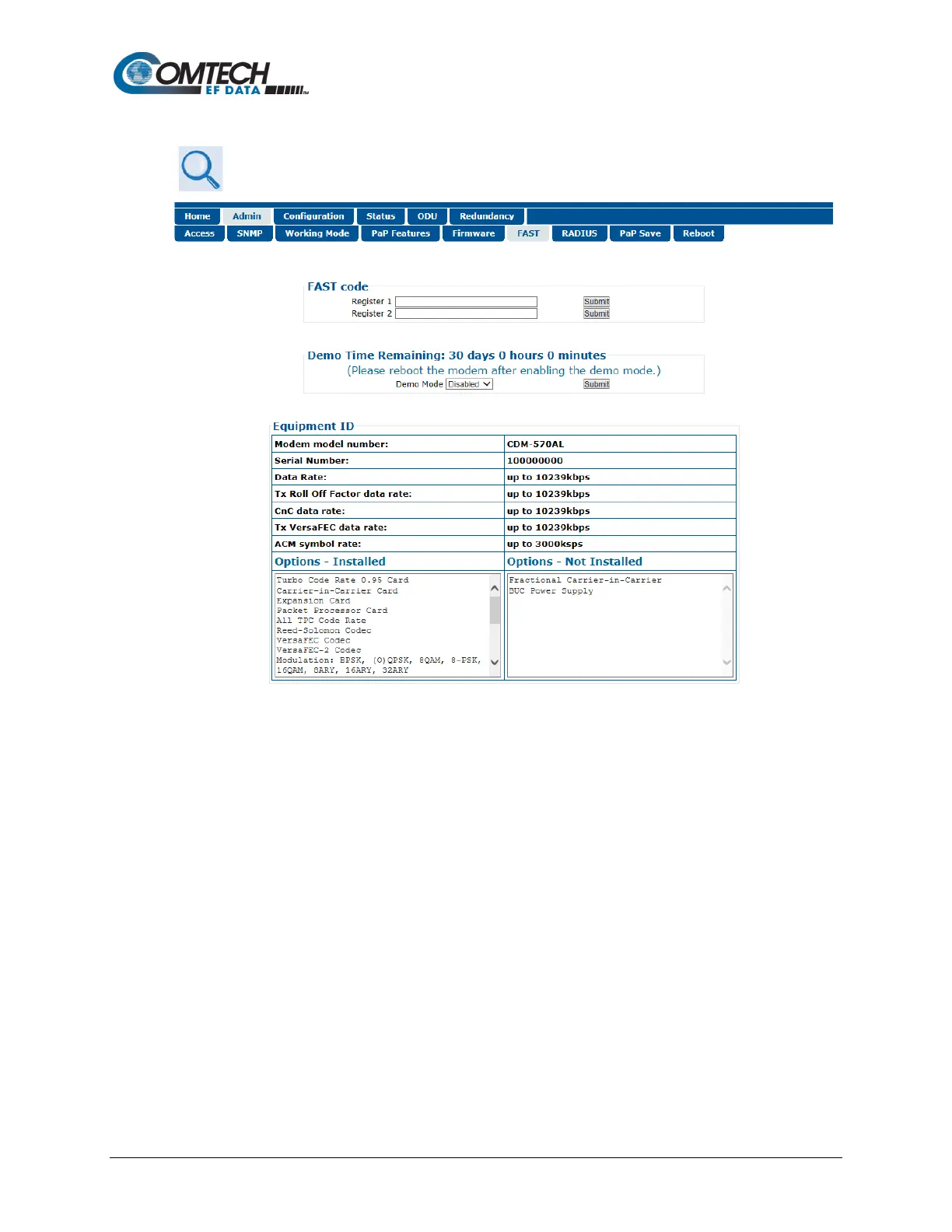
Figure 5-1. CDM-570A HTTP Interface – Admin | FAST Page
Use the CDM-570A HTTP Interface ‘Admin | FAST’ page (Figure 5-1) for complete management
of FAST Features. This page provides FAST code entry/option activation control, and srollable list
boxes that display availability and activation status for all FAST options.
Do these steps:
1. Before you contact Comtech EF Data Product Support to order FAST feature upgrades,
you must retrieve the modem’s motherboard serial number. Use the front panel SELECT:
FAST menu, as explained in Sect. 5.2.1 Step 1, to obtain and record the modem’s
motherboard serial number.
Write down the Serial Number: ______________________________________
2. Use the ‘Admin | FAST’ page to view the currently installed or available FAST features.
Any options that appear in the scrollable Options – Not Installed list box may be
purchased as a FAST upgrade.



 To Next Page