CDM-570A/570AL Satellite Modem with Optional Packet Processor
Revision 5
Optional Packet Processor - Serial/Telnet CLI Operation 9–58 MN-CDM570A
9.3.8.2.2 Satellite Modem > Monitor > Link Statistics
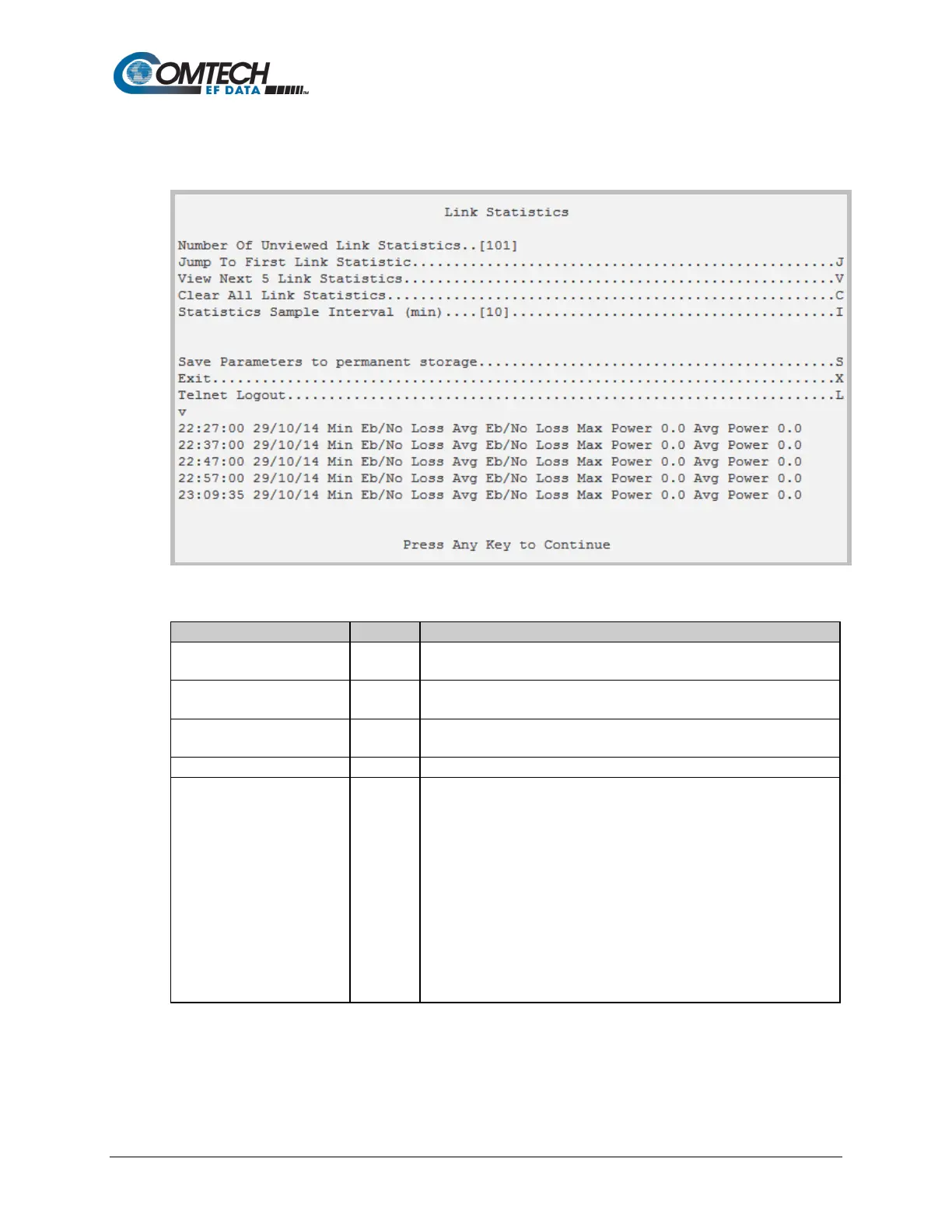
Open the nested Link Statistics page from the Monitor page.
Figure 9-42. Link Statistics
Number of Unviewed Link
Statistic
[RO]
Displays the total number of unread Link Statistics. As statistics groups
are displayed, the counter decrements accordingly.
Jump To First Link Statistic J
Upon selection, sets the listings for Hot Key ‘V’ to the first link statistic
that was stored subsequent to the latest buffer reset.
View Next 5 Link Statistics V
Buffers the next group of five stored link statistics into the events
window. Information is presented as shown in Figure 9-42.
Clear All Link Statistics
Erases all entries from the Link Statistics logging buffer.
Statistics Sample Interval
(min)
Select a time interval, in minutes, in which the modem is polled for link
statistics:
1 – 10
2 – 20
3 – 30
4 – 40
5 – 50
6 – 60
7 – 70
8 – 80
9 – 90



 To Next Page