CDM-570A/570AL Satellite Modem with Optional Packet Processor
Revision 5
Ethernet-based Remote Product Management 7–52 MN-CDM570A
7.4.3.3.6.3 Configuration | WAN | HDLC
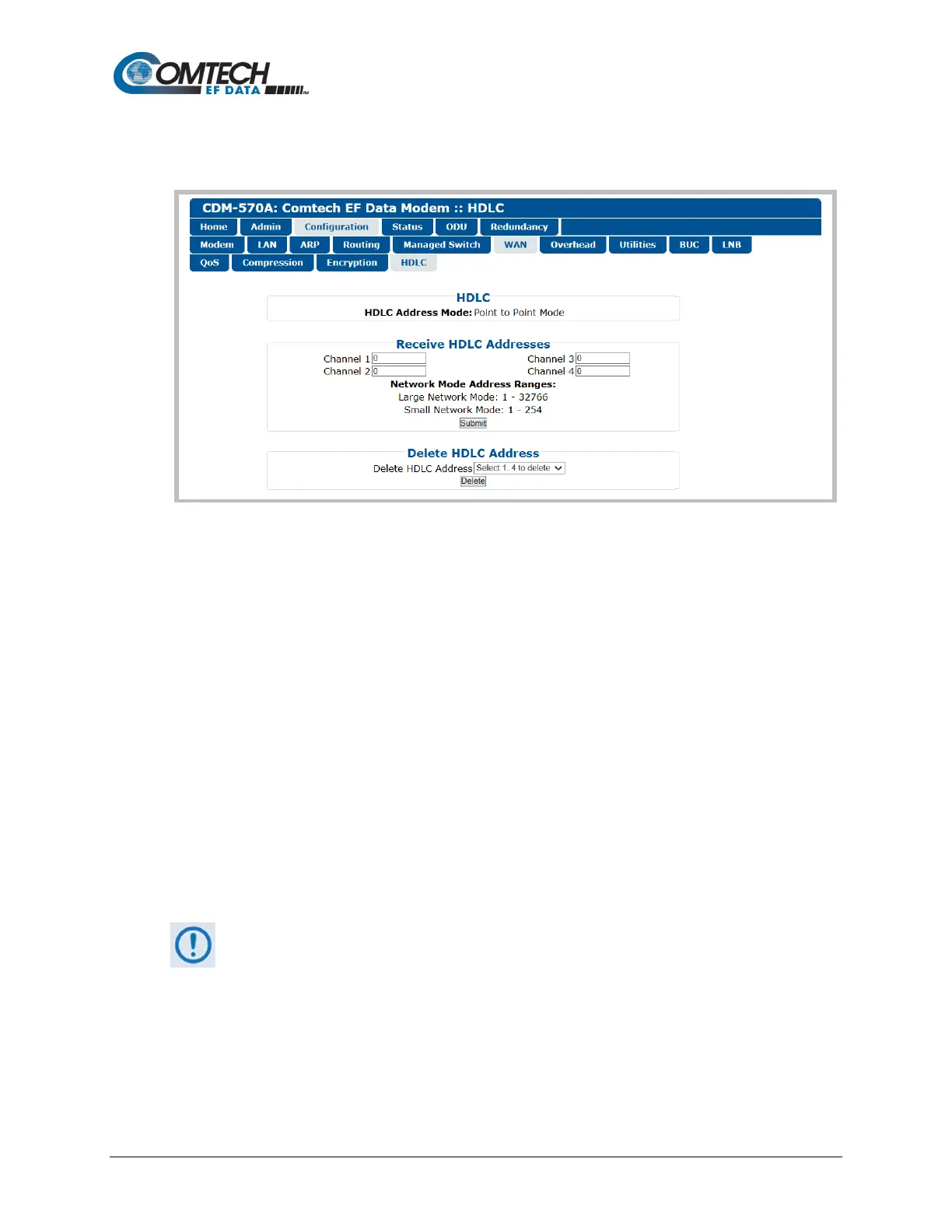
This page allows configuration of HDLC encapsulation parameters.
Figure 7-28. Configuration | WAN | HDLC Page
HDLC
Identifies the HDLC Address Mode that was defined using the ‘Admin | Working Mode’ page
(Sect. 7.4.3.2.3): Small Network Mode, Large Network Mode, Point-to-Point Mode, Vipersat
Mode, or Managed Switch mode.
Receive HDLC Addresses
Enter the Network Mode Address Range for Channels 1 through 4 here. Note that the valid Small
Network Mode address range is from 1 to 254, and the Large Network Mode address range is
from 1 to 32766.
Click [Submit] to save.
Delete HDLC Address
Use the drop-down list to delete an HDLC Address on a per-channel basis (1, 2, 3, or 4);
otherwise, choose “Select 1…4 to delete” to delete all assigned addresses.
Click [Delete] to execute your choice.
Make sure to also click [Save PaP Parameters] on the ‘Admin | PaP Save’ page
before proceeding further.



 To Next Page