CDM-570A/570AL Satellite Modem with Optional Packet Processor
Revision 5
Optional Packet Processor - Serial/Telnet CLI Operation 9–27 MN-CDM570A
9.3.4.1 QoS Configuration > QoS Rules Configuration
9.3.4.1.1 QoS Rules Configuration (Max/Priority Mode)
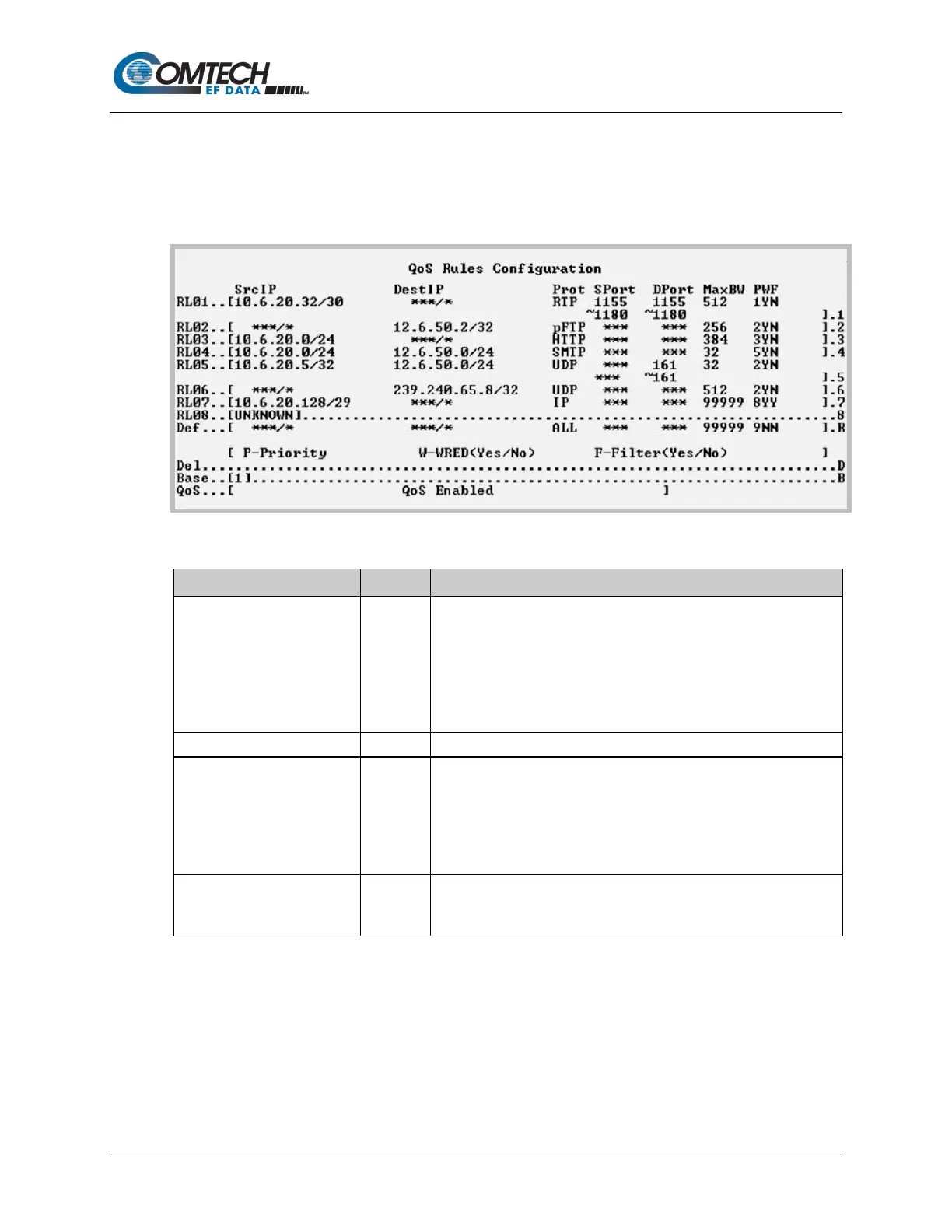
Open the nested QoS Rules Configuration page from the QoS Configuration page.
Figure 9-17. QoS Rules Configuration (Max/Priority Mode)
(The current eight of up to 32
definable QoS Rules).
Assign Max/Pri QoS to up to 32 different types of definable flows.
Define flows by any combination of Protocol, Priority,
Source/Destination IP Addresses (specific or range), and/or Layer 3
Source and Destination Ports.
FOR RULE ASSIGNMENT OR EDIT PROCESS, SEE “Assign or Edit
Set the QoS Rule to delete, from 1 to 32.
Select Base to display or edit a different group of eight of up to 32 QoS
Rules.
For example, if you want to edit QoS Rule 9: Type ‘B’, and then type
‘9’ to select the Base value of 9. The QoS Rules Configuration page
will refresh to display RL09 through RL16.
This line displays state of the QoS option as Unavailable, Enabled, or
Disabled. If available, QoS is Enabled or Disabled from the
Administrator Features page.



 To Next Page