CDM-570A/570AL Satellite Modem with Optional Packet Processor
Revision 5
Ethernet-based Remote Product Management 7–33 MN-CDM570A
7.4.3.3.2 Configuration | LAN
If you submit any changes to this page when the optional Packet Processor is
INSTALLED, you must also open the ‘Admin | Pap Save’ page (see Sect. 7.4.3.2.8)
and immediately click [Save PaP Parameters].
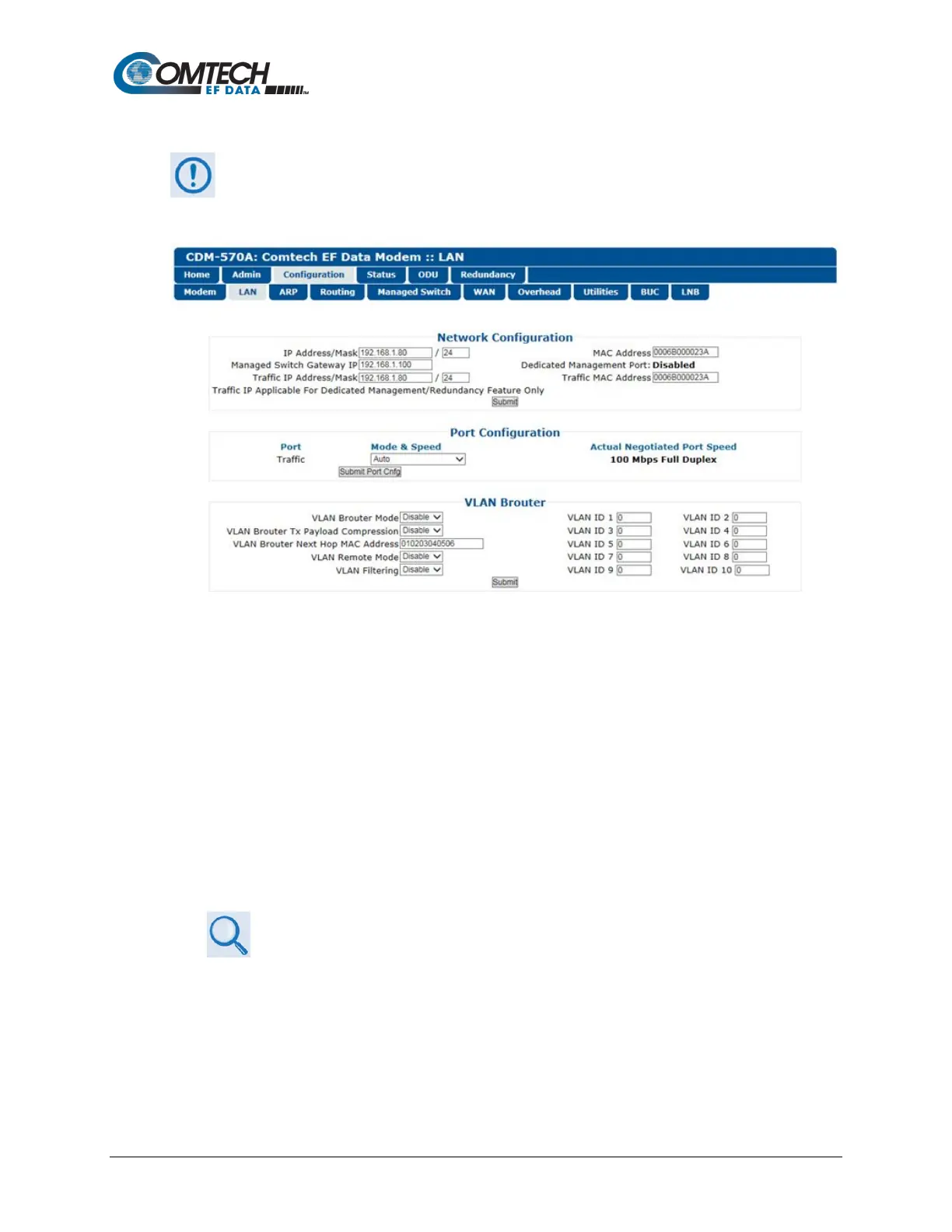
Figure 7-18. Configuration | LAN Page
Network Configuration (Typical with or without Packet Processor)
• IP Address/Mask – Use this field to configure the modem’s Management IP Address.
• Managed Switch Gateway IP – Use this field to configure this IP Address.
• Traffic UP Address/Mask (not applicable in Managed Switch Mode) – Use this field to
configure the modem’s Traffic IP Address. Note that this address is assigned automatically
when the modem is running in Managed Switch Mode.
• MAC Address – This parameter is read-only and cannot be changed.
• Dedicated Management Port – This feature is available when the optional Packet Processor
is INSTALLED, but it is unavailable when VLAN Mode is Enabled.
Appendix Q. DEDICATED MANAGEMENT PORT FEATURE
• Traffic MAC Address – This parameter is read-only and cannot be changed.
Click [Submit] to save.



 To Next Page