CDM-570L/570AL Satellite Modem with Optional Packet Processor
Revision 5
Optional High Performance Packet Processor D–26 MN-CDM570A
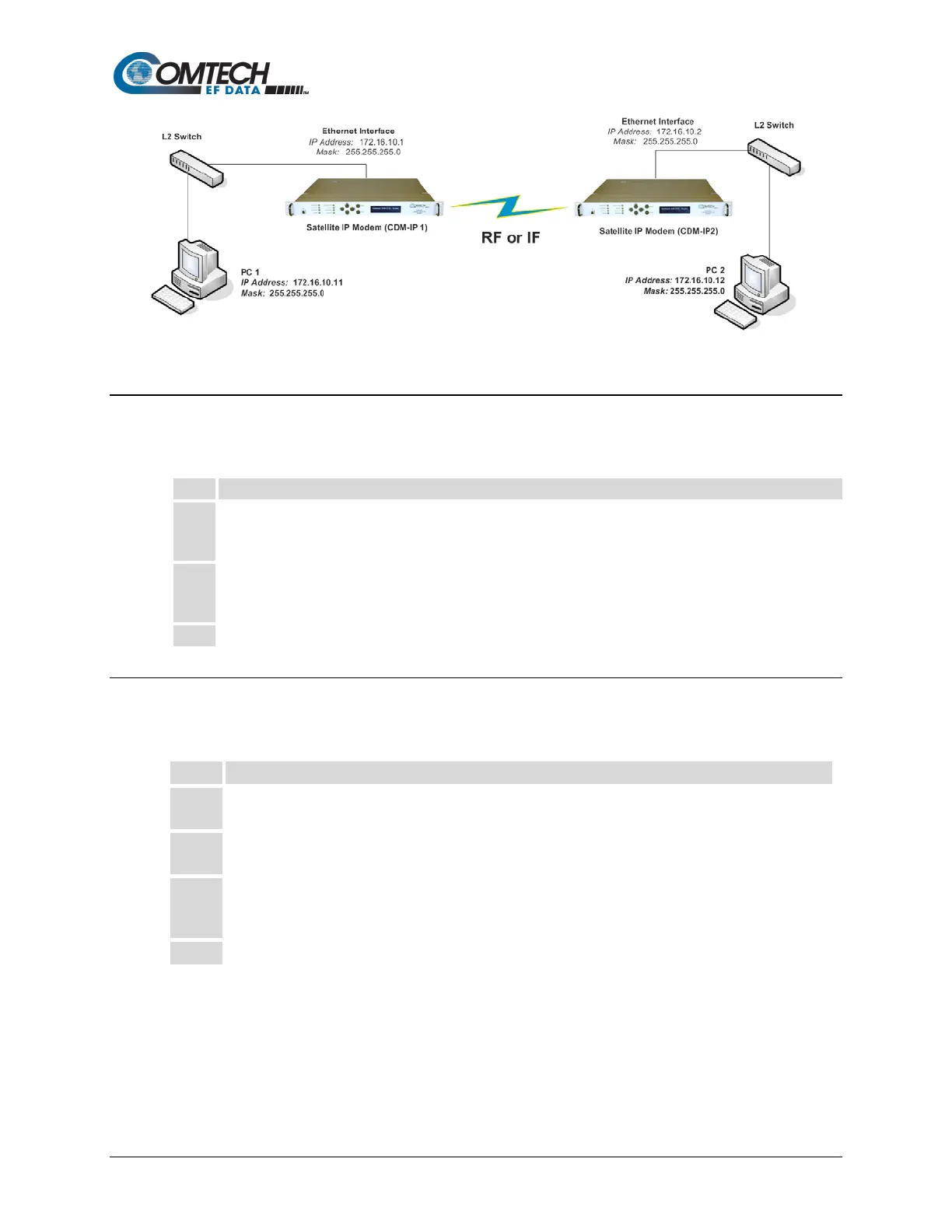
Figure D-3. Managed Switch Point-to-Point System Configuration
D.2.5.1 Configure User PCs
Do these steps:
• Set the IP Address to 172.16.10.11;
• Set the mask to 255.255.255.0.
• Set the IP Address to 172.16.10.12;
• Set the mask to 255.255.255.0.
Reboot the PCs (if required).
D.2.5.2 Configure CDM-IP 1, CDM-IP 2 – Set IP Address(es)
Do these steps (the applicable CLI “hot key” is shown in brackets [#]):
From the CLI Main Menu:
Select the Interface Configuration submenu [ I ].
From the Interface Configuration Menu:
Select the Ethernet Interface submenu [ E ].
Set Ethernet IP Address [ I ]:
• Set CDM-IP 1 to 172.16.10.1
• Set CDM-IP 2 to 172.16.10.2
Set the Ethernet Subnet Prefix Length [ M ] to 24.
All other parameters can be left at their factory default settings. At this point, the basic
configuration is complete. You should now be able to use Windows Command-line to confirm that
communications are active between the user PCs and the CDM-IP modems.



 To Next Page