CDM-570A/570AL Satellite Modem with Optional Packet Processor
Revision 5
Ethernet-based Remote Product Management 7–45 MN-CDM570A
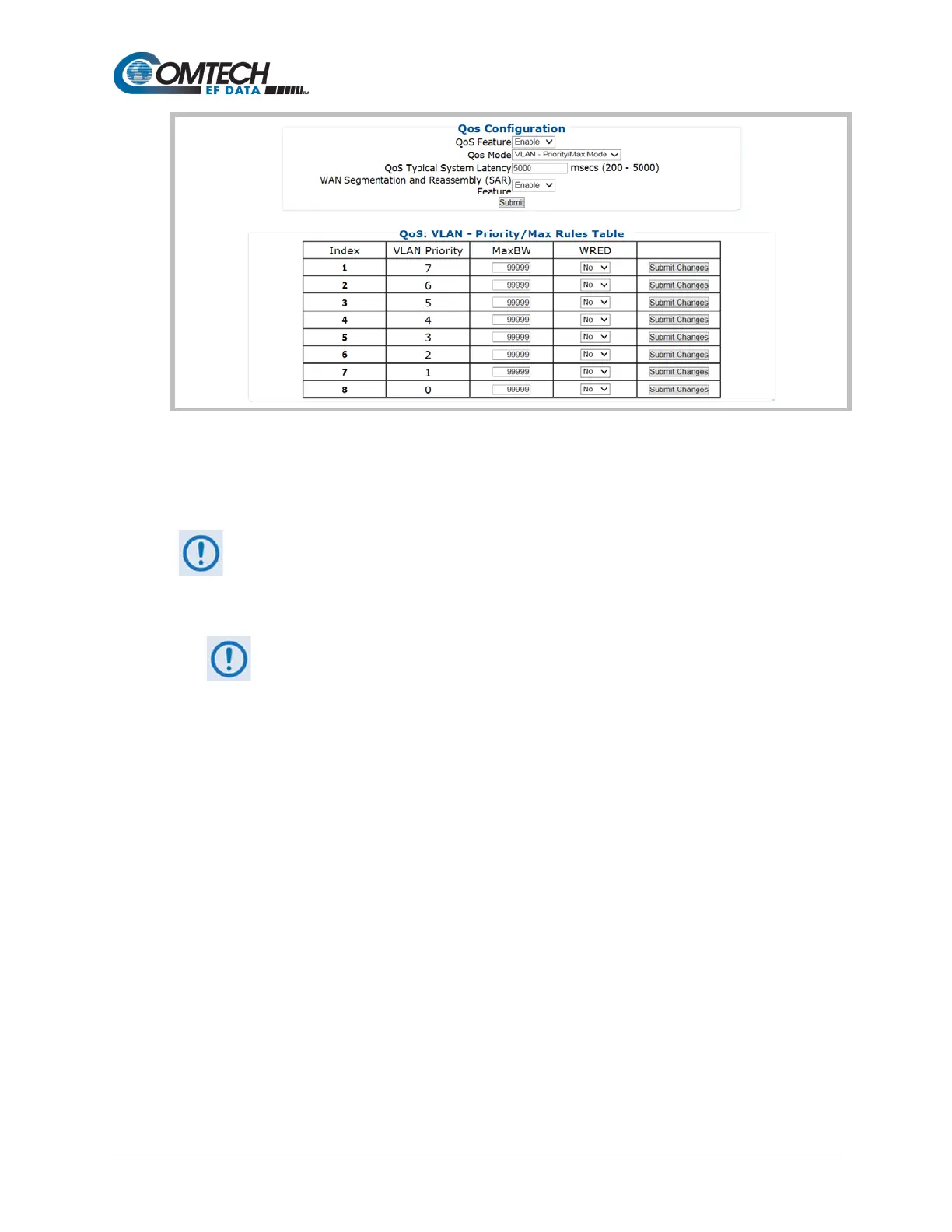
QoS Control Mode = VLAN – Priority/Max Mode (Banner, Menu Bar not shown)
Figure 7-26. Configuration | WAN | QoS Pages (cont.)
QoS Configuration
This page section’s appearance and function is typical for all selected QoS
Modes.
• QoS Feature – Use the drop-down list to Enable or Disable QoS operation.
Be sure to click [Submit] once you Enable operation; otherwise, all other
operations on this page will be inaccessible.
• QoS Mode – Use the drop-down list to set the QoS Mode as Rule – Max/Priority Mode,
Rule – Min/Max Mode, DiffServ Mode, or VLAN – Priority/Max Mode.
• QoS Typical System Latency – Enter a value, in milliseconds, from 200 to 5000.
WAN Segmentation and Reassembly (SAR) – Use the drop-down list to Disable or Enable
WAN SAR operation.
WAN SAR is an adaptive process that triggers only when the packet latency exceeds 25
msec.
WAN SAR is needed, when running small-speed (i.e., <700 kbps) links, to keep latency and
jitter within the 25 msec latency/10 msec jitter specification high priority queue when the
lower priority queue contains large packets.
Click [Submit] to save.



 To Next Page