CDM-570A/570A Satellite Modem with Optional Packet Processor
Revision 5
Dedicated Management Port Feature Q–7 MN-CDM570A
Q.4 Working Mode = Router Mode (Point-to-Multipoint / Point-to-Point /
Vipersat)
Q.4.1 Configure Router Mode
Do these steps:
1. Use the CDM-570A/570AL Serial CLI to set your active Router Working Mode. As shown
previously in Figure Q-4 from the Administration menu, press ‘C’ to display the available
choices:
Router uses 1 byte HDLC addresses
Router mode using 2 byte HDLC addresses
Router mode uses 0 HDLC addresses to save satellite bandwidth
Router mode when running in a Vipersat Network
2. Enable Dedicated Management Port operation. As shown previously in Figure Q-3, on
the Ethernet Interface menu, press ‘D’ to display the Dedicated Management Port
operation choices; then, press ‘2’ to Enable.
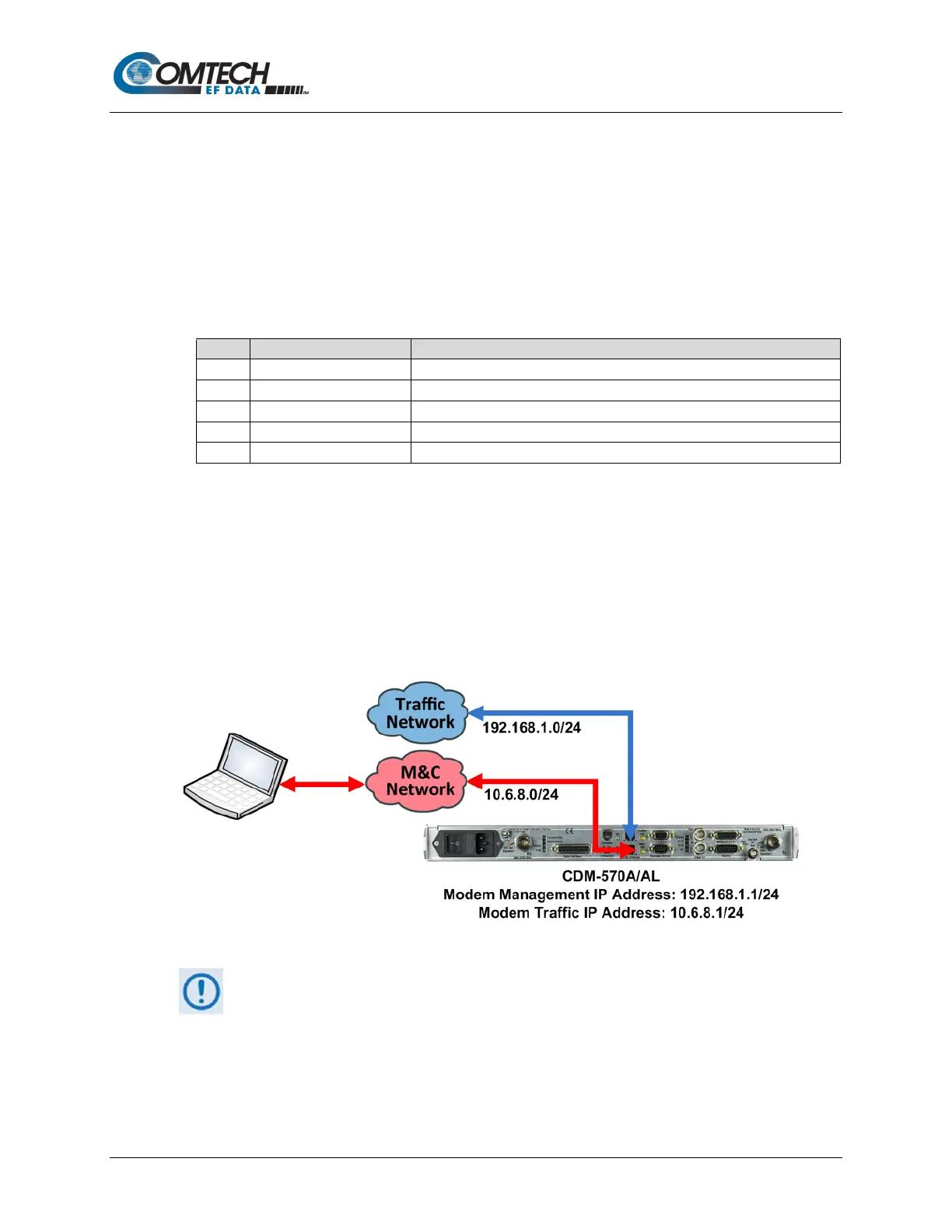
3. Dedicated Management Port, when used in Router Mode, requires two IP Addresses
(Figure Q-7):
• One for M&C (management) – the ‘10/100 Ethernet | M&C 100’ port;
• One for Traffic (Ethernet data) – the Traffic 100 port.
Figure Q-7. CDM-570A/570AL Router Mode IP Addresses
When Dedicated Management Port is disabled, the existing Management IP
Address is used for both M&C and traffic.
When you first enable Dedicated Management Port, the existing single IP Address is assigned
automatically as the Management IP Address – you are required to configure the Traffic IP
Address(es) (Figure Q-8):



 To Next Page