14. Adjust Mode Field Service Ver. 1.0 Aug. 2005
204
bizhub 200/250/350
Adjustment / Setting
14.3.2 Scanner
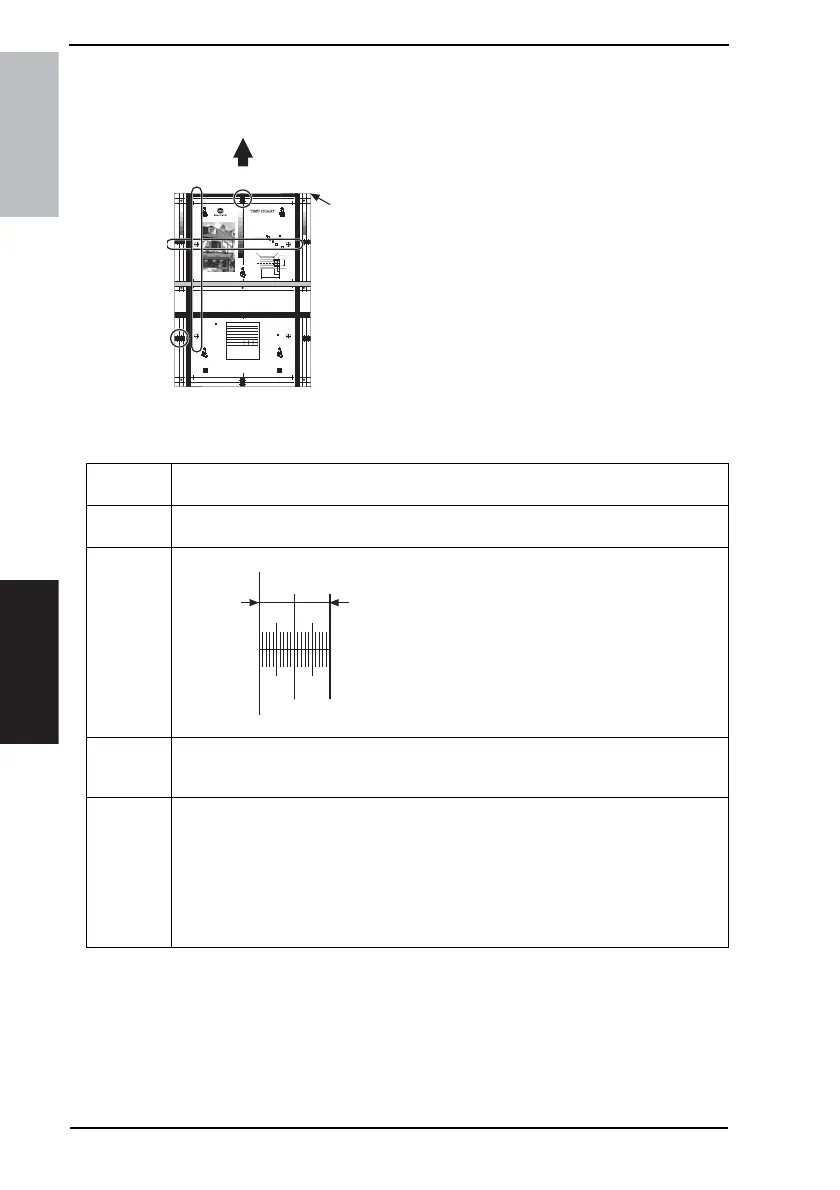
• Use the following Test Chart for the adjustment of the Scanner Section.
• If the Test Chart is not available, a scale may be used instead.
• A: Scan image position: CD adjust-
ment
• B: Scan image position: FD adjust-
ment
• C: Scanner CD zoom ratio adjustment
• D: Scanner FD zoom ratio adjustment
A. Registration (CD)
1
2
3
4
5
6
7
8
9
10
2.0
2.5
2.8
3.2
3.6
4.0
4.5
5.0
5.6
6.3
2.2
2.0
2.5
2.8
3.2
3.6
4.0
4.5
5.0
5.6
6.3
2.2
2.0
2.5
2.8
3.2
3.6
4.0
4.5
5.0
5.6
6.3
2.2
2.0
2.5
2.8
3.2
3.6
4.0
4.5
5.0
5.6
6.3
2.2
2.0
2.5
2.8
3.2
3.6
4.0
4.5
5.0
5.6
6.3
2.2
8pt.
9pt.
10pt.
12pt.
14pt.
18pt.
ABCDEFGHIJKLabcdefghijklm1234567890
ABCDEFGHIJKabcdefghijkl12345678
ABCDEFGHIJabcdefghijk1234567
ABCDEFGabcdefg123456789
ABCDEFabcdefg1234567
ABCDEabcdef12345
8pt.
9pt.
10pt.
12pt.
14pt.
18pt.
౮⌀ᬀሼශሼഀઃ㧝౮⌀ᬀሼශሼഀઃ㧞౮
౮⌀ᬀሼශሼഀઃ㧝౮⌀ᬀሼශሼഀઃ
౮⌀ᬀሼශሼഀઃ㧝౮⌀ᬀሼශሼഀ
౮⌀ᬀሼශሼഀઃ㧝౮⌀ᬀሼ
౮⌀ᬀሼශሼഀઃ㧝౮⌀
౮⌀ᬀሼශሼഀઃ㧝
al plates and gen
ts an office mach
while and after
rol over the ink
ickness quality c
ut tools a positive
antly longer than
you with copy qu
ets you and impre
tically separate w
nder constant con
t cylinders to con
imply makes desti
many as copies c
send out you can
uable printed mat
a simplifies the e
compared to a sta
isters and automa
and running off t
nd efficiency to m
ation from pater t
plate the three osd
longer then ordin
stment and runs job no blanket wash your office offset to cut copying costs with this can on automatic changeover from paper masters and automated short rur
n from a pound of ink copy can be run on both sides of the sheet with multiple colors of on a master turning on the machine and running off the copies its not
many sizes of materials on almost all kinds of stock rag bond card stock smooth finish adding new versatility speed and efficiency mated run a choice of optior
en changes are nccessary now advanced fingertip programming single lever action control the inking and dampening system permits the operator to exercise pre
rating cycle greatly reduces repetitive shortrun duplicating time for example when used and impression cylinders that are selfadjusting for changes is paper or r
anually control even though the machine is running on automatic changeover from pater to scales on paper feed that match scales on rceiving tray of machine
t runs to metal plates and general duplicating takes only a matter of seconds the machine includes two ductor rollers and five distributor rollers offset rollers las
s its not a press its an office machine heres practical automation the wide image model nylon for longer wear people who arent acquaited you want it to be it p
a choise of options before while and after copies are run allows the operator to adjust the quality aquamatic control not only assures sharp clean first copies b
o metal plate and from shortrun prese the inking and dampening system permits the three with varying weigts of paper no special adjustments needed cylinders
ollers are large size to insure even distribution of ink the two form rollers are of different machine all without tools a positive vacuum paper feed system keeps
rs soft rollers are made of polyurethane to resist chemical attack most hard rollers are for to gripper master and impression cylinders automatically adjust to th
7㧙
12㧙
20㧙
౮⌀ᬀሼශሼഀઃ㧝౮⌀ᬀሼශ
౮⌀ᬀሼශሼഀઃ
౮⌀ᬀሼශሼ
7㧙
12㧙
20㧙
౮⌀ᬀሼශሼഀઃ㧝౮⌀ᬀሼශ
౮⌀ᬀሼශሼഀઃ
౮⌀ᬀሼශሼ
7㧙
12㧙
20㧙
ABCDEFGHIJKLMNOPQRST
ABCDEFGHIJKL
ABCDEFG
7㧙
12㧙
20㧙
ABCDEFGHIJKLMNOPQRST
ABCDEFGHIJKL
ABCDEFG
5
10
Ǿ14
Ǿ4.8
C1.5
R1.5
40
PART NO. 4034-7940-01
(TEST CHART NO. KMTC-001-01)
Printed in Japan
MODEL :
MACHINE S/N :
DATE :
EXP. :
MODE : Text Photo Text / Photo
Printing Direction :
Original-Set Direction :
OTHERS :
㧛
AUTO
㧛 㧑
MANUAL( )
TOTAL COUNTER :
4040F3C519DA
A
B
Original
Reference
C
D
Functions
• To adjust for variations in the accuracy of IR parts and their mounting accuracy by vary-
ing the scan start position in the main scanning direction.
Use
• When the Original Glass is replaced.
• When the CCD Unit is with a new one.
Adjustment
Specifica-
tion
• Adjust so that width A on the sample copy
made falls within the following range.
• It is required that Registration (CD) of Printer be
adjusted so as to meet the specifications.
Specifications: 20 mm ± 1.0 mm
Setting Range: -72 to +72 (1 mm = 24 dot)
Adjustment
Instructions
If width A of the output copy falls outside the specified range and
if width A is 19 mm or less: increase the setting value.
if width A is 21 mm or greater: decrease the setting value.
Setting/
Procedure
1. Position the Test Chart correctly so that the original reference point is aligned with the
scale.
2. Press the Start key to make a copy.
3. Check point A on the image of the copy.
4. If width A on the copy falls outside the specified range, enter the Adjust mode.
5. Touch [Scanner] → [Registration] → [CD] in that order.
6. Press the Clear key and enter the value from the 10-Key Pad.
7. Make adjustments until the specifications are met.
4040F3C523DA
A









 To Next Page