Field Service Ver. 1.0 Aug. 2005 11. Soft Switch List
63
FK-503Adjustment / Setting
NOTE
• The features with (*) are settable by users. *: Screen setting
NOTE
• The features with (*) are settable by users. *: Screen setting
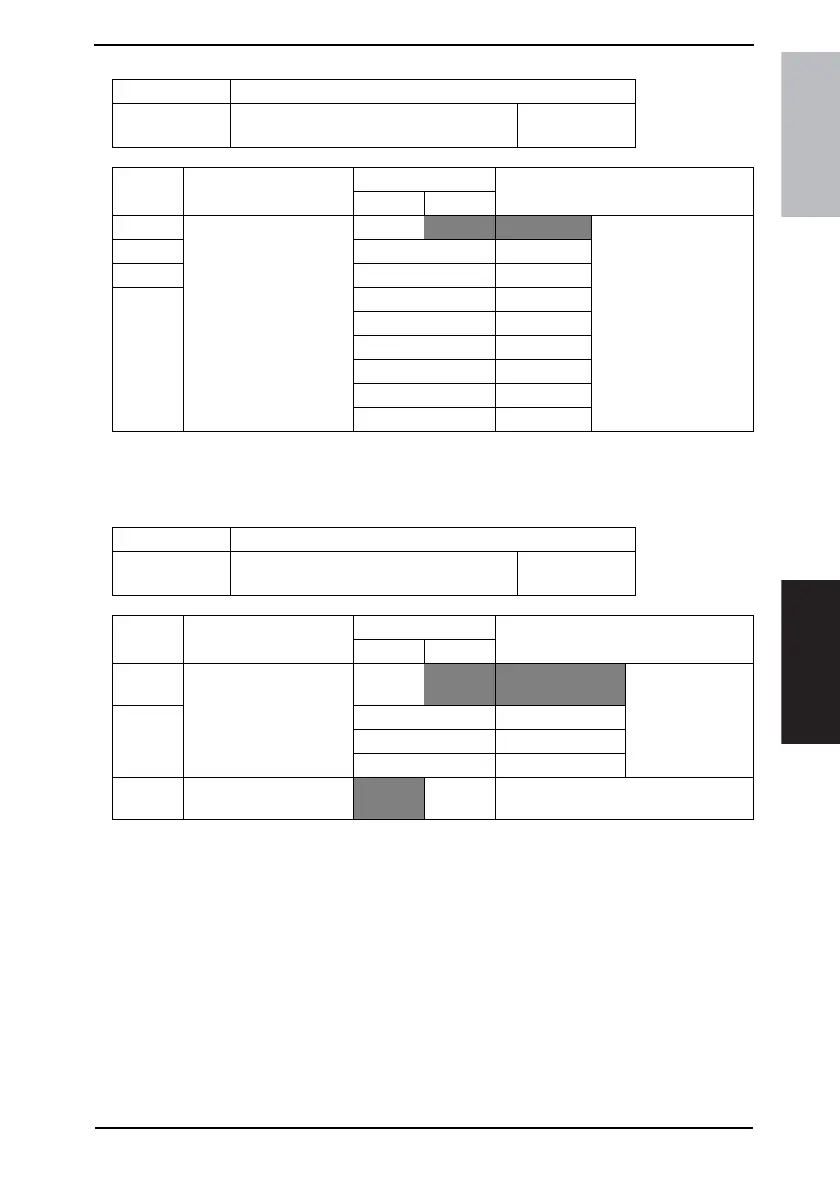
MODE Factory setting bit
017
Bit: 7654 3210
1100 0000
HEX:C0
Bit Feature
Logic
Description
01
3 Select initial value of TSI
name *
Bit 3-0:
0000 TSI 1
2 0001 TSI 2
1 0010 TSI 3
0 0011 TSI 4
0100 TSI 5
0101 TSI 6
0110 TSI 7
0111 TSI 8
Others Not available
MODE Factory setting bit
018
Bit: 7654 3210
0000 0000
HEX:01
Bit Feature
Logic
Description
01
5 Select destination screen:
Displays screen of desti-
nation when document is
loaded in FAX mode. *
Bit 5-4:
00 One-touch 1st
screen
4 01 Name screen
10 Dial number screen
11 Index screen
3 Specify full-dial sending
Allowed Not
allowed









 To Next Page