11. Soft Switch List Field Service Ver. 1.0 Aug. 2005
64
FK-503
Adjustment / Setting
NOTE
• The features with (*) are settable by users. *: Screen setting
• Some machines cannot receive calls.
Care must be taken when you set the ringing count to 10 or more.
• For PSTN2, refer to MODE 249.
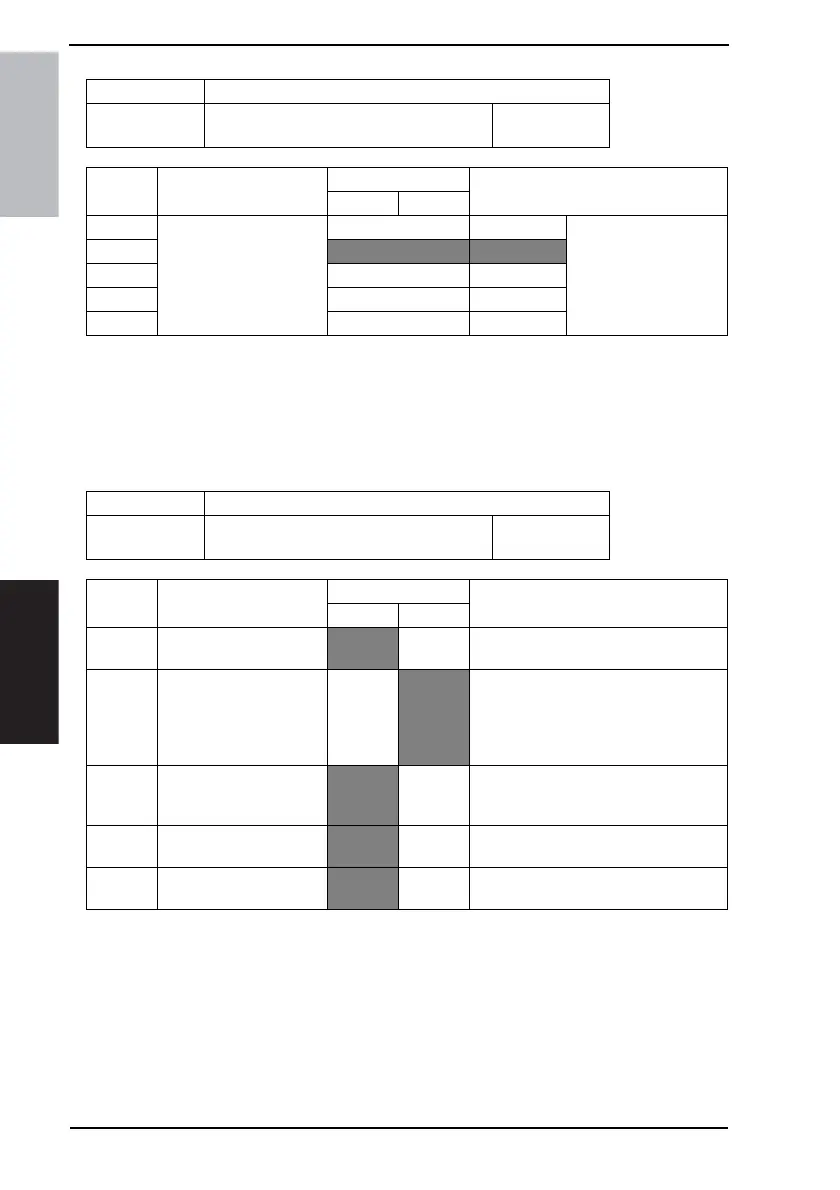
MODE Factory setting bit
019
Bit: 7654 3210
0000 1000
HEX:08
Bit Feature
Logic
Description
01
7
Specify the ringing
count of auto receiving
call
(PSTN1) *
Bit 7-3: 00000 0 Specify the ringing count
till the main product
starts receiving a call.
6
00001 1
5 |
4 10100 20
3 Others Not available
MODE Factory setting bit
020
Bit: 7654 3210
0100 0000
HEX:40
Bit Feature
Logic
Description
01
7 Displays # of reports.
No Yes “Yes” displays # of pages on phone line
in addition to ordinary # of papers.
6 Trace protocol. No
Yes “Yes” prints result of protocol trace after
completing communication. If next com-
munication is proceeded before this
printing, information on previous com-
munication protocol will be deleted.
5 Display number of error
lines/transmission speed.
No Yes “Yes” displays # of error lines/transmis-
sion speed on panel and outputs port for
auto checking.
4 Select monitor interval for
line.
Phase A All
phases
Specifies interval for monitoring phone
lines for G3 communication.
3 Display error codes.
(Panel, report)
No Yes “Yes” displays error codes (6 digit) on
panel and in report.









 To Next Page