11. Soft Switch List Field Service Ver. 1.0 Aug. 2005
106
FK-503
Adjustment / Setting
NOTE
• The features with (*) are settable by users. *: Screen setting <*>: Soft switch setting
NOTE
• The features with (*) are settable by users. *: Screen setting
• Predetermined text: Image data (TIFF-F format) has been attached to the E-mail.
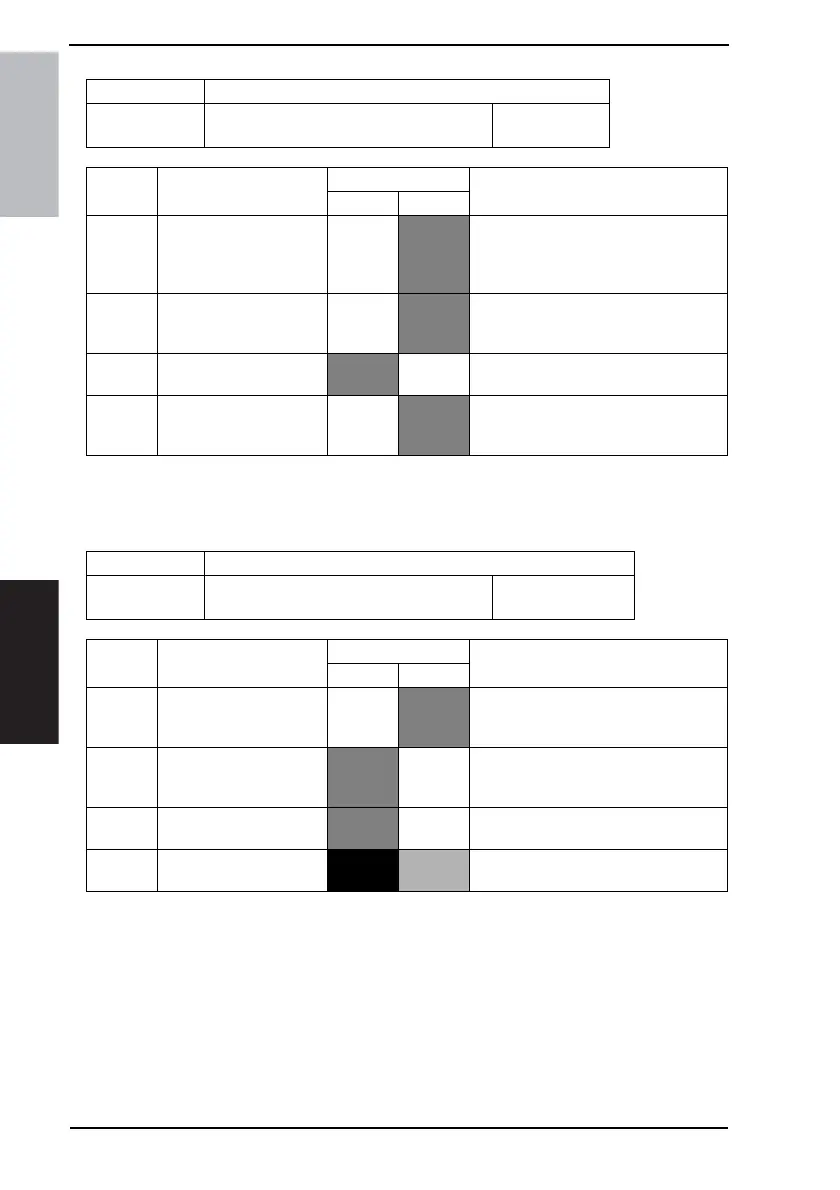
MODE Factory setting bit
352
Bit: 7654 3210
1101 0000
HEX:D0
Bit Feature Logic Description
01
7 Notification of result
(Network function) *
No
Yes Specify whether a communication error
message is returned to the sender when
a communication error occurs with code
E6xxxx when E-mail is received.
6 Position for adding Gate-
way TSI <*>
Outside
of docu-
ment
Inside of
docu-
ment
Specify where to add the TSI when for-
warding through Gateway transmission
(Direct FAX, IP Relay).
5 Specify whether to add
TSI when forwarding <*>
Not add Add Specify whether to add TSI when for-
warding received documents.
4 Position for adding TSI
when forwarding <*>
Outside
of docu-
ment
Inside of
docu-
ment
Select where to add the TSI when for-
warding received documents.
MODE Factory setting bit
353
Bit: 7654 3210
1000 1000
HEX:88 (For U.S.)
HEX:80 (For Europe)
Bit Feature
Logic
Description
01
7 Text insertion into docu-
ment to send
(Network function) *
No
Yes Specify whether to insert a preset text
message at the head of a stored docu-
ment image to be transmitted by E-mail.
6 Header printing on
received document
(Network function) *
No Yes Specify whether to print a header on
documents received via E-mail.
4 Insert arbitrary text mes-
sage *
No Ye s
3 Display arbitrary text mes-
sage screen
No Yes









 To Next Page