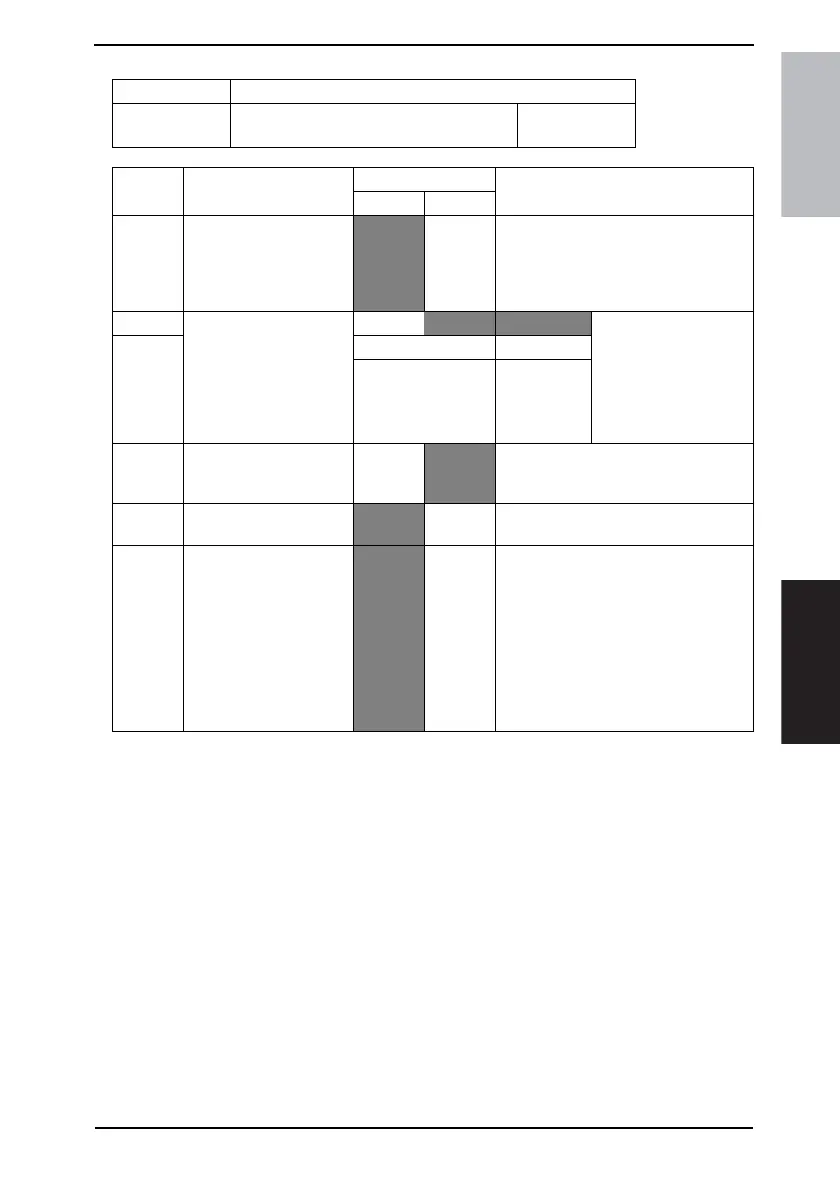
Field Service Ver. 1.0 Aug. 2005 11. Soft Switch List
105
FK-503Adjustment / Setting
NOTE
• The features with (*) are settable by users. *: Screen setting <*>: Soft switch setting
The feature with [**] is available only in a system with a multi-port option.
• For G3-1 and G3-2, see ÅgSelect PSTN port automatically (MODE 006 Bit 1)Åh.
MODE Factory setting bit
351
Bit: 7654 3210
0001 0000
HEX:18
Bit Feature
Logic
Description
01
7 Gateway transmission
(Network function) *
Not
allowed
Allowed Specify allowed or not allowed for send-
ing E-mail using gateway communica-
tions.
SMTP cannot be received when the
gateway transmission is not allowed.
6 Outgoing port for gate-
way transmission
(Network function) **
Bit 6-5:
00 G3-1 Specify an outgoing port
for FAX transfer (FAX
transfer of received E-
mail file) through gate-
way transmission.
(valid for G3 multi-port
only) [See note.]
511G3-2
Others Not available
3 Gateway TSI <*> Normally
not add
Nor-
mally
add
Direct FAX, IP Relay
2 Internet FAX (IP) recep-
tion
Enable Disable
1 TSI information for SMTP
reception <*>
Machine
name pri-
ority
IP
address
priority
Specify whether to describe the
machine name (or IP address if none) of
the TSI in Subject or prioritize the IP
address when forwarding documents
received by IP address FAX.
This setting is applied also for the prior-
ity order of display of destination name
information of the RX Activity Report for
IP address fax reception and IP Relay
reception.









 To Next Page