11. Soft Switch List Field Service Ver. 1.0 Aug. 2005
108
FK-503
Adjustment / Setting
NOTE
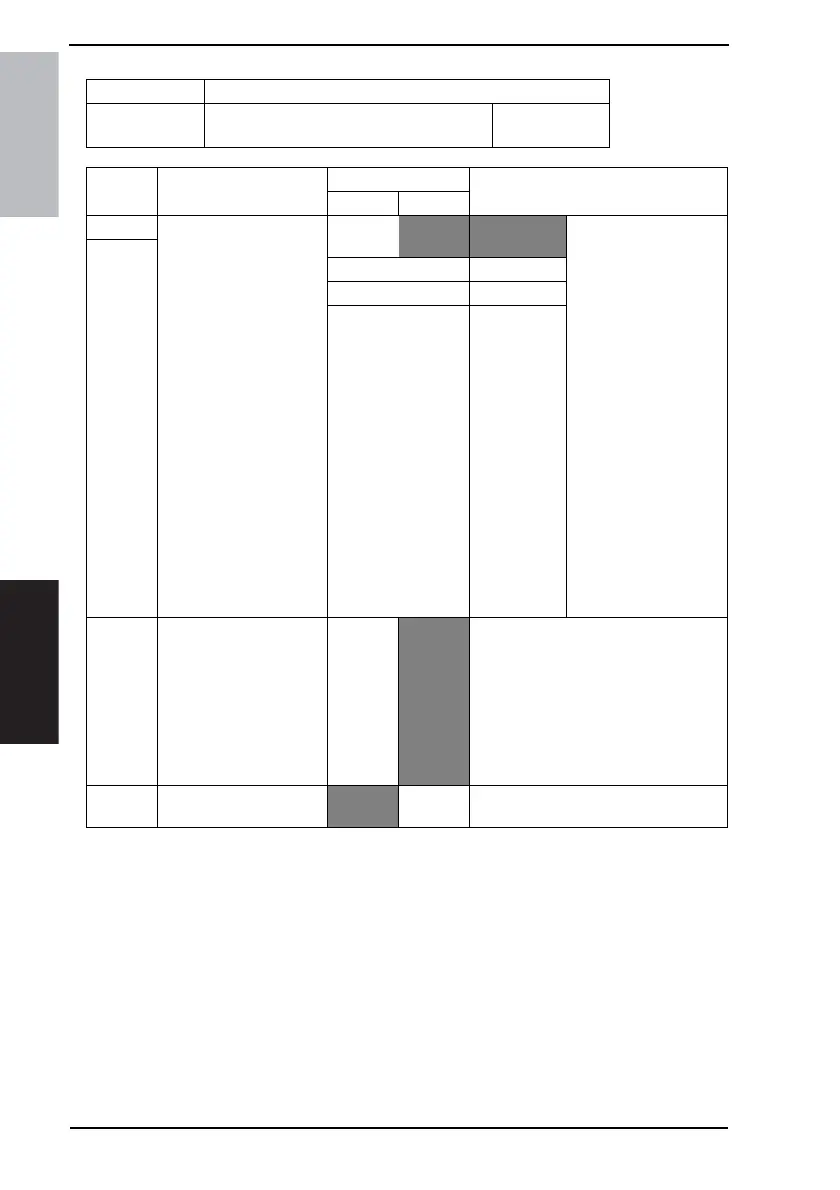
• The features with (*) are settable by users. *: Screen setting
MODE Factory setting bit
355
Bit: 7654 3210
0010 0000
HEX:20
Bit Feature
Logic
Description
01
7 Switch 10M and 100M:
Select communication
rate of LAN adapter (Net-
work function) *
Bit7-6:
00 Auto-negoti-
ation
• Auto-negotiation:
Determine the com-
munication rate by
identifying 10BASE-T
or 100BASE-TX.
• Set to 100M: Connec-
tion is set to
100BASE-TX.
• Set to 10M: Connec-
tion is set to 10BASE-
T.
Valid after the power is
turned off and on.
(Will not communicate
when “Set to 100M” or
“Set to 10M” is chosen
and the communication
rate is not correct for the
communication line.
Check and specify the
correct communication
rate for the line.)
6
01 Set to 100M
10 Set to 10M
11 Not available
5 Switch full-duplex and
half-duplex:
Select packet transmit/
receive when connecting
to switching hub.
(Network function) *
Full
Duplex
Half
Duplex
This switch is valid when MODE 355 Bit
7 to 6 is set to “Set to 100M” or “Set to
10M”.
• Full-duplex: Packets can be sent and
received simultaneously.
• Half-duplex: Packets can be sent or
received separately.
Valid after the main power switch is
turned off and on.
4 Automatically obtain IP
address (DHCP) *
No Ye s









 To Next Page