11. Soft Switch List Field Service Ver. 1.0 Aug. 2005
110
FK-503
Adjustment / Setting
NOTE
• The features with (*) are settable by users. <*>: Soft switch setting
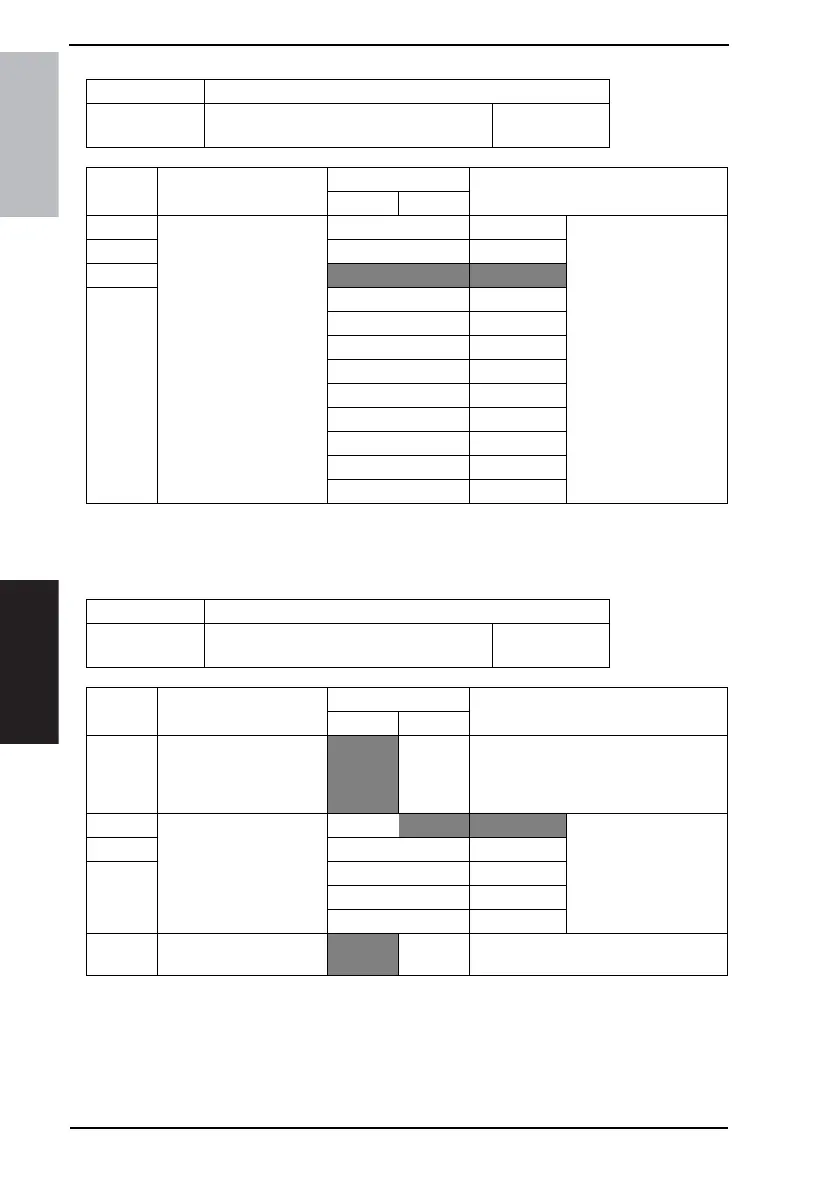
MODE Factory setting bit
358
Bit: 7654 3210
0010 0000
HEX:20
Bit Feature
Logic
Description
01
7 POP3 receive timeout
(Network function) <*>
Bit 7-4: 0000 Not available Set time waiting for a
response to mail com-
mands from the POP3
server in E-mail trans-
mission.
Effective after the power
is turned off and on.
6 0001 30 sec
5
0010 60 sec
4 0011 90 sec
0100 120 sec
0101 150 sec
0110 180 sec
0111 210 sec
1000 240 sec
1001 270 sec
1010 300 sec
Others Not available
MODE Factory setting bit
359
Bit: 7654 3210
0000 0000
HEX:00
Bit Feature
Logic
Description
01
7 Number of times to retry
E-mail transmission (Net-
work function)
Normal Addi-
tional
retry
When this switch is set to “Additional
retry”, retry E-mail transmission accord-
ing to MODE 370, 371 after retrying the
number of times specified by the user.
6 Scanner mode: Coding
method (TIFF) when
[Advanced] is specified.
Bit 6-4:
000 MH
5001MR
4010MMR
011 JBIG
Others Not available
0 Forced priority transmis-
sion (Network function)
OFF ON Specify whether to forcibly perform prior-
ity transmission for awaiting documents.









 To Next Page