11. Soft Switch List Field Service Ver. 1.0 Aug. 2005
118
FK-503
Adjustment / Setting
MODE Factory setting bit
379
Bit: 7654 3210
0001 0000
HEX:10
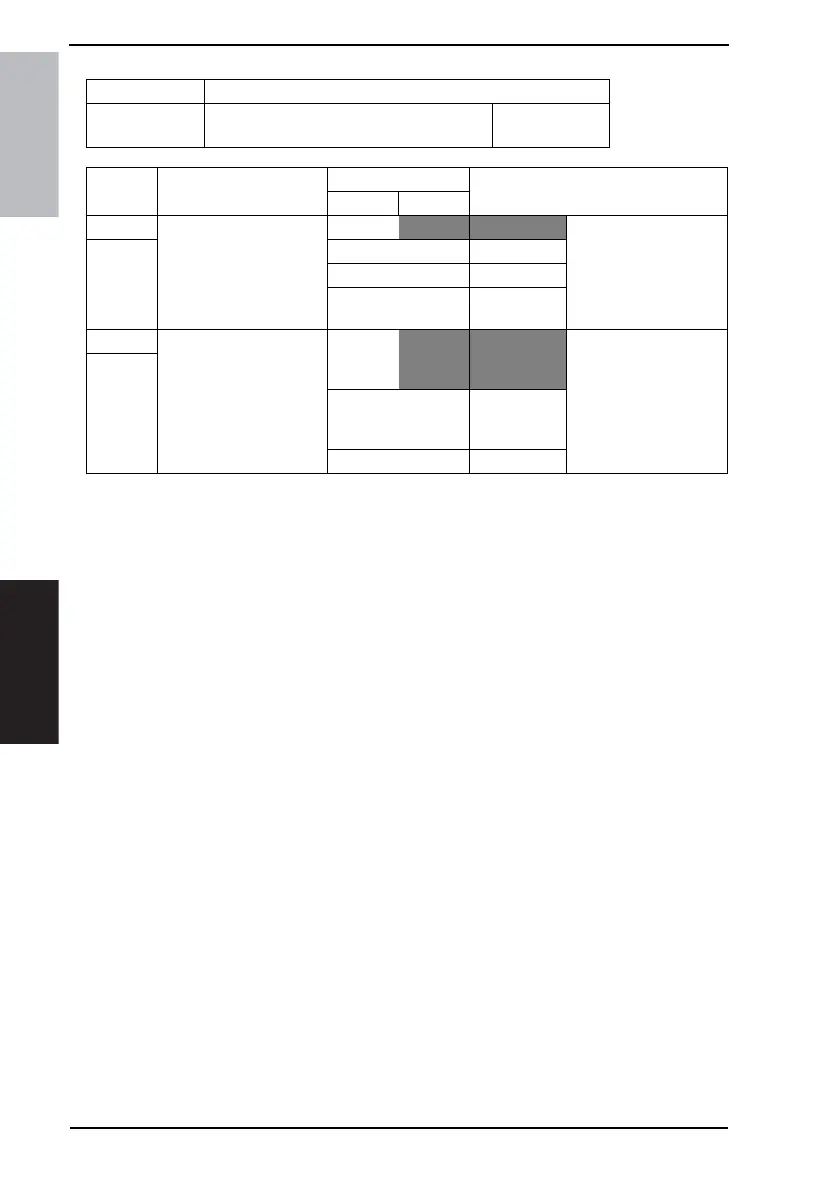
Bit Feature
Logic
Description
01
3 Specify position for cutting
off data when forwarding
received documents
Bit3-2:
00 Center Specify position for cut-
ting off data for the main
scan size from the origi-
nal size to sending size
when forwarding
received documents.
2 01 Left side
10 Not available
11 Right side
1 Specify image editing
when forwarding
Bit1-0:
00 Edit to regu-
lar size and
forward
Specify whether to set
the main scan width of
received data to regular
width or leave the stored
data width as is when
forwarding received doc-
uments.
0
01 Forward
stored data as
is
Others Not available









 To Next Page