Field Service Ver. 1.0 Aug. 2005 11. Soft Switch List
119
FK-503Adjustment / Setting
NOTE
• The features with (*) are settable by users. *: Screen setting <*>: Soft switch setting
(*1) The SMTP authentication function is valid under the following conditions.
• MODE 380 Bit 6 is set to “1”.
• When the SMTP authentication user name and SMTP authentication password
share the POP3 user name and POP3 password, MODE 380 Bit 2 is set to “0”.
When the SMTP authentication user name and SMTP authentication password do
not share the POP3 user name and POP3 password, MODE 380 Bit 2 is set to “1”,
and “SMTP AUTH User Name” and “SMTP AUTH Password” are set in Network
Settings.
• MODE 380 Bit 5, 4, or 3 is set to “0”.
(*2) When all mail authentication functions are validated (MODE 380 Bits 5, 4, and 3
all are set to “0”), they are prioritized in the order “DRAM-MD5 authentication (Bit 5)”
Æ “LOGIN authentication (Bit 4)” Æ “PLAIN authentication (Bit 3)” .
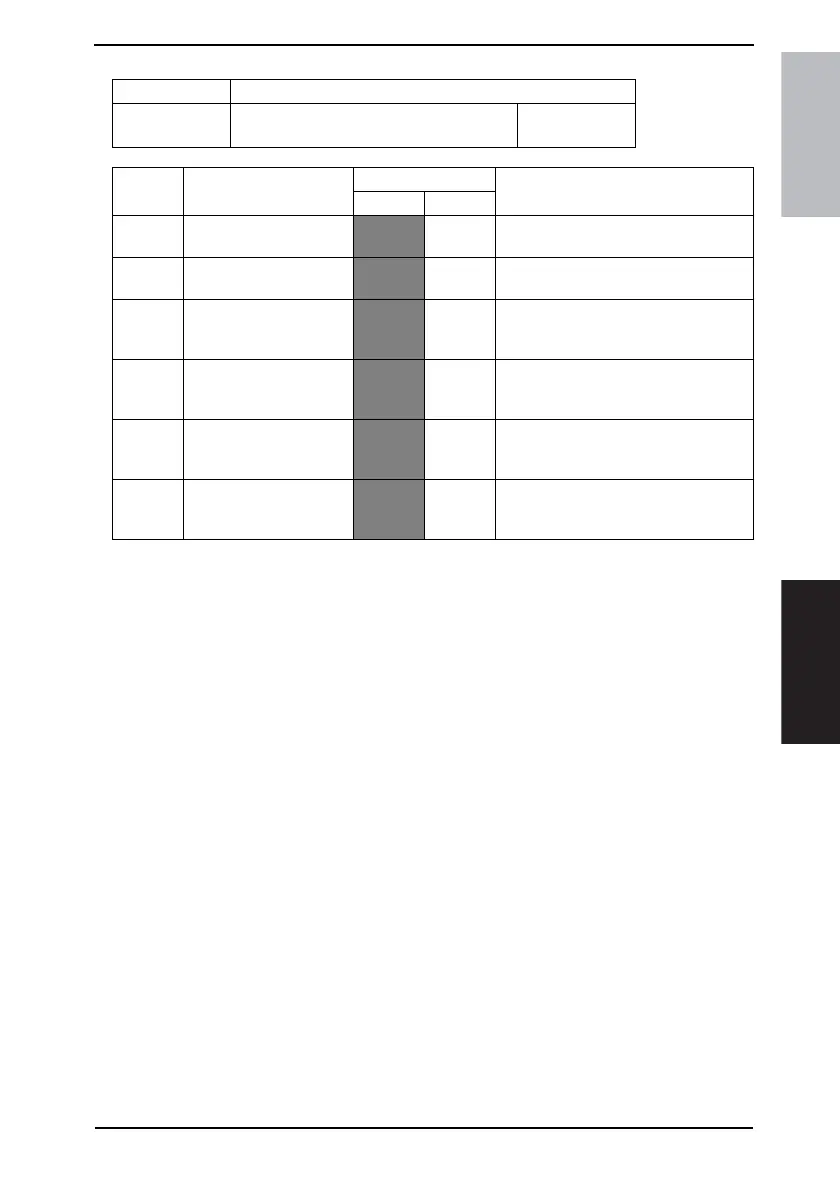
MODE Factory setting bit
380
Bit: 7654 3210
0000 0000
HEX:00
Bit Feature
Logic
Description
01
7 Enable APOP authentica-
tion function <*>
Not
enable
Enable Specify whether to enable the APOP
function.
6 Enable SMTP authentica-
tion function <*>
Not
enable
Enable Specify whether to enable the SMTP
authentication function. (*1)
5 SMTP authentication:
Allow CRAMMD5 authen-
tication function <*>
Allowed Not
allowed
Specify whether to enable the CRAM-
MD5 authentication function for SMTP
authentication. (*2)
4 SMTP authentication:
Allow LOGIN authentica-
tion function <*>
Allowed Not
allowed
Specify whether to enable the LOGIN
authentication function for SMTP
authentication. (*2)
3 SMTP authentication:
Allow PLAIN authentica-
tion function <*>
Allowed Not
allowed
Specify whether to enable the PLAIN
authentication function for SMTP
authentication. (*2)
2 Separate SMTP authenti-
cation ID/password and
POP3 information <*>
Not sep-
arate
Separate Specify whether to share the SMTP
authentication ID/password with POP3
information.









 To Next Page